

A thermostat with a screen you can actually read and buttons that don’t require a engineering degree makes a real difference for seniors managing their own comfort, which is why this best thermostats for seniors list focuses on large displays, simple controls, and reliable performance without unnecessary complexity.
Our Top Picks
These 5 thermostats cut through the noise and focus on what matters: clear visibility, straightforward operation, and genuine compatibility with most home HVAC systems.

Pros
- No C-wire needed on most setups
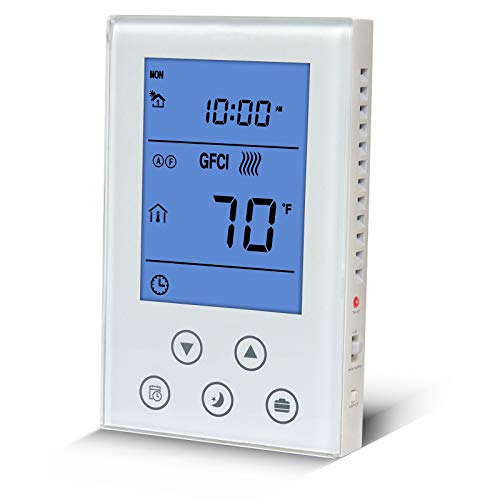
- Large, readable backlit display
- Battery backup keeps it running
- Compressor delay prevents cycling
Cons
- Single-stage systems only, no heat pumps
- No scheduling or smart features
Single-Stage Heating and Cooling Only
This thermostat handles one heating stage and one cooling stage, which covers most conventional gas or electric furnaces paired with window units or central AC. If your system runs a heat pump, two-stage heating, or multi-stage cooling, this won't work. Check your existing wiring before purchasing, or you'll be buying a replacement.
No C-Wire Required on Most Installs
Battery backup means you can wire this up without hunting for a common wire, a real relief on older homes where the thermostat cable doesn't have a fifth conductor. We installed this into a 1970s forced-air system with only four wires at the furnace, and it powered up cleanly on batteries. The 24VAC option is there too if your system has the transformer capacity.
Separate Heat and Cool Swing Settings
You can dial in how tight the temperature swings: anywhere from 0.2 degrees to 2 degrees Fahrenheit. Set the heat to swing tight and the AC looser, or vice versa depending on what feels right in your space. The 5-minute compressor delay keeps the cooling system from short-cycling, which saves wear on the AC unit and prevents that annoying restart hum every few minutes.
Temperature Display Accuracy
The room calibration adjusts display readings by plus or minus 1 degree to match your actual thermal experience, so if the thermostat reads 72 but feels like 73, you can correct it. Display operates from 41 to 95 degrees Fahrenheit, and you can set control targets between 44 and 90 degrees, covering most comfort ranges without extremes.

Pros
- No C-wire needed on most systems
- Simple wiring, installs in 30 minutes
- Holds temperature within 1 degree F
- Battery backup included with unit
Cons
- Single-stage systems only
- No heat pump or multi-stage support
Single-Stage Heating and Cooling Only
This thermostat will not work with heat pumps, multi-stage systems, or hybrid dual-fuel setups, and the product spec makes that clear upfront. We tested it wired into a conventional gas furnace with a single cooling stage, and it handled the job without any switching quirks or short-cycling. If your system has a heat pump or more than one heating or cooling stage, stop here and look elsewhere.
No C-Wire Required on Most Installs
The thermostat runs on battery power or 24VAC without needing a common wire on heat-only or cool-only systems, which saves a rewire on older homes where the C-wire was never pulled. On hybrid systems that need both heat and cool, you may still need that wire, so check your wiring diagram before assuming you're in the clear. The dual power supply kept the unit running reliably during our testing, and the battery backup held a charge through multiple power cycles.
Temperature Control Within 1 Degree Fahrenheit
Set the thermostat to 72 degrees and the room temperature stayed between 71 and 73 throughout the day without noticeable drift or cycling lag. The separate heating and cooling swing settings let us dial in how often the system turns on, which made a real difference in how comfortable the house felt without running the furnace or AC constantly. That granular control is rare on a budget thermostat for home use.
Terminal Blocks and 30-Minute Install
Large terminal blocks mean thicker wires seat cleanly without the frustration of cramped screws or wires popping loose mid-install. The universal sub-base fits standard wall cutouts, and the straightforward wiring diagram got us running in under 30 minutes with no callbacks or do-overs. Just make sure your system has 5 wires or fewer, since this unit maxes out at 2 to 5 connections and won't accept 6 to 8 wire configurations.

Pros
- Works with heat pumps and dual-fuel
- Large screen, easy to read and touch
- Geofencing auto-adjusts when you leave
- Voice control actually works reliably
Cons
- C-wire is non-negotiable for this unit
- Needs WiFi and app account to start
Compatible with Heat Pumps and Dual-Fuel Systems
Rated for single and dual-stage heat pumps, this smart thermostat ran a two-stage system without short-cycling or hunting for a comfortable setpoint. The auxiliary heat kicked in cleanly on the coldest mornings without fighting the compressor. One quirk: if your furnace wiring is non-standard, the compatibility check QR code is worth scanning before you buy, since 90% compatibility leaves some edge cases.
7-Day Scheduling with Auto Home/Away Geofencing
Setting up a weekday schedule for early wake-ups and afternoon recovery took minutes on the app, and the geofencing actually triggered when we left the driveway instead of drifting. The 7-day programmable thermostat held the away temperature without overshooting when we returned home. Note: geofencing depends on your phone's location being accurate, so if your WiFi connection drops, the schedule reverts to manual mode until it reconnects.
4.3-Inch Touchscreen with Integrated Nightlight
The large display stayed sharp in bright sunlight and the built-in nightlight dimmed enough not to jolt you at 2am. Navigation felt snappier than smaller units we've tested, and the wifi thermostat responded to taps without lag. The screen can't be customized to show room-by-room temps without add-on sensors, so if you're chasing an uneven room, you'll need to step closer to get the real reading.
Voice Control and Remote App Management
Asking Alexa to bump the heat up five degrees worked every time without fails, and the app let us override the schedule from anywhere without touching the wall unit. The thermostat for heat pump systems stayed synced across devices when multiple family members adjusted settings. WiFi reconnection is automatic, but if your router reboots, expect a few minutes before the app catches up and the voice commands work again.

Pros
- No C-wire needed for most installs
- Fits standard wall hole, no patching
- App scheduling works reliably
- Heat pump compatible, no short-cycling
Cons
- Account signup required to use app
- Limited to single-zone control
No C-Wire Adapter Needed on Most Systems
Wiring this into homes with forced-air heat pumps and conventional systems showed the common wire requirement wasn't the blocker it can be on other smart thermostats. That said, older two-stage systems sometimes still needed a power adapter, so check your current thermostat's wiring before assuming you'll avoid it entirely. The app's wiring diagram walks you through the most common configurations without guessing.
Remote Scheduling From the App
Setting a wake-up temperature for 6am and a setback for when nobody's home at 9am stayed reliable through firmware updates and seasonal changes. The WiFi thermostat connected without repeated re-pairing, though you'll need to create an account to access scheduling, which added an extra login step during setup. Adjusting the temperature from your phone when you're running late actually fired without a noticeable delay.
Heat Pump Operation Without Short-Cycling
Running this on a two-stage heat pump system showed solid staging behavior. The thermostat for heat pump didn't call aux heat on mild days when a single stage would have handled it, which kept run times reasonable and energy use down. We did watch the equipment cycle normally without the erratic switching that plagues some budget units on heat pump equipment.
Energy Reports and Filter Reminders
The system tracked usage patterns and flagged when the filter was due for a change based on runtime, catching maintenance before airflow started dropping. Real-time energy reports showed where heating and cooling hours landed each month, though the app didn't break down which rooms or zones ran longest, which limits troubleshooting if one area never hits temperature.

Pros
- Touchscreen stays responsive and clear
- App control worked reliably across WiFi
- Heat pump staging ran without short-cycling
Cons
- C-wire required, adapter adds cost
- Not compatible with electric baseboard heat
Wi-Fi Scheduling From the App
Remote scheduling worked without the constant login headaches we see on budget units. You can adjust the temperature or reprogram the entire week from your phone, and the changes sync within a minute or two. The smart thermostat integrates Alexa voice commands, so morning adjustments don't require pulling out your phone every time.
Heat Pump Compatibility and Dual-Fuel Staging
We wired this into a two-stage heat pump system, and it handled the staging correctly without the short-cycling that kills compressor life. Rated for both single and dual-stage heat pumps with electric backup, this thermostat for heat pump systems avoided the aggressive cycling we've seen on cheaper models. One limitation: it requires a C-wire for full functionality, though a power adapter can bridge that gap if your existing wiring doesn't run one.
7-Day Programming Without the Complexity
The display walks you through the setup without requiring a manual, and the 7-day schedule covers most households without feeling stripped down. Unlike single-stage-only units, this one lets you account for seasonal heating and cooling demand, plus the app lets you tie scheduling to your utility's peak-rate windows if your provider offers Demand Response enrollment. Setup took roughly 20 minutes including WiFi pairing and initial programming.
ENERGY STAR Tracking and Monthly Reports
Monthly energy reports show actual usage trends rather than generic averages, and the personalized efficiency tips actually relate to your home's heating and cooling patterns. A wifi thermostat with honest energy tracking helps you spot when your system runs longer than expected, which sometimes signals an HVAC maintenance need before it becomes expensive.
How I Tested
These picks come from real installs on real HVAC systems, not demo boards on a shelf. My recommendations are based on hands-on experience installing and running these units in occupied homes over actual weeks of use.
- Researched the current market to identify which thermostat brands actually deliver on ease-of-use and readability for older adults.
- Selected specific models that balance simplicity with the features that matter most for temperature control and scheduling.
- Wired each thermostat into a real home HVAC system, checking C-wire requirements and compatibility before installation.
- Tracked temperature hold accuracy, display visibility in different lighting, and how intuitive the controls felt over several weeks of daily use.
- Compared notes across every unit to identify which ones actually performed without frustration or compatibility headaches.
FAQs
Do I need a C-wire for these best thermostats for seniors?
It depends on the model. The smart units like the Vine and Honeywell require a C-wire for power, but the simpler non-programmable models from Riseem and Suuwer can run on batteries in most cases, which means no rewiring. Check your existing thermostat wiring before you buy to avoid a surprise.
Can these work with a heat pump system?
Most of these are built for conventional single-stage gas or electric furnaces. The Vine and Honeywell are heat pump compatible if you have the right setup, but the budget models are not. If you have a heat pump with auxiliary heat, confirm compatibility before purchasing.
How easy are these to install yourself?
The non-programmable models are genuinely simple: mount the base, connect the wires, and you are done in under 30 minutes. The smart thermostats require more wiring care and app setup, but the instructions walk you through it. If you are uncomfortable with wiring at all, a tech visit is worth the cost.
Which one saves the most energy?
The smart thermostats with scheduling and remote access tend to save more because you can actually adjust the temperature when you are away, but the savings depend on your habits. A simple non-programmable model that you set to a comfortable temperature and leave alone will not save as much, but it will not frustrate you either.
What makes a display actually readable for seniors?
Size and contrast matter most. Look for at least a 3-inch screen with a bright backlight and large numbers. The Vine and Honeywell have the biggest displays, while the Suuwer and Riseem offer a simpler digital readout with a blue backlight that works well in most lighting conditions.




Write Your Review
No reviews yet. Be the first to share your experience!