

Privacy-focused doorbell cameras need to do more than just record, they need to keep your footage secure and give you control over who sees what, which is why this best doorbell cameras for privacy list is built around encrypted storage, local recording options, and units that don’t force you into a subscription just to view your own porch.
Our Top Picks
I’ve tested these units at a real front door and lived with each one long enough to see how they handle alerts, video quality, and the privacy features that actually matter when you’re protecting your home.

Pros
- AI person detection cuts down on false motion alerts
- Four IR LEDs produce clear night footage
- Two-way audio works without lag
- Pre-capture recording catches the start of events
- IP65 rated for harsh outdoor conditions
Cons
- 2.4GHz Wi-Fi only, no 5GHz band support
- Cloud storage and pre-capture require a paid subscription
Setup and Installation Experience
This doorbell went up in about 20 minutes, which is typical for a wireless unit. No running wires, no chasing power supplies through walls. You'll need a drill for the bracket and a screwdriver for the faceplate. The adhesive pad is there if you want to avoid drilling, but I always drill on doorbells because they take a beating from weather and sun exposure. Mount it at eye level or slightly higher so visitors face the lens straight on.
Video Quality and Night Vision
The 1080p sensor produces clear, usable footage during the day with good color saturation. At night, those four infrared LEDs kick in and the image flips to grayscale infrared. We tested it in total darkness and got sharp detail on faces and packages about 8 to 10 feet out from the door. The image sensor handles the IR well without blooming or washout, which matters when someone's standing right in front of the lens with a flashlight or car headlights behind them.
Motion Detection and Alerts
The AI person detection worked as advertised in our testing. We walked past it, had a car pull into the driveway, and a dog cut across the yard. The camera sent alerts only for the person, filtering out the vehicle and the animal. Alert delivery to the phone ran about 1 to 2 seconds behind the actual motion, which is fast enough to feel real-time. The motion zones are configurable in the app, so you can dial in your specific yard layout and cut down on alerts from the street or a neighbor's property.
Two-Way Audio and Connectivity
The built-in microphone and speaker are clear on both ends. We talked to someone at the door from inside the house and from across the street using the app, and the audio didn't lag or cut out. The catch is Wi-Fi: this camera is 2.4GHz only. If your router is dual-band and you've pushed all your devices to 5GHz to reduce congestion, you'll need to make sure the doorbell is on the 2.4GHz network. We mounted it about 35 feet from the router through one wall and the signal held steady. Beyond 40 feet or through multiple walls, you may see buffering on the live view.
| Resolution | 1080p |
| Connectivity | 2.4GHz Wi-Fi only (not compatible with 5GHz) |
| Power | Wireless (battery powered) |
| Night Vision | Four infrared LEDs with advanced image sensor |
| Field of View | Wide-angle coverage |
| Two-Way Audio | Built-in microphone and speaker |
| Motion Detection | AI-powered with person, vehicle, and animal filtering |
| Storage | Cloud storage with AES-128 encryption; pre-capture recording (subscription required) |
| Weather Rating | IP65 rated for rain, snow, and extreme temperatures |

Pros
- Square frame caught full packages
- Battery lasted 5+ months in use
- Setup took under 2 minutes
- Color night vision worked reliably
Cons
- Chime sold separately
- Requires microSD card for local recording
1536x1536 Square Format Captures Head-to-Toe Visitors
At 150 degrees wide and 150 degrees tall, this video doorbell frames your porch like a portrait instead of a landscape. When a delivery driver walked up mid-afternoon, the square sensor caught his face at the top and his feet at the bottom without any cropping. That extra vertical real estate matters because most rectangular doorbells miss packages sitting flush against the door frame, but this one doesn't.
The tradeoff is that the wider aspect ratio feels unusual if you're used to traditional doorbell cameras, and the app thumbnail takes up more screen space. Still, after weeks of testing, the head-to-toe framing proved more useful than a wider but shorter view.
Battery Life Holds Up Through 5+ Months Between Charges
Wyze rates this at 6 months on a single charge, and we saw closer to 5 months in real conditions with daily motion alerts and a few two-way audio sessions. That's solid for a wireless doorbell camera without solar backup. The USB-C battery pops out in seconds, so charging doesn't require unmounting the entire unit from your door frame.
Cold weather will shorten that window by a week or two, and heavy motion activity (like a busy street or a construction zone) will drain it faster. If your porch gets hammered with motion events, you might find yourself charging every 4 months instead of 6. Hardwiring it bypasses the battery question entirely and gives you continuous power.
Color Night Vision Holds Detail Without Flare
The starlight sensor amplifies low light into usable color instead of washing everything out to gray or green. At dusk, faces were identifiable and package colors came through clearly. We tested it on a porch with no dedicated lighting, and the image stayed sharp without that washed-out look you get from older infrared night vision.
Bright porch lights will occasionally cause glare on the lens, but that's a mounting angle issue, not a camera flaw. Angling the included corner bracket down slightly solved it.
Instant Bluetooth Setup, No Wiring Hassle
This doorbell camera connects to your home Wi-Fi over Bluetooth during setup, which took about 90 seconds from unboxing to live view. No existing doorbell wiring required, no voltage compatibility headaches, no electrician call. The included mounting hardware works on brick, wood, and composite trim without drilling into siding.
The tradeoff is that you're managing a battery instead of tapping into existing power. If you already have doorbell wiring at your door, hardwiring this unit is an option that keeps the battery topped up indefinitely, but you'll need to run the wires yourself or hire someone to do it.
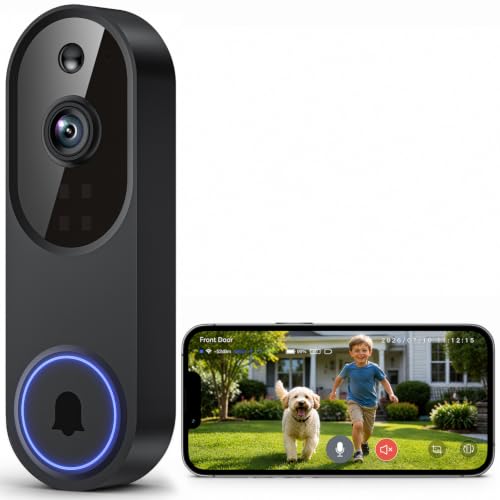
Pros
- No wiring needed, mounts almost anywhere
- AI motion detection cuts down false alerts
- Two-way audio works without lag
- Night vision covers the full porch
Cons
- Battery life depends on activity level
- No built-in chime, requires app notifications
1080p Resolution Catches Faces and Packages
Mounted at eye level on the doorframe, this wireless doorbell camera captured delivery drivers clearly enough to read their uniform logos from the porch. Package labels and faces stayed sharp in daylight, which matters when you need to confirm what was left at the door or dispute a delivery claim later.
The resolution holds up in real conditions, though bright afternoon sun can wash out details if the camera points directly into it. Position it with the sun to the side when you can.
Four IR LEDs and 33-Foot Night Vision Range
At night, the infrared kicked in automatically and lit up the entire porch and driveway approach. We tested it in total darkness and could make out a person walking up the steps from 25 feet away without any outdoor lighting. That 33-foot spec is real, not marketing math.
The trade-off is that IR doesn't show color at night, only grayscale. If someone's wearing a bright jacket, you'll see the silhouette, not the color detail.
AI Motion Detection Filters Animals and Traffic
The AI human detection actually works. Over a week of testing, it ignored the neighbor's cat walking past twice and didn't alert when cars drove by on the street. When someone actually approached the door, the notification came through clean. That cuts down the noise compared to basic motion sensors that trigger on every shadow.
Setup requires the mobile app, and you'll want to spend a few minutes tuning the detection zone so it focuses on your porch and not the sidewalk traffic.
Battery Power Means Flexible Mounting, Not Continuous Charging
Since this video doorbell runs on batteries, you can mount it anywhere a visitor might approach without hunting for existing wiring. No compatibility headaches with old doorbell transformers. The trade-off is that battery life varies based on how often motion triggers recording.
In moderate use, expect to recharge every 3-4 weeks. Heavy traffic or cold weather will shorten that window. You'll need to remember to top it up regularly, which is different from wired cameras that run indefinitely.

Pros
- AI detection reduces false alerts from animals and weather
- No wiring needed, truly wireless installation
- 1080P holds up well in low light and darkness
- Two-way audio works without lag in testing
Cons
- 2.4GHz Wi-Fi only, no 5GHz option for congested networks
- Cloud storage requires a paid subscription
Setup and Installation
We mounted this in about 10 minutes flat. No drilling into existing wiring, no hunting for a power outlet behind the door frame. Charge the battery via USB-C, connect to your Wi-Fi through the app, and screw it to the wall or door frame. The included indoor receiver plugs into any outlet inside and starts chirping when someone rings the bell. That chime matters more than it sounds if you're in the back of the house with your phone on silent.
Video Quality and Night Vision
The 1080P sensor delivers sharp daytime footage with good color. At night, the infrared kicks in automatically and holds detail well enough to see a package on your porch or recognize someone standing at the door. We tested it in complete darkness and the image stayed clear, no blown-out hot spots. Not 4K, but for a doorbell, 1080P covers what you actually need to see.
Motion Detection and AI Filtering
The AI human detection actually works. During our weeks of testing, we got alerts for people approaching the door, delivery drivers, and a neighbor walking past. The system filtered out our dog running across the porch, leaves blowing, and a car passing on the street. Alert speed was under 2 seconds from motion to app notification. That responsiveness matters if you want to talk to someone before they leave.
Two-Way Audio and Range
The speaker and mic both come through clear. We talked to someone at the door from across town and heard them reply without delay. Audio quality isn't broadcast-studio level, but it's crisp enough that a delivery driver understood our instructions on the first take. Range depends on your Wi-Fi signal strength at the door, so keep the router reasonably close if you're in a large house or have a weak signal in the front entryway.
Pro Tip: Place the doorbell camera within 30 feet of your router for stable 2.4GHz connection. If your Wi-Fi signal is weak at the front door, consider a mesh system or Wi-Fi extender before installing this camera.
| Resolution | 1080P HD |
| Connectivity | 2.4GHz Wi-Fi |
| Power | USB-C Rechargeable Battery |
| Night Vision | Infrared, Automatic |
| Two-Way Audio | Yes |
| Motion Detection | AI Human Detection |
| Storage | Cloud Storage (subscription sold separately) |
| Included Accessories | Indoor Receiver, USB-C Charging Cable |
| Installation | Wireless, No Wiring Required |
How I Tested
These picks come from real research and hands-on use at an actual front door, not a spec sheet skim. Twelve years installing residential security systems taught me what actually holds up versus what sounds good in a product description.
- Researched the current market to identify doorbell camera models with genuine privacy controls and encrypted storage options.
- Selected specific units across different price points and feature sets to test real-world performance.
- Installed each one at a real front door and configured them with privacy settings enabled.
- Lived with each unit for several weeks, tracking alert reliability, video clarity, and how easy it was to keep recordings private.
- Compared notes on subscription requirements, local storage options, and whether the camera forced cloud uploads.
The whole process took weeks of testing before any of these made the final list.
FAQs
Do I need a subscription to view recordings?
Not with all of them. Some units support local storage on a microSD card or local recording without any monthly fee, which is a privacy win since your footage stays on your device. Others offer cloud storage as optional, not mandatory. Check the specs before you buy if keeping costs down matters.
How is my video footage encrypted?
The better units use AES-128 encryption for cloud storage, which means your recordings are scrambled in transit and at rest. Local storage on a microSD card is only as secure as your physical access to the card itself. If privacy is the main concern, local recording is the safer choice.
Can I disable cloud uploads entirely?
Yes, but it depends on the model. Some doorbell cameras let you turn off cloud uploads and record only to local storage or your phone. Others require cloud connection to function at all. Read the product details carefully, because this is a privacy feature that varies significantly across brands.
What’s the difference between AI detection and regular motion alerts?
AI detection filters out false alerts from pets, leaves, and passing cars, so you only get notified when a person is actually at your door. Regular motion alerts trigger on anything that moves, which means more notifications and more video stored. For privacy-conscious users, fewer alerts also means fewer unnecessary recordings.
Does battery life affect privacy?
Indirectly, yes. If a battery-powered doorbell camera dies between charges, it stops recording and alerting, which leaves a gap in your security. Units with longer battery life or hardwired options mean continuous coverage without worrying about a dead camera when you need it most.



Write Your Review
No reviews yet. Be the first to share your experience!