

Try Amazon Prime free for 30 days
Fast free delivery on heavy items, plus Prime Video, Prime Music and member-only deal prices.
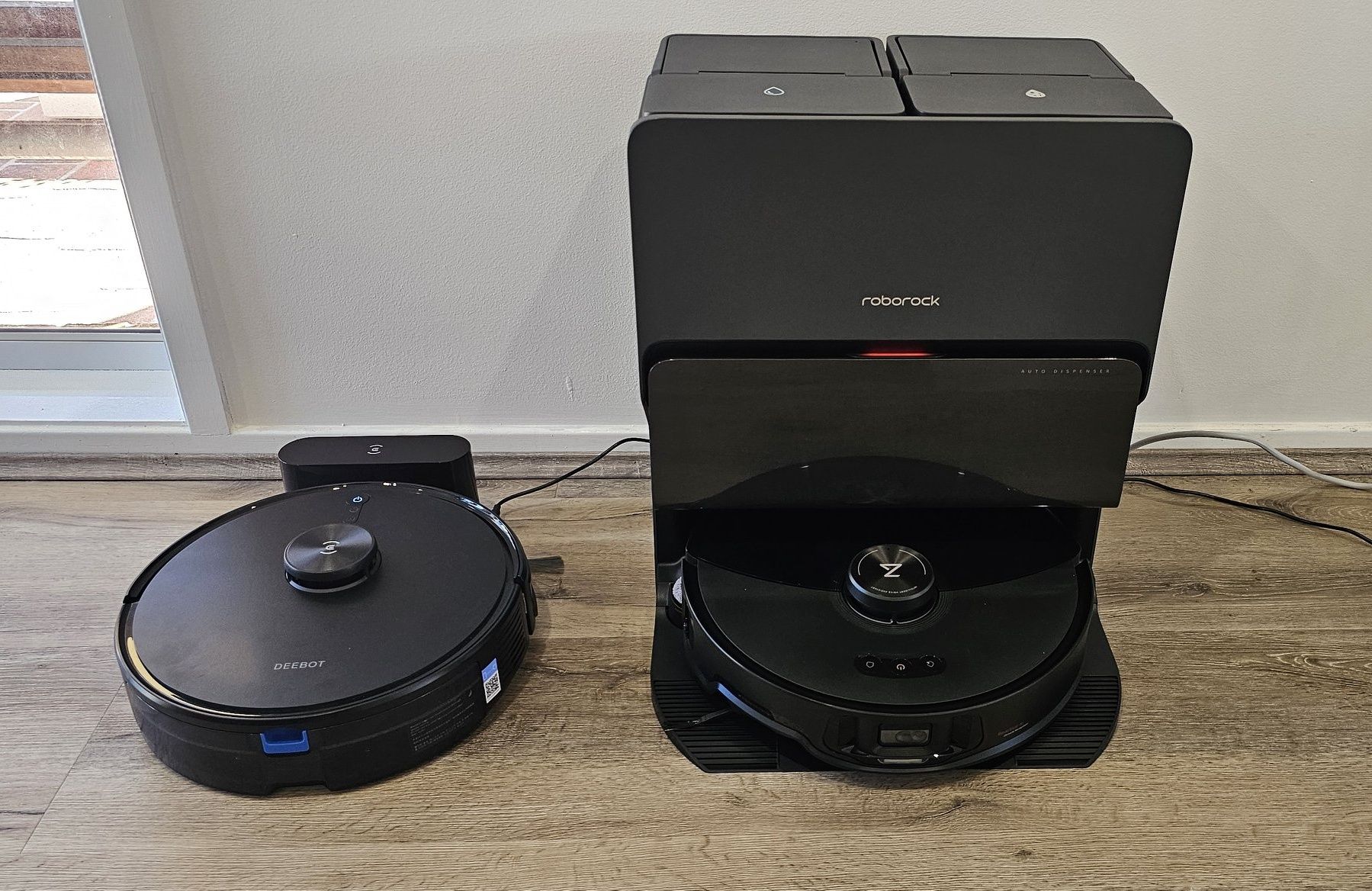
I’ll be straight with you. I’m not a tech journalist. I’m just someone who spent a lot of money on a robot vacuum and wanted to make sure it was actually worth it. After using the Roborock S8 MaxV Ultra for several days around my house, here’s my honest take on everything from suction power to the mopping system to the app.
Quick Overview
The Roborock S8 MaxV Ultra doesn’t do one thing well. It does everything well, and that’s rare. It packs 10,000Pa of suction, dual main brushes, an extendable side brush that reaches into corners, a dual-vibration mop system running at 4,000 strokes per minute, a secondary side mop that hugs the wall, and a dock that washes and dries the mop pads with 60°C hot water and hot air. Oh, and the app and mapping? Still rock solid.
Here’s what I’ll break down:
- Vacuuming performance
- Mopping performance
- Carpet cleaning
- Obstacle clearance
- App, mapping, and voice control
Vacuuming Performance: Strong Suction, Dual Brushes, and a Side Brush That Actually Reaches Corners
10,000Pa Suction: One of the Strongest on the Market
In terms of raw numbers, the S8 MaxV Ultra sits at #2 on the market for suction power at 10,000Pa. To put that in context: most premium robot vacuums land around 8,000Pa, and mid-range ones typically hover around 6,000Pa. More suction means more debris actually makes it into the dustbin, faster.
Now, I want to be real here. Raw suction numbers are hard to demonstrate in photos or videos. You don’t see suction working, you feel the results. Where it makes the biggest difference is on carpets, where dust gets packed deep into the fibers. If you have rugs or carpets at home, this machine will absolutely deliver. The second it rolls onto carpet, it automatically cranks up suction. No manual input needed.
Dual Main Brushes: Built to Pick Up What Suction Alone Can’t
This is one of the features that sets the S8 MaxV Ultra apart from most of the competition. The two counter-rotating rubber brushes don’t just agitate debris. They physically grip and lift larger particles like small rocks, gravel, and chunky crumbs that suction alone would just push around. Think of it as a pinching motion that scoops debris off the floor and into the dustbin.
I haven’t had the chance to run a full stress test on this yet, but even in regular daily use, the difference is noticeable. The floor feels cleaner after each pass.
Extendable Side Brush for Corners and Tight Spaces
This is genuinely clever engineering. When the robot approaches a wall corner or navigates around chair legs and furniture feet, the side brush extends outward to sweep debris away from the edges and into the robot’s suction path.
The reason this matters: the vacuum inlet on any robot vacuum sits somewhere in the middle of the unit’s undercarriage, so it physically can’t reach into 90-degree corners on its own. The extendable side brush solves this problem elegantly. Roborock’s R&D team deserves credit for building this into the S8 MaxV Ultra.
I tested it by scattering rice in a tight right-angle corner, one of the hardest scenarios for any robot vacuum, and the S8 MaxV Ultra cleaned it up completely.
Auto Dust Emptying Back at the Dock
Not a new feature at this price point, but it’s one of the most important ones on the dock. Every time the robot returns to base, the dock automatically vacuums the dustbin clean and transfers everything into a sealed bag on the dock itself.
Why does this matter? A clogged dustbin means reduced suction. Keeping the bin empty means the robot is always running at full suction capacity. Roborock claims you can go up to 7 weeks without emptying the dock bag. My house runs pretty clean, so I’d guess I’m looking at 8 to 9 weeks easily.
Mopping Performance: Vibrating Mop and Side Mop for Wall Edges
This is where Roborock sets itself apart from most competitors, who typically use spinning mop pads. Roborock’s approach is vibration-based mopping, and the S8 MaxV Ultra takes it further with an additional auxiliary mop on the side.
Dual-Vibration Mop at 4,000 Strokes Per Minute
Inside the robot, there are two vibration modules that drive the mop pad against the floor in rapid, high-frequency oscillations up to 4,000 times per minute. That’s a significant jump from older generations, and it’s a completely different physics from spinning mop pads used by other brands.
The vibration creates friction between the pad and the floor, which is what actually scrubs out dried-on stains rather than just dampening them. In daily use, my hard floors come out noticeably cleaner. Not just damp-wiped, actually scrubbed.
Auxiliary Side Mop for Wall Edges: This One’s a Game-Changer
If you’ve ever watched a robot vacuum mop your floor and then bent down to check the strip right along the baseboard, you know that zone always gets missed. The main mop pad simply can’t reach it.
The S8 MaxV Ultra adds a small circular auxiliary mop pad that permanently extends from the left side of the robot. It’s always deployed, always in contact with the floor, and always dragging along the baseboard as the robot navigates walls.
Watching it work in real time is satisfying. It genuinely stays in contact with the wall edge on every pass. And when areas like chair legs and furniture come up, that side mop reaches into spots the previous generation Roborock models simply couldn’t cover. The dock has a separate cleaning station specifically for this auxiliary pad; it doesn’t just share the main mop washing area.
Hot Water Wash at 60°C and Hot Air Dry at 60°C
When the robot returns to dock, the mop pads get washed with 60°C hot water and then dried with 60°C hot air. This isn’t just a quality-of-life feature. It’s a hygiene feature.
Hot water breaks down grease and oil residue far more effectively than cold water. If your robot mops through the kitchen or near the dining table, where cooking oil and food grease tend to splatter, hot water washing genuinely makes a difference in how clean the pads actually get between cycles.
The hot-air drying prevents mold and bacteria from developing in a damp mop pad sitting in the dock between cleaning sessions. This matters more than most people realize.
Pro tip from my setup: I designate the kitchen as its own zone in the app and configure it to mop at maximum intensity with extra water passes. Everything else runs on standard settings.
Carpet Cleaning: 10,000Pa and 20mm Mop Lift
There are two specific things that make the S8 MaxV Ultra arguably the best robot vacuum for carpets available right now.
First, the 10,000Pa suction tears through carpet fibers to pull up embedded dust and allergens that weaker machines leave behind.
Second, and this is the key differentiator: because the S8 MaxV Ultra uses vibration-style mops rather than spinning discs, it can lift the mop pad up to 20mm when it detects carpet. Most competitors max out around 10mm. The current best-in-class from other brands caps at 15mm. At 20mm, there’s zero risk of the damp mop pad touching your carpet while the robot is vacuuming.
One practical tip: if you have a large rug or area carpet, map it as its own separate room or zone in the app. When it’s classified as a dedicated zone, the robot treats it differently with higher suction and no mopping, instead of just reacting on the fly as it rolls over it. The difference in cleaning results is real.
Obstacle Clearance: Up to 2cm
The maximum threshold height the S8 MaxV Ultra can climb over is 2 centimeters. Transitions between floor types, thickened door thresholds, or low cable management bumps under 20mm tall are handled without hesitation.
If you have any physical barriers in your home, measure them. If they’re taller than 20mm, the robot will bump the collision sensor on its chassis and back off. My advice is to bevel or sand down any hard stops to under 20mm if you want seamless full-home coverage.
I tested it directly with a stacked obstacle and it climbed over cleanly.
App, Mapping, and Voice Control
The App Is Your Control Center: Learn It
There’s no getting around it. The Roborock app is where you unlock the full value of this machine. There are too many configurable parameters to manage any other way.
The most important thing you can do in the app is set up proper room zones and per-zone cleaning configs. You can run 4 levels of suction and 4 levels of mopping intensity, independently, per zone. Kitchen gets max mop intensity and double passes. Bedroom gets light suction and no mopping. Bathroom gets moderate everything. Once it’s dialed in, the robot just handles itself.
Mapping performance is excellent. It builds an accurate floor plan fast, and if it ever loses its position mid-run, it re-orients quickly and continues without coming back to dock.
Two-Way Camera
The camera on the robot, primarily used for obstacle recognition, doubles as a two-way live video feed you can access through the app. So if you’re away from home, you can check in on things or talk to someone in the house. It’s a bonus feature I’ve actually used a few times.
“Hello Rocky” Voice Control
The wake word is “Hello Rocky.” From there, you can issue basic commands without opening the app. It worked well when I stuck to the phrasing listed in the app’s voice command guide. Step outside that exact phrasing and it misses, but that’s an industry-wide problem right now, not specific to Roborock. It’s a convenience feature, not a replacement for the app.
Final Verdict
The Roborock S8 MaxV Ultra is purpose-built to handle all the edge cases that cheaper robot vacuums fail at: corners, carpet, baseboard edges, and kitchen grease. The combination of 10,000Pa suction, dual counter-rotating brushes, an extending side brush, a 4,000 strokes-per-minute vibration mop, and a wall-hugging auxiliary mop pad covers every weak point in a single package.
The dock adds real value too. Hot water mop washing, hot air drying, and auto dustbin emptying mean low maintenance for weeks at a time.
Is it worth the premium price? If your home has carpets, grease-prone kitchen floors, and tight furniture layouts, yes, without hesitation. This is the most complete robot vacuum and mop combo I’ve personally used, and I’ve used quite a few.
Tested over multiple days of real-world home use. All observations are first-hand.
Sources:





Write Your Review
No reviews yet. Be the first to share your experience!