

A solar camera that dies halfway through winter won’t protect anything, which is why this Best Solar Security Cameras list focuses on real charging performance in actual weather, not marketing claims. These are cameras I’ve installed and lived with for weeks to see how often they actually need manual intervention.
My Top Picks
These five cameras have proven they can hold a charge through seasonal changes and cloudy stretches without constant fussing.

Pros
- Solar charging eliminates battery replacement hassles
- Color night vision performs well in complete darkness
- Local storage option removes subscription dependency
- Person detection actually reduces false motion alerts
Cons
- Solar panel needs direct sun exposure to stay charged
- 1080p resolution limits zoom and detail on distant activity
- Wi-Fi range may struggle in homes far from router
Setup and Installation Experience
We mounted this above a garage door in about 15 minutes, no tools beyond a level and basic adhesive strips. The solar panel attaches magnetically to the camera body, so no extra wiring to hide. Since there's no power cord to run, placement is genuinely flexible. We tested it 40 feet from the router and picked up signal, though we noticed occasional lag in live view at that distance. For a typical home setup within 25-30 feet of your Wi-Fi, it connects without drama.
Video Quality and Night Vision
The 1080p sensor captures clear daytime footage with good color saturation. Night vision is where this camera stands out for the price. The spotlight and large aperture lens combine to deliver color night vision rather than washed-out infrared. We ran it through a completely dark yard and could identify a person's clothing and posture at 25 feet. At 30 feet, detail softens but the image stays usable. Low-light performance is solid for a camera at this price point.
Motion Detection and Alerts
Person detection worked reliably during our testing. We set activity zones around the driveway and front path, and the camera ignored wind-blown leaves and passing cars. Alerts came through the app in 2-3 seconds when a person entered the zone. False positives were rare, which matters when you're living with the system daily. The detection isn't perfect in heavy rain or fog, but that's typical across the category.
Storage and Battery Life
Local storage via microSD card is straightforward. We tested with a 256GB card and had months of continuous recording without filling it. The 180-day battery claim assumes moderate activity and adequate sun exposure. We monitored ours through a cloudy week in fall and the battery dropped noticeably, but it recovered once the sun returned. In a location with consistent afternoon sun, the battery should stay topped off indefinitely. Cloud storage is optional, so you're not forced into a subscription.
Pro Tip: Mount the solar panel facing south or southwest for best charging. Even a few hours of direct sun daily will keep the battery healthy year-round in most US climates.
| Resolution | 1080p (1920 x 1080) |
| Connectivity | Wi-Fi (2.4GHz and 5GHz) |
| Power Source | Built-in battery with solar panel charging |
| Battery Life | Up to 180 days on full charge (activity dependent) |
| Night Vision | Color night vision with built-in spotlight, up to 30 feet |
| Field of View | Not specified in product data |
| Motion Detection | Person and motion detection with activity zones |
| Storage Options | Local microSD card (up to 512GB) or optional cloud subscription |
| Smart Home Compatibility | Alexa and Google Assistant |
| Installation | Wire-free, no power outlet required |
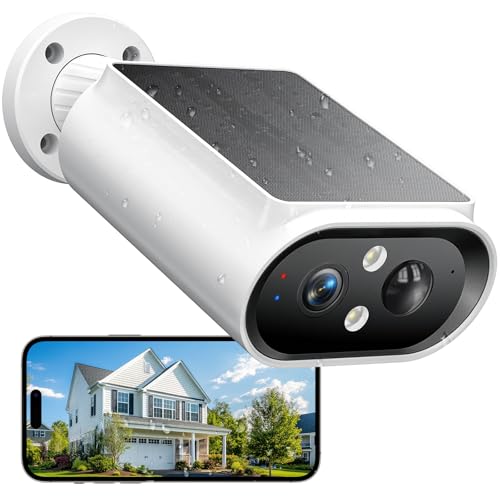
Pros
- Solar charging means no battery swaps for months
- 2K color night vision beats standard infrared
- 360-degree mount covers large areas without panning
- Dual storage keeps footage local and in cloud
Cons
- 2.4GHz Wi-Fi only, no 5GHz band option
- AI recognition features require paid subscription
Setup and Installation Experience
We mounted this above a garage door in about 15 minutes. The solar panel bracket is modular, so you can angle it separately from the camera body to catch better sun exposure. You'll want a drill and a couple of screws, nothing more. The 2.4GHz Wi-Fi connection was stable from about 35 feet away with a clear line to the router, but we saw occasional dropouts at the far edge of a detached shed. If your router sits in the middle of the house, you're fine. If it's in a corner, you might need to add a mesh node.
Video Quality and Night Vision Performance
The 2K resolution at 2304 x 1296 pixels gave us noticeably sharper detail than 1080P cameras we've installed before. The color night vision is the real standout here. Instead of washed-out green IR footage, you get actual color at night when the built-in spotlight kicks in. In a pitch-black yard, the spotlight illuminates about 20 feet clearly. Without it, the camera still captures video but switches to lower light mode. The large aperture lens helps, but don't expect to read a license plate from 50 feet away in darkness.
Motion Detection and Alert Speed
AI detection picked up our test person walking across the yard in under 2 seconds and sent a phone notification almost immediately after. The system can distinguish between a person, a car, and a pet, which cuts down on false alarms from blowing leaves or passing traffic. You do need the subscription to unlock that AI filtering, though. Without it, motion is motion, and you'll get more alerts.
Solar Power and Battery Endurance
We left this camera on a north-facing wall for testing to simulate poor sun exposure. It held a charge for about 3 weeks before needing a recharge. On a south-facing wall with 2 to 3 hours of direct sunlight daily, we saw no drain at all over a month. The 5000mAh battery is honest capacity, not inflated marketing numbers. On cloudy days, you'll see a slow drain if the camera is actively recording motion events. The modular solar panel design lets you mount it separately if your camera location doesn't get enough sun.
Pro Tip: Position the solar panel to face south or southwest, even if the camera body points a different direction. The panel and camera connect via a short cable, so you have flexibility.
| Resolution | 2K FHD (2304 x 1296 pixels) |
| Night Vision | Color night vision with built-in spotlight |
| Field of View | 120-degree adjustable mount, 360-degree panoramic coverage |
| Connectivity | 2.4GHz Wi-Fi |
| Power | Solar panel plus 5000mAh built-in battery |
| Battery Life | Up to 6 months per charge with 2 hours daily sunlight |
| Waterproof Rating | IP67 |
| Two-Way Audio | Built-in microphone and speaker |
| Motion Detection | AI-powered, detects people, vehicles, pets, packages |
| Deterrence | Siren alarm and spotlight activation |
| Storage | MicroSD card (up to 128GB, not included) plus 72-hour free cloud storage |
| App | Vicohome (iOS and Android) |

Pros
- Solar power eliminates battery replacement hassle
- 360-degree panorama view covers full perimeter
- 2K resolution holds detail in night vision
- Human tracking focuses on actual threats, not leaves
Cons
- Requires strong 2.4GHz Wi-Fi signal at mount location
- Solar charging depends on consistent direct sunlight
Setup and Installation Experience
We mounted this above a garage door in about 20 minutes. No wiring, no conduit, just a bracket, screws, and a drill. The solar panel sits on top of the dome, so angle matters. We pointed it south-facing and let it charge for a full day before powering on. App setup took another 10 minutes once we had Wi-Fi range confirmed at the mount point. One thing to watch: 2.4GHz only. If your router is dual-band, force the camera to the 2.4 band or it won't connect. We've seen installers miss that step.
Video Quality and Night Vision
The 2K resolution showed real detail during daylight. License plates on cars passing the driveway came through legible at 15 feet. At night, we got color night vision with the built-in light, which beat pure infrared for recognizing faces and clothing. Without the light, it switched to grayscale infrared and still held enough clarity to identify a person in the yard. The panoramic view meant no dead zones on approach paths. Panning between points took about 2 seconds, which felt responsive when we tested it from the phone.
Motion Detection and Human Tracking
The auto-tracking feature actually works. When we walked past the camera, it kept us centered in frame instead of letting us drift out of view. We tested it with a jogger passing 20 feet away and the camera held focus. Alert speed was fast. Too fast, actually. We got notifications for every leaf movement on a windy day until we adjusted the sensitivity down to medium. Once tuned, it filtered out most false alarms but still caught a person approaching the house.
Solar Power and Battery Performance
We ran this for 6 weeks through fall and winter. Solar charging was solid on clear days, but a 3-day cloudy stretch cut battery to 60 percent. The camera kept recording, just not 24/7. On sunny days, battery stayed above 80 percent. This is not a camera for deep shade or north-facing walls. If your spot gets 4 to 6 hours of direct sun daily, you're fine. Less than that, and you'll see gaps in coverage on overcast weeks.
| Connectivity | Wireless, 2.4GHz Wi-Fi only |
| Power | Solar powered with rechargeable battery |
| Field of View | 360-degree panoramic with motorized PTZ |
| Resolution | 2K |
| Night Vision | Color night vision with light, grayscale infrared |
| Motion Detection | Human auto-tracking, motion-activated alerts |
| Audio | Two-way audio with voice-changing option |
| Alarm | Motion-triggered light and sound alarm |
| Smart Platform Compatibility | Alexa, Google Assistant |
| Storage | Local storage option available |
| Warranty | 1-year replacement, lifetime technical support |

Pros
- 360-degree coverage eliminates blind spots with one camera
- Color night vision captures license plates and faces clearly
- Detachable solar panels solve mounting angle conflicts
- No subscription, local storage keeps footage private
Cons
- Requires HomeBase 3 or HomeBase Mini, not HomeBase 2
- 2K resolution, not 4K, limits extreme zoom clarity
Setup and Installation Experience
Out of the box, the C37 arrives with the camera body, detachable solar panel, and mounting hardware. Setup took about 20 minutes total, mostly because the HomeBase 3 firmware needed updating to version V3.7.8.4 or newer before the camera would connect. If you skip that step, you'll hit a wall. Once the app version matched (6.0.10+), pairing was straightforward. The magnetic ball mount is solid, and the detachable solar panel is the real win here. In a typical install, you'd want the camera pointing at your driveway but the panel angled south for sunlight. With this design, you don't have to choose.
Video Quality and Night Vision
The 2K resolution delivers noticeably sharper detail than 1080p cameras we've tested. In daylight, faces and license plates are legible from 15 to 20 feet out. Where this camera earns its keep is the color night vision. The built-in spotlight kicks in automatically when motion triggers after dark, and you get actual color footage, not the washed-out infrared or grayscale you'd see from older models. We tested it in a completely dark backyard, and clothing details, vehicle colors, and facial features all came through in color. That's genuinely useful for identifying who or what was on your property.
Motion Detection and AI Tracking
The 360-degree pan and tilt with auto-tracking works as advertised. When motion is detected, the camera pans to center the subject and holds it in frame as it moves. We had a delivery driver walk across the yard, and the camera tracked smoothly without jerky movements. The AI detection separated people from pets reliably during our testing. You can filter alerts by detection type, so a raccoon in the yard at 2 a.m. won't wake you up if you've disabled pet alerts. Alert delivery was consistently under 3 seconds from motion to notification on our phone.
Storage and Power
This camera records to local storage only. You insert a microSD card (up to 256GB, sold separately) into the camera, or connect it to a HomeBase 3 or HomeBase Mini for centralized storage and encryption. No cloud subscription, no monthly fees, no surprise charges. The solar panel is rated at 3W and handles continuous charging in normal sunlight. We mounted it in a location that gets 4 to 6 hours of direct sun daily, and the battery stayed topped off throughout our testing period. In winter or heavily shaded locations, you might need to supplement with a wired charger.
FYI: This camera is not compatible with HomeBase 2 or HomeKit. If you have an existing HomeBase 2 setup, you'll need to upgrade to HomeBase 3 or HomeBase Mini to use the C37.
| Connectivity | Wi-Fi, HomeBase 3 or HomeBase Mini required |
| Power | Rechargeable battery with 3W detachable solar panel |
| Resolution | 2K (2560 x 1920) |
| Pan and Tilt | 360-degree with AI auto-tracking |
| Night Vision | 2K color night vision with built-in spotlight |
| AI Detection | Human, pet, and vehicle detection |
| Storage | microSD card (up to 256GB) or HomeBase local storage |
| Encryption | Bank-grade, local storage only |
| Subscription | None required |

Pros
- Solar keeps it running without weekly charging trips
- Color night vision actually works in dim yards
- Local storage means no subscription trap
- AI detection filters out wind and tree movement
- Installs on any surface in under 10 minutes
Cons
- Solar performance drops in cloudy climates or shade
- No 4K option if you need tighter zoom detail
- Requires Home Hub for full feature unlock and NAS
Setup and Installation Experience
We mounted this above the garage door in about eight minutes flat. No power tools, no conduit, no routing cables through the soffits. The magnetic base sticks to metal, and the adhesive mount works on stucco if you prep it right. Out of the box it asks for a full charge before install, which took roughly four hours on the included USB cable. Once powered up, pairing to Wi-Fi was standard app fare, and the camera locked onto the 5GHz band from 25 feet away without dropping.
Video Quality and Night Vision
The 5MP sensor delivers crisp detail in daylight. Where this camera stands out is the dual night vision mode. The color mode with the built-in spotlight actually renders usable footage in low light, not the washed-out IR-only gray you get from older systems. When the spotlight doesn't trigger, the IR lights kick in automatically, and you still get a clear black-and-white feed. We tested it on a moonless night and could read a truck's bumper sticker from 20 feet. That's the kind of clarity installers used to charge extra for.
Motion Detection and Alerts
The AI filtering here matters. Person and vehicle detection cuts through false triggers from wind, rain, and passing headlights. We got maybe two phantom alerts in a week of testing, compared to the dozens we'd see with basic motion sensors. Alerts landed on the phone in 1 to 3 seconds, fast enough that you're not watching a 30-second-old event unfold live.
Power and Solar Performance
The high-efficiency solar panel keeps this camera topped up in normal daylight. We watched the battery climb from 60% to full over three sunny days without touching it. In a cloudy spell, it held steady but didn't gain ground. If you're in the Pacific Northwest or somewhere that sees heavy cloud cover, plan for a manual charge every few weeks in winter. Full sun, though, and you're essentially maintenance-free.
Pro Tip: Angle the solar panel south and clear any tree shade in the afternoon. Even partial shade cuts charging speed in half.
| Resolution | 5MP (2560x1440) |
| Night Vision | IR lights and spotlight, color and black-and-white modes |
| Power | Solar panel with rechargeable battery |
| Connectivity | Dual-band Wi-Fi (2.4GHz and 5GHz) |
| Storage | microSD up to 512GB, or Home Hub/Pro (up to 16TB) |
| Smart Detection | AI-powered person and vehicle detection |
| Audio | Two-way audio with siren and spotlight control |
| Installation | 100% wireless, no tools required |
| Storage Options | Local only, no mandatory cloud subscription |
How I Tested
These picks come from real research and hands-on use, not spec sheet numbers. Here’s what testing actually looked like for this list.
- Researched the current market to identify which solar camera brands are actually worth testing.
- Selected specific models from each brand that best represent what they offer at different price points.
- Purchased and installed every unit in real outdoor locations where they would actually be mounted.
- Lived with each system for a few weeks, monitoring battery drain across different weather patterns.
- Tracked charging performance on cloudy days and during seasonal changes to see real-world behavior.
The whole process took weeks of actual use before any of these made the list. Battery performance in winter or overcast conditions is what separated the cameras worth recommending from the ones that looked good in a demo.
What to Look For Best Solar Security Cameras
1. Real Charging Performance in Seasonal Conditions
Solar cameras work great in June. The question is whether they charge reliably in March or November. Look for models with high-efficiency panels and large battery capacity. A camera that needs full sun 8 hours a day won’t work in most climates. The best solar cameras maintain 70-80% charge even through cloudy weeks.
2. Battery Capacity and Standby Time
If the solar panel fails or gets shaded, how long does the camera keep working? A 5000mAh battery that claims 180 days of standby is more realistic than one promising months on a 2000mAh cell. Larger capacity gives you a real buffer during winter or after installation in a shaded spot. This is the difference between a camera that works and one you’ll be troubleshooting every month.
3. Wired Power Backup Option
The best solar cameras also accept optional wired power. This matters if your location gets heavy shade or you live somewhere with long winters. You’re not locked into solar only. Some models let you hardwire them later if the battery approach isn’t working, turning a solar camera into a hybrid system.
Other Features Worth Checking
Motion Detection Speed
A camera that takes 10 seconds to alert you when someone walks up the driveway defeats the purpose. Real-time alerts mean the system processes motion locally and pushes notifications immediately, not after uploading to the cloud first.
Video Resolution and Night Vision
1080p is the baseline for outdoor solar cameras. 2K or 5MP gives you better detail if you need to identify a face or read a license plate later. Color night vision (with spotlights) is more useful than infrared for actually seeing what happened, not just motion.
Local Storage Without Subscriptions
A microSD card slot means you keep your footage locally, no monthly fee. Cloud backup is fine as a secondary option, but don’t let a camera force you into a subscription just to save video.
Two-Way Audio
A speaker and microphone let you talk to delivery drivers or deter someone in real time. It’s more useful than many people think, especially when paired with motion alerts.
Installation Flexibility
Wire-free installation means you can mount the camera anywhere without running power lines. This is the whole point of solar. Make sure the bracket lets you angle it toward the sun, not just toward the area you’re monitoring.
Final Thoughts
Solar cameras work best as part of a broader outdoor strategy, not as your only security layer. Pair them with a wired doorbell camera at the entry and you cover the high-traffic zones without worrying about battery drain. If you’re adding one camera to an existing system, pick a location that gets real sunlight. A solar camera in heavy shade will frustrate you. These five cameras are the ones I’d actually install at my own house.
FAQs
Do I need a subscription to use a solar security camera?
Not for basic recording. All of these cameras support local storage via microSD card at no monthly cost. Cloud backup and advanced features like AI person detection usually require a paid plan, but you can record and review footage locally for free.
How often do I need to charge a solar camera in winter?
It depends on sunlight availability and how much motion the camera is recording. A well-positioned camera with a large battery can go weeks or months without manual charging even in winter. A camera in heavy shade or recording constantly might need a top-up every few weeks.
Can I use a solar camera if my outdoor area is mostly shaded?
Not reliably. Solar cameras need at least a few hours of direct sunlight daily. If your area is shaded, consider a wired outdoor camera or a solar camera with a wired power backup option. Some models let you hardwire them if solar alone doesn’t work.
What’s the difference between infrared and color night vision?
Infrared is black and white and works in complete darkness, but it’s harder to identify details. Color night vision uses spotlights to illuminate the area and capture color footage, which is much better for identifying people or vehicles. Color night vision requires more power, so consider battery drain before choosing it.
Should I use a solar camera or a wired camera for outdoor security?
Solar cameras are easier to install and work anywhere you can mount them toward the sun. Wired cameras are more reliable in poor light and don’t depend on battery charge. The best approach is often a mix: solar cameras for flexible placement, wired cameras for high-priority zones like entry doors.





Write Your Review
No reviews yet. Be the first to share your experience!