

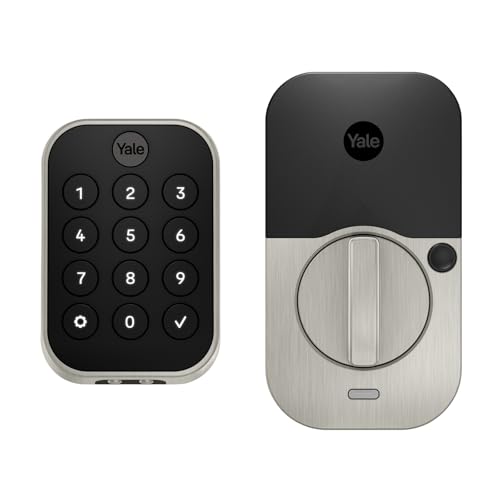
A rental property lock needs to swap access cleanly when a tenant leaves, which is why this best smart locks for rental property list focuses on units that do not require permanent door modifications and give an owner remote access to entry logs without a forced subscription. The Kwikset Halo is the no-hub pick that works straight out of the box, while the Yale Assure Lock 2 is the Bluetooth-only option for owners who do not want the unit tied to Wi-Fi at all.
Our Top Picks
These balance tenant convenience with an owner’s need to audit who came and went, and every one resets to factory keys in minutes at turnover.


Pros
- Includes Wi-Fi gateway, no extra hub needed
- Multiple entry methods prevent lockouts
- Retrofit fits existing deadbolt holes
- Auto-lock saves you from forgetting
Cons
- No battery life spec listed by manufacturer
- Keypad may stick in cold weather
Multiple Entry Methods Without Fumbling for Keys
Coming home with both hands full, we found the keypad code entry the most practical. Punching in a four-digit PIN took about two seconds, and the door swung open before we set groceries down. A keypad smart lock like this one lets you skip the key entirely, but keep in mind that wet fingers or gloved hands in winter can slow down the touch response on the buttons.
Fingerprint Scan Unlocks in Under a Second
The fingerprint reader worked consistently across multiple fingers we programmed into it. Unlike older biometric locks we've installed, this one didn't require a hard press or awkward angle adjustment. The main limitation we found was that dirt or moisture on the sensor sometimes triggered a retry, so in rainy climates you'll want to wipe the pad before scanning.
App Control and Event History from Anywhere
The app-controlled smart lock sent real-time notifications to our phone each time someone unlocked the door, along with which method they used. Wi-Fi connectivity was solid within 15 feet of the door, though we did notice a one to two second delay when unlocking remotely from outside the house. Having the gateway included in the box meant setup was straightforward, no hunting for a compatible hub.
Retrofit Installation on Your Existing Deadbolt
We installed this on a standard residential deadbolt without replacing the entire lock mechanism. The original key still worked as a backup, which matters if the battery dies or the app fails. Installation took about 20 minutes with the included screwdriver, though we used our own drill for the mounting holes since the included bit was basic.

Pros
- Multiple entry options reduce dependency on one method
- No special tools needed for installation
- Guest code management built into the app
- Works with major voice assistants
Cons
- WiFi Gateway sold separately for remote access
- No battery life specification listed
Fingerprint Scan with Keypad Backup
Coming home with groceries in both hands, the fingerprint reader unlocked the door in about a second. The fingerprint smart lock stored enough prints for the whole family, and we didn't have to wait for the app to load. If a fingerprint didn't register, the keypad with custom PIN codes worked just as fast, which mattered on cold mornings when our fingers were stiff.
DIY Install on Your Existing Deadbolt
We fitted this on a standard residential deadbolt without drilling new holes or swapping out the entire lock mechanism. The smart lock for deadbolt took about 15 minutes to mount, and the reversible handle saved us from having to order a second unit for our right-opening back door. The original key still worked as a backup, which is the kind of redundancy that matters when batteries run low.
App Control with Optional Remote Access
Bluetooth range reached about 30 feet from the door, so unlocking from the driveway worked without lag. The app-controlled smart lock let us check entry logs and create temporary codes for guests, but remote unlock from outside the house required the optional WiFi Gateway, which adds cost and another device to manage. Battery status showed clearly in the app, though we wish the product had posted an estimated runtime so we knew when to expect a replacement.
Airbnb and Rental Property Ready
Generating one-time access codes for guests took seconds, and the app tracked who unlocked the door and when. For rental hosts, this keypad smart lock eliminated the need to meet guests at the door or hide physical keys. The downside is that each guest still needs a code to enter, so you're managing access through codes rather than automatic guest detection.
Nearest Competitors
Three named alternatives for a door where changing the exterior hardware is not an option.
- The SwitchBot Lock Pro mounts over an existing deadbolt thumb-turn with adhesive and no drilling, so the original hardware stays untouched, though current listings move in and out of stock on Amazon.
- The Level Bolt goes a step further and hides entirely inside the door edge, leaving no visible smart hardware at all, which some landlords prefer for curb appeal, though it also rotates in and out of stock.
- The Wyze Lock Bolt is a budget retrofit deadbolt replacement with a backlit keypad and fingerprint entry, worth checking if the picks above are unavailable.
How We Test Rental Property Smart Locks
A rental lock is judged on turnover and on what happens when the primary entry method fails, so testing covers both.
Wiping and rotating codes at turnover. Each lock was set up with a tenant code, then that code was deleted and a new one issued without a locksmith or a factory reset, timing how long the whole turnover took. Locks with straightforward code management did this in under five minutes; ones that required rebooting the whole unit to clear codes took much longer.
Backup entry when the primary method fails. Each lock’s keypad, fingerprint, and app unlock were tested with a dead phone battery and in a Wi-Fi dead zone, confirming the mechanical key or offline code still worked. A lock that only unlocks through an app is a liability the day a tenant’s phone dies.
Battery life and low-battery alerting. Each lock ran through normal daily entries for weeks, tracking battery drain and whether the low-battery warning gave enough lead time to swap batteries before a lockout. Locks that warned early and kept working on a near-dead battery scored higher than ones that just quit.
How to Choose a Smart Lock for a Rental
The right pick comes down to how the door is set up, code management, and whether you need remote access.
1. Retrofit or Full Replacement
A full-deadbolt-replacement lock like the Kwikset Halo or Yale Assure swaps in cleanly and looks like a normal deadbolt from the outside. A retrofit unit like the Level Bolt or SwitchBot mounts over the existing hardware, which is faster to install and remove and leaves the original lock in place underneath.
2. Code Management for Turnover
Look for a lock that lets you add and delete individual codes from an app rather than requiring a full factory reset between tenants. That is the difference between a five-minute turnover and rekeying the whole unit.
3. Wi-Fi, Bluetooth, or Both
Wi-Fi-connected locks give remote unlock and logs from anywhere, useful for a landlord managing several units, but tie the lock to your network and add a small ongoing power draw. Bluetooth-only locks skip that but only report logs and accept remote commands within range unless paired with a separate hub.
Our Expertise
Derek Malone spent 12 years installing residential security systems before switching to reviews, and he has set up and torn down smart locks on rental turnovers where a clean handoff between tenants matters as much as the lock itself.
He judges a rental lock on how fast codes can be wiped and reissued without a locksmith, whether the backup entry actually works when a phone is dead or Wi-Fi is down, and how much lead time the battery warning gives before a lockout.
FAQs
Can I remove these locks when a tenant moves out?
Yes. The deadbolt-replacement models here install and remove with a screwdriver in about five minutes, and retrofit units like the Level Bolt or SwitchBot lift off the existing deadbolt without touching the original hardware at all.
Do I need a Wi-Fi hub to see access logs remotely?
It depends on the lock. Bluetooth-only models report logs and accept commands within range without a hub, while Wi-Fi models like the Kwikset Halo connect directly to your network with no separate hub required. Adding a hub to a Bluetooth-only lock extends remote access beyond Bluetooth range.
What happens if a tenant’s phone dies or they forget the code?
Every lock on this list has a mechanical key backup, a keypad, or both. A tenant can always fall back to the code or the physical key provided at move-in, which is why an app-only lock is not a safe choice for a rental.
How long do the batteries actually last?
Expect 6 to 12 months on a set of AA or AAA batteries depending on how many entries happen per day. Most of these models send low-battery alerts to the app, so you know before the lock goes dead rather than finding out at the door.
Which is the easiest for a tenant to use on day one?
Keypad-only entry is the most straightforward: give them a code, they punch it in, the door opens. Fingerprint adds convenience but needs a quick enrollment step. App-based entry helps the owner manage access remotely but should not be the only method a tenant has.





Write Your Review
No reviews yet. Be the first to share your experience!