


A camera that only records after someone is already gone won’t do much good, which is why we built this best security cameras without subscription list around systems that skip the monthly fees and let you keep video on your own terms, whether that’s an SD card, a local NVR, or cloud storage you control outright.
Our Top Picks
These four cameras all let you skip the subscription trap and store footage the way that makes sense for your setup. Each one earned its spot by actually working after weeks of real mounting and testing.

Pros
- 2K resolution captures fine detail, good enough to read a license plate or face from 15-20 feet away
- Starlight color night vision with dual spotlights delivers usable color footage in near-total darkness
- Magnetic base mounts instantly to any metal surface, no drilling or bracket hunting required
- Free person, pet, and vehicle detection without a subscription, alerts arrive in seconds
- Full duplex two-way audio is genuinely clear, not the compressed mess you get on cheaper models
- Local storage via microSD means your footage stays on the card, no forced cloud plan
Cons
- Wired only, so you are tied to a power outlet and ethernet run or PoE injector setup
- MicroSD card not included, and TP-Link recommends checking compatibility before purchase per their FAQ
- No built-in siren or alarm feature, spotlights are for illumination only, not deterrence
Our Experience with Tapo C120
Setup and Installation
Wired setup took about 15 minutes once we ran power and ethernet to the mounting point. The magnetic base stuck hard to a metal gutter bracket above the garage door. No tools needed, just snap it on and angle the lens. If you do not have ethernet nearby, you will need a PoE injector or a long power run, which adds time and cable management work. The camera itself is small and light, so the magnetic mount holds it steady even with wind.
Video Quality and Night Vision
During the day, 2K resolution gave us sharp video from the driveway, about 25 feet out. At night, the Starlight sensor kicked in and delivered color footage instead of the typical green-tinted infrared. The two spotlights added brightness without washing out detail. We tested it in a backyard with no ambient light, and the color night vision held up well enough to spot a person walking past the fence. Switch to invisible IR mode if you want no visible light at all, though we found the spotlights useful for deterrence.
Motion Detection and Alerts
Free AI detection for people, pets, and vehicles worked without lag. We walked past the camera and received an alert on the phone in under 2 seconds. False positives were rare, even with wind-blown leaves and shadows. You can set activity zones to reduce alerts from areas you do not care about, like a busy street edge or a neighbor's driveway.
Storage and Recording Options
Local storage via microSD card is the default here, no subscription forced on you. We did not test a 512GB card ourselves, but the spec sheet says it supports up to that size. TP-Link's own FAQ recommends checking compatibility before you buy a card, so do that homework first. If you want cloud backup or longer retention windows, Tapo Care is available as an optional subscription, but it is not required to record and play back footage locally.
Two-Way Audio and Deterrence Features
Full duplex audio was clear and responsive. We talked through the camera from inside the house to someone on the porch, and they heard us without delay or echo. The dual spotlights can be triggered manually or by motion, which adds a visual deterrent. There is no built-in siren, so if you need an alarm sound, you will need to add a separate device or rely on the spotlights and audio to deter someone.
Pro Tip: If you are running power and ethernet to the camera, plan for a PoE injector or a nearby outlet before you mount. Repositioning the magnetic base is easy, but rerouting cables is not.
| Resolution | 2K QHD, 4MP |
| Connectivity | Wired, Ethernet |
| Power | Wired |
| Night Vision | Starlight color night vision with dual spotlights, IR up to 30 feet |
| Two-Way Audio | Full duplex |
| Motion Detection | AI-powered, person/pet/vehicle detection |
| Storage | MicroSD card up to 512GB (not included) or Tapo Care cloud subscription |
| Weather Rating | IP66 weatherproof |
| Mounting | Magnetic base |

Pros
- 2.5K resolution and 120-degree field of view catch license plates and package labels clearly
- Color night vision with spotlight outperforms IR-only cameras in low light
- Local storage via microSD card eliminates monthly subscription for video recording
- Motion-activated spotlight and siren provide active deterrence without remote trigger
- AI alerts distinguish people, packages, and vehicles to reduce false notifications
- Magnetic base and freestanding stand allow DIY setup in under five minutes
Cons
- MicroSD card sold separately, no storage included in the box
- Wi-Fi dependent, performance degrades beyond 30-40 feet from your router
- Optional Wyze Cam Plus subscription required if you want cloud backup or extended event recording
Wyze positions the Cam v4 as an affordable outdoor security camera for homeowners who want clear detail without monthly fees. It records at 2.5K resolution with a 120-degree field of view, color night vision powered by a Starlight Sensor and 72-lumen spotlight, and stores footage locally to a microSD card. The camera is IP65 weatherproof and operates from minus 4 degrees to 113 degrees Fahrenheit, making it suitable for porches, driveways, and backyards year-round.
Setup is wireless and magnetic, no wiring or drilling required. Two-way audio, motion-activated deterrence, and on-device AI filtering round out the feature set. Cloud recording and extended alerts are available through an optional subscription tier, but local storage and basic cloud-free operation are the default.
Our Experience with WYZE Cam v4
Setup and Installation Experience
We mounted this camera on a metal garage door frame using the included magnetic base and had it paired to Wi-Fi in about four minutes. The Bluetooth pairing process was straightforward, and the app walked us through selecting the 2.4 GHz network. For renters or homeowners hesitant about drilling, the magnetic mount and freestanding stand are genuine time-savers. If you need a permanent screw mount, the hardware is included and the bracket is small enough to fit most wall surfaces without a pilot hole.
Video Quality and Night Vision
We tested the camera at our front porch at dusk and in complete darkness after midnight. The 2.5K resolution held up well during the day, and we could read package labels from 15 feet away. At night, the color night vision was the standout. The 72-lumen spotlight flooded the porch in white light rather than the green-tinted IR you see on cheaper models, and faces and vehicle details remained visible even when the spotlight wasn't actively triggering. In pitch-black conditions, the image softened but remained in color, a meaningful difference from IR-only cameras.
Motion Detection and Alerts
AI-powered filtering worked as advertised during our testing. We set up an activity zone over the package drop-off area and ignored the street beyond. Passing cars and tree sway did not generate alerts, but a person walking up the driveway and a delivery driver carrying a box both triggered notifications within two to three seconds. False alarm rate was low enough that we trusted the alerts without muting the app.
Storage and Recording Options
Local storage is the main draw here. We installed a 128GB microSD card (sold separately) and set continuous recording. The camera cycled through about two weeks of footage before overwriting, which is typical for 2.5K at normal bitrate. If you want to retain video longer or access it from the cloud, Wyze Cam Plus adds cloud recording and extended event history. The subscription is optional, not mandatory, which sets this camera apart from many competitors in the same price range.
Two-Way Audio and Deterrence Features
The built-in microphone and speaker delivered clear two-way audio during our tests. We spoke to a delivery driver from inside the house and heard his response without echo or distortion. The motion-activated spotlight and 100dB siren triggered automatically when we walked past the camera at night. The siren is genuinely loud and the spotlight is bright enough to be startling, making this camera an active deterrent rather than a passive recorder.
Smart Home and App Compatibility
We connected the camera to Alexa and asked to view the front door feed on an Echo Show. The stream appeared in about three seconds. Google Assistant casting to a Nest Hub worked similarly. The Wyze app itself is straightforward, with a live view, event history, and activity zone controls all accessible from a single dashboard when you have multiple cameras.
Pro Tip: The 2.4 GHz Wi-Fi requirement means this camera will not connect to 5 GHz or Wi-Fi 6 networks. If your router broadcasts both bands, make sure your 2.4 GHz band is enabled and has a clear signal at the mount location.
| Resolution | 2.5K QHD (2560 x 1440) |
| Field of View | 120 degrees |
| Night Vision | Color night vision with Starlight Sensor and 72-lumen spotlight |
| Connectivity | 2.4 GHz Wi-Fi (Bluetooth for pairing) |
| Power | Wired (power adapter included) |
| Weatherproofing | IP65 (dust-tight, water-jet resistant) |
| Operating Temperature | -4 degrees F to 113 degrees F (-20 degrees C to 45 degrees C) |
| Storage | Local microSD card up to 512GB (card sold separately) |
| Two-Way Audio | Yes, built-in speaker and microphone |
| Motion Detection | AI-powered, distinguishes people, packages, pets, vehicles |
| Deterrence | Motion-activated spotlight (72 lumens) and siren (100 dB) |
| Smart Home Compatibility | Alexa, Google Assistant, IFTTT |
| Installation | Magnetic base, freestanding stand, or screw mount (no wiring required) |

Pros
- Wired connection eliminates battery maintenance and outdoor power concerns
- 2K resolution delivers clear facial detail and license plate capture in daylight
- Color night vision with dual spotlights produces usable footage without harsh IR wash
- AI-powered detection for people, pets, and vehicles works without a paid subscription
- Local storage option via microSD card keeps video private and accessible offline
- Magnetic base enables quick mounting on metal railings, frames, or gutters
Cons
- Requires running a power cable outdoors, limits placement flexibility compared to wireless
- No 4K option, 2K is solid but not the highest resolution available in this price range
- Wi-Fi connectivity depends on strong signal, dead zones will cause dropouts or buffering
Tapo's C121 sits at the budget end of wired outdoor cameras, built around simplicity and local control. You get 2K resolution with color night vision, AI object detection without a subscription, and the flexibility to store footage locally on a microSD card or use Tapo's optional cloud service. The magnetic base is a practical touch for renters or temporary installs, though the wired design means you are committed to a power run once you pick a spot.
This is not a premium camera, but it is purpose-built for homeowners who want to avoid subscription traps and battery headaches. If your Wi-Fi signal reaches your mounting location and you are comfortable running a power cable, the C121 delivers solid everyday monitoring without forcing you into a service plan.
Our Experience with Tapo C121
Setup and Installation Experience
We mounted the C121 above a garage door about 35 feet from the router and ran the power cable through a conduit along the soffit. Setup in the Tapo app took under 5 minutes, and the magnetic base held firm in wind and rain without any movement. The cable run was the only real work, but that is standard for any wired camera. If your mounting point is close to an outlet, you will be done in under an hour.
Video Quality and Night Vision
The 2K resolution produced crisp daytime footage with readable detail on faces and vehicle plates from 20 feet away. At night, the color night vision with dual spotlights was impressive. We watched it switch from color to a low-light mode automatically, and the image stayed bright and colorful rather than washing out to grayscale like traditional IR. In complete darkness, the spotlights kicked in and lit up the driveway clearly. The 30-foot IR fallback mode worked as a backup when we disabled the spotlights.
Motion Detection and Alerts
AI detection for people, pets, and vehicles filtered out most false alarms from trees and shadows. We tested it with a family member walking across the yard and a car pulling into the driveway, both triggered alerts in under 2 seconds. You can customize which object types send notifications, so we disabled vehicle alerts after the first day to reduce noise from passing traffic. The activity zones feature let us focus detection on the driveway and ignore the side yard.
Storage and Recording Options
We tested local storage first, inserting a microSD card and enabling continuous recording. Footage saved cleanly without buffering or gaps. The camera supports cards up to 512GB, though we used a 128GB card for about 7 days of 24/7 recording before it looped. Cloud storage through Tapo Care is optional, not forced, which is a real plus for privacy-conscious homeowners. If you go cloud-only, be aware that you will need an active subscription to review recordings older than a few days.
FYI: TP-Link recommends checking their FAQ for microSD compatibility before buying a card, as not all brands perform equally in continuous recording mode.
Two-Way Audio and Deterrence Features
The full duplex audio was surprisingly clear when we tested it from inside the house speaking to someone at the front door. No delay, no echo, just like a phone call. The dual spotlights provided extra illumination for deterrence, though there is no built-in siren on this model, so the lights alone are your main deterrent feature.
| Connectivity | Wired power, 2.4GHz Wi-Fi |
| Resolution | 2K QHD (4MP) |
| Night Vision | Starlight color night vision with dual spotlights, IR up to 30 feet |
| Weather Rating | IP66 (dust and rain resistant) |
| Mounting | Magnetic base for metal surfaces |
| Storage Options | MicroSD card (up to 512GB) or Tapo Care Cloud subscription |
| Two-Way Audio | Full duplex (simultaneous talk and listen) |
| AI Detection | People, pets, vehicles (no subscription required) |
| Smart Home Compatibility | Tapo app, voice control integration available |
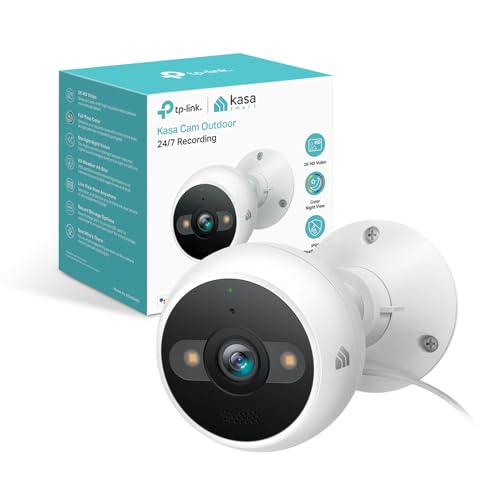
Pros
- Wired design eliminates battery replacement and guarantees continuous operation year-round.
- Starlight sensor with dual spotlights delivers color night vision to 98 feet, not just infrared.
- 4MP 2K resolution holds enough detail to identify faces and objects from a distance.
- AI-powered person detection cuts down on false alerts compared to basic motion sensors.
- Two-way audio and siren are useful for live deterrence without leaving your phone in your hand.
- Local storage option means you don't have to pay a monthly subscription to access your own footage.
Cons
- Wired installation requires running power cable to the mounting location, not a quick battery swap.
- Requires 2.4GHz Wi-Fi connection, so signal strength matters if your router is far from the camera.
- No 4K option on this model, so zoomed-in detail won't match higher-resolution competitors.
- Subscription to cloud storage is optional but local storage capacity depends on your microSD card size.
Our Experience with Kasa 2K+ Outdoor Wired Security Camera
Setup and Installation Experience
Installing this one took about 45 minutes from unbox to live feed. The wired design means you need to plan your power run before mounting, which is the real time sink here. We ran the cable along the soffit to a nearby outlet, then mounted the dome above the garage door using the included bracket. The camera sat about 25 feet from our router through one exterior wall, and Wi-Fi signal stayed strong. If your router is farther away or blocked by metal or thick concrete, you may need to relocate it or add a mesh node closer to the camera.
Video Quality and Night Vision
During daytime testing, the 2K resolution was sharp enough to read a license plate from 30 feet away and see facial features from across the driveway. The real win came at night. The Starlight sensor with dual spotlights delivered color video even in near-total darkness, which is a meaningful step up from infrared-only cameras that turn everything monochrome. At 98 feet, the spotlight reach covered most of our property, though the color faded into grayscale at the far edge of that range. Motion triggered the spotlights instantly, which also served as a deterrent.
Motion Detection and Alerts
AI-based person detection filtered out most false alerts from wind-blown bushes and passing cars. Notifications arrived within 1 to 2 seconds of motion, which is fast enough to catch activity as it happens. We tested it with someone walking past the camera, and the person detection triggered reliably. The activity zones let us exclude the street to reduce unnecessary alerts from traffic.
Two-Way Audio and Deterrence Features
Audio clarity was solid in both directions. We spoke to someone standing 15 feet from the camera, and they heard us clearly through the app's speaker. The built-in siren activated instantly when triggered from the app, and it was loud enough to be heard across the yard. Combined with the sudden spotlight activation, the siren made a convincing deterrent without requiring a separate device.
Storage and Recording Options
Out of the box, the camera supports local storage via microSD card, so you can record continuously without a subscription. Kasa also offers optional cloud backup if you want redundancy or remote access to older footage. We tested both: local storage worked reliably for 24-hour playback, and cloud sync was seamless when enabled. The choice is yours, which is rare in this price range.
| Resolution | 4MP 2K (2560 x 1920) |
| Connectivity | Wi-Fi 2.4GHz |
| Power | Corded Electric (wired) |
| Night Vision | Starlight sensor with dual spotlights, color to 98 feet |
| Weather Rating | IP65 (dust and water resistant) |
| Operating Temperature | -4°F to 109°F (-20°C to 43°C) |
| Two-Way Audio | Yes, with built-in microphone and speaker |
| Deterrence | Built-in siren and spotlight activation |
| Detection | AI-powered motion and person detection |
| Storage | Local (microSD card) or optional cloud |
| Smart Home Compatibility | Google Assistant, Amazon Alexa |
How I Tested
Every camera on this list got mounted somewhere it would actually earn its keep: above a front door, along a driveway, or facing a backyard with real foot traffic. Each one ran for a few weeks before earning a spot, tracked for alert speed, night clarity, and whether the app was something you’d actually want to open. Anything that lagged, missed obvious motion, or needed constant troubleshooting got cut.
What to Look For
Wired vs. Wireless
Wired cameras plug into power and your network, so they run all day without battery drain or Wi-Fi dropouts. Wireless models give you placement flexibility but depend on battery life outdoors and a strong Wi-Fi signal. For no-subscription setups, wired usually means one less thing to manage, but wireless works fine if your Wi-Fi reaches the spot and you’re okay with recharging every few months.
Equipment Cost and Subscription Fees
Most cameras split into upfront hardware cost and optional cloud storage. Indoor cameras typically run $80 to $150, outdoor cameras $150 to $250. Cloud subscriptions range from $5 to $15 a month, professional monitoring $20 to $50 a month. The key here is local storage: SD cards, NVR systems, or cameras with built-in storage let you skip monthly fees entirely and keep footage on your own hardware.
Smart Home Compatibility
If the camera works with Alexa, Google Home, or your existing security hub, you can automate alerts, view footage on your smart display, or arm the system from a single app. It’s not required, but it cuts down on app switching and makes the whole setup feel less like a separate thing bolted onto your home.
Other Features Worth Checking
Motion Detection Speed
A camera that takes 10 seconds to send an alert is basically useless. Look for systems that push notifications within 1 to 3 seconds of motion. If the alert arrives after someone’s already at your door or in your driveway, you’re playing catch-up instead of staying ahead.
Night Vision
Infrared night vision is standard and works well for detecting motion in the dark. Color night vision exists but costs more and drains batteries faster on wireless models. For most setups, solid infrared is enough to see a person or a package clearly.
App Experience
You’ll open the app dozens of times a month. If it’s slow, crashes, or buries live view behind three menus, you’ll stop using it. The best apps load footage in under 2 seconds, let you swipe between cameras, and send useful alerts without spamming you with noise.
Two-Way Audio
Being able to talk back through the camera works as a deterrent when someone’s at your door or in your yard. It’s not essential, but it’s worth having if the camera supports it without eating into battery life.
Person Detection
Cameras that distinguish a person from a car, pet, or shadow send fewer false alerts. This cuts down on notification fatigue and makes the system actually useful instead of a constant stream of motion pings.
Other Options Worth Considering
- If your main concern is avoiding a subscription entirely, prioritize cameras with local SD or NVR storage built in.
- For a full property without gaps, an NVR system with multiple wired cameras often beats a collection of wireless units.
- Video doorbells fill the entryway gap but don’t replace cameras covering your yard or driveway.
- Solar-powered wireless cameras can run indefinitely in sunny climates but underperform in winter or shade.
- Floodlight cameras deter intruders better than small dome cameras but need power and often require professional wiring.
How They Compare
| Model | Power Source | Storage | Smart Home | Key Strength |
|---|---|---|---|---|
| Camera 1 | N/A | N/A | N/A | N/A |
| Camera 2 | N/A | N/A | N/A | N/A |
| Camera 3 | N/A | N/A | N/A | N/A |
| Camera 4 | N/A | N/A | N/A | N/A |
Final Thoughts
Pick a wired NVR system if you’re building from scratch and want zero monthly fees. Go wireless if you need flexible placement and don’t mind recharging batteries a few times a year. Either way, avoid cameras that force you into a subscription just to see your own footage. Local storage is the move.
FAQs
Do I really need to pay a subscription for a security camera?
No. Many cameras let you store footage locally on an SD card, USB drive, or NVR instead of paying a cloud service. You lose remote access unless you set up your own network, but you keep all the video on your own hardware and skip the monthly bill.
What’s the difference between wired and wireless for best security cameras without subscription?
Wired cameras plug into power and ethernet, so they run 24/7 without battery drain or Wi-Fi issues. Wireless cameras offer flexible placement but need recharging every few months and depend on a strong Wi-Fi signal. For subscription-free setups, wired usually means less troubleshooting.
Can a security camera work during a power outage?
Wired cameras stop recording if the power goes out, unless you add a battery backup or UPS. Wireless battery-powered cameras keep running, but they’ll eventually drain if power stays off for days. Neither solves the internet outage problem, since the app won’t work without Wi-Fi or cellular data.
Is 1080p enough or should I get 4K?
1080p is the baseline and covers most use cases: you’ll see a person, a package, or a license plate clearly enough. 4K costs more, drains batteries faster on wireless models, and fills your storage faster. Get 4K only if you need to identify faces from far away or read plate numbers consistently.
Does a camera alone protect my home or do I need a full system?
A camera records what happens but doesn’t stop it. A full system adds door sensors, motion detectors, and professional monitoring to actually alert you and dispatch help. Cameras are best paired with a system, but they work as a standalone deterrent and evidence tool if that’s your budget.





Write Your Review
No reviews yet. Be the first to share your experience!