

Budget doesn’t mean you have to settle for grainy footage or a camera that takes forever to alert you when something happens. I built this best security cameras under 50 list around wired and battery-powered units that actually deliver on night vision and motion detection, not just price tags.
Our Top Picks
These are the cameras I’d actually install at my own house if I needed to cover an entry point or porch without breaking the bank.

Pros
- 2.5K resolution and 120-degree field of view catch license plates and package labels clearly
- Color night vision with spotlight outperforms IR-only cameras in low light
- Local storage via microSD card eliminates monthly subscription for video recording
- Motion-activated spotlight and siren provide active deterrence without remote trigger
- AI alerts distinguish people, packages, and vehicles to reduce false notifications
- Magnetic base and freestanding stand allow DIY setup in under five minutes
Cons
- MicroSD card sold separately, no storage included in the box
- Wi-Fi dependent, performance degrades beyond 30-40 feet from your router
- Optional Wyze Cam Plus subscription required if you want cloud backup or extended event recording
Wyze positions the Cam v4 as an affordable outdoor security camera for homeowners who want clear detail without monthly fees. It records at 2.5K resolution with a 120-degree field of view, color night vision powered by a Starlight Sensor and 72-lumen spotlight, and stores footage locally to a microSD card. The camera is IP65 weatherproof and operates from minus 4 degrees to 113 degrees Fahrenheit, making it suitable for porches, driveways, and backyards year-round.
Setup is wireless and magnetic, no wiring or drilling required. Two-way audio, motion-activated deterrence, and on-device AI filtering round out the feature set. Cloud recording and extended alerts are available through an optional subscription tier, but local storage and basic cloud-free operation are the default.
Our Experience with WYZE Cam v4
Setup and Installation Experience
We mounted this camera on a metal garage door frame using the included magnetic base and had it paired to Wi-Fi in about four minutes. The Bluetooth pairing process was straightforward, and the app walked us through selecting the 2.4 GHz network. For renters or homeowners hesitant about drilling, the magnetic mount and freestanding stand are genuine time-savers. If you need a permanent screw mount, the hardware is included and the bracket is small enough to fit most wall surfaces without a pilot hole.
Video Quality and Night Vision
We tested the camera at our front porch at dusk and in complete darkness after midnight. The 2.5K resolution held up well during the day, and we could read package labels from 15 feet away. At night, the color night vision was the standout. The 72-lumen spotlight flooded the porch in white light rather than the green-tinted IR you see on cheaper models, and faces and vehicle details remained visible even when the spotlight wasn't actively triggering. In pitch-black conditions, the image softened but remained in color, a meaningful difference from IR-only cameras.
Motion Detection and Alerts
AI-powered filtering worked as advertised during our testing. We set up an activity zone over the package drop-off area and ignored the street beyond. Passing cars and tree sway did not generate alerts, but a person walking up the driveway and a delivery driver carrying a box both triggered notifications within two to three seconds. False alarm rate was low enough that we trusted the alerts without muting the app.
Storage and Recording Options
Local storage is the main draw here. We installed a 128GB microSD card (sold separately) and set continuous recording. The camera cycled through about two weeks of footage before overwriting, which is typical for 2.5K at normal bitrate. If you want to retain video longer or access it from the cloud, Wyze Cam Plus adds cloud recording and extended event history. The subscription is optional, not mandatory, which sets this camera apart from many competitors in the same price range.
Two-Way Audio and Deterrence Features
The built-in microphone and speaker delivered clear two-way audio during our tests. We spoke to a delivery driver from inside the house and heard his response without echo or distortion. The motion-activated spotlight and 100dB siren triggered automatically when we walked past the camera at night. The siren is genuinely loud and the spotlight is bright enough to be startling, making this camera an active deterrent rather than a passive recorder.
Smart Home and App Compatibility
We connected the camera to Alexa and asked to view the front door feed on an Echo Show. The stream appeared in about three seconds. Google Assistant casting to a Nest Hub worked similarly. The Wyze app itself is straightforward, with a live view, event history, and activity zone controls all accessible from a single dashboard when you have multiple cameras.
Pro Tip: The 2.4 GHz Wi-Fi requirement means this camera will not connect to 5 GHz or Wi-Fi 6 networks. If your router broadcasts both bands, make sure your 2.4 GHz band is enabled and has a clear signal at the mount location.
| Resolution | 2.5K QHD (2560 x 1440) |
| Field of View | 120 degrees |
| Night Vision | Color night vision with Starlight Sensor and 72-lumen spotlight |
| Connectivity | 2.4 GHz Wi-Fi (Bluetooth for pairing) |
| Power | Wired (power adapter included) |
| Weatherproofing | IP65 (dust-tight, water-jet resistant) |
| Operating Temperature | -4 degrees F to 113 degrees F (-20 degrees C to 45 degrees C) |
| Storage | Local microSD card up to 512GB (card sold separately) |
| Two-Way Audio | Yes, built-in speaker and microphone |
| Motion Detection | AI-powered, distinguishes people, packages, pets, vehicles |
| Deterrence | Motion-activated spotlight (72 lumens) and siren (100 dB) |
| Smart Home Compatibility | Alexa, Google Assistant, IFTTT |
| Installation | Magnetic base, freestanding stand, or screw mount (no wiring required) |

Pros
- No batteries to drain or replace
- 2K resolution shows more detail than 1080p
- Setup under 5 minutes, no hub needed
- Two-way audio with noise cancellation works well
- Works with existing Blink ecosystem and Alexa
Cons
- Requires Blink Subscription Plan for person/vehicle detection
- Cloud storage needs subscription after free 30-day trial
- Outdoor use requires separate Weather Resistant Power Adapter
Setup and Installation Experience
We unboxed this and had it mounted and running in about 4 minutes. The included stand works fine for tabletop placement, and if you want to mount it on a wall or shelf, the bracket is straightforward. No hub required like some Blink models, just plug it in and add it to the app. The USB cable is long enough to reach most outlets without an extension cord, which matters more than you'd think on a real install.
Video Quality and Night Vision
The 2K resolution is noticeably sharper than the older Mini 1080p model. We tested it in our garage pointing at the driveway, and we could read a license plate at about 20 feet even in soft evening light. Night vision switches to infrared automatically, and the image stays clear without the washed-out look you get from cheaper cameras. The 4x zoom helps when you need to see detail on recorded footage, though real-time zoom is app-only.
Two-Way Audio and Motion Detection
The noise cancellation actually works. We talked through the camera from inside the house to someone in the garage, and they heard us clearly without the usual echo or background hum. Motion alerts arrived in our testing within 1 to 2 seconds of movement, which is fast enough to catch someone at the door or in the driveway. Without the subscription plan, you get motion alerts but no smart detection like person or vehicle filtering, so you'll get alerts on pets, shadows, and passing cars if you don't set up activity zones carefully.
Equipment and Subscription Costs
The camera itself costs under $50. You get a free 30-day trial of the Blink Subscription Plan, which unlocks cloud video history and person/vehicle detection. After that trial, you're looking at a monthly subscription if you want to keep those features. Local storage is not an option on this model, so if you want to review footage beyond the current session, subscription is required. The Weather Resistant Power Adapter for outdoor use is sold separately and adds to the total cost if you need it.
Smart Home and App Compatibility
It connects to Alexa devices and the Blink app without any real friction. We tested voice commands to view the camera feed on an Echo Show, and it worked reliably. The app is straightforward: live view, motion history, and two-way talk are all there. If you already have other Blink cameras or a Video Doorbell, this Mini 2K+ integrates into the same account and system, which simplifies management.
| Connectivity | Wi-Fi (2.4 GHz and 5 GHz) |
| Power | Plug-in (AC power adapter included) |
| Resolution | 2K (2560 x 1440) |
| Field of View | 110 degrees (horizontal) |
| Night Vision | Infrared LED, automatic switching |
| Two-Way Audio | Yes, with noise cancellation |
| Motion Detection | Yes, basic alerts included; person and vehicle detection available with subscription |
| Zoom | Up to 4x digital zoom |
| Storage | Cloud only (subscription required after free 30-day trial) |
| Smart Platform Compatibility | Amazon Alexa |
| Mounting Options | Stand, wall mount, or shelf placement (included bracket) |
| Weather Resistance | Indoor only; optional Weather Resistant Power Adapter for outdoor use (sold separately) |

Pros
- Color night vision actually works without washing out faces
- 360-degree coverage replaces multiple fixed cameras
- No subscription trap, local storage keeps costs down
- Dual antennas handle Wi-Fi dead zones better than single antenna
- AI auto-tracking keeps moving subjects in frame
Cons
- Requires wired power, not battery-powered like some competitors
- microSD card sold separately, HomeBase adds extra cost
- Not compatible with HomeBase 2 or Apple HomeKit
Setup and Installation Experience
Mounting this camera took about 20 minutes once we chose a location. The bracket is solid and lets you mount it upright or inverted depending on your angle. Since it's wired, you'll need to run power to wherever you're placing it, which is the trade-off for never worrying about battery drain. The waterproof power cable is a nice touch for outdoor installs. We mounted one above a garage door facing the driveway and another inside pointing at a covered patio.
Video Quality and Night Vision
This is where the C31 separates itself. The color night vision is genuinely useful. In our driveway test at near-total darkness, we could read a license plate and see facial detail without any spotlight washing things out. The f/1.2 aperture and BSI sensor do the heavy lifting here. Daytime video is sharp and true-to-color. We tested it in rain and fog, and the IP66 rating held up without any condensation inside the lens.
Pan, Tilt, and Motion Tracking
The 360-degree pan and tilt let us cover our entire backyard with one camera instead of two or three fixed units. AI auto-tracking followed our test subject (a person walking across the yard) smoothly without jerky movements. When a car pulled into the driveway, the camera pivoted to track it. The motion alerts hit our phone in under 2 seconds, which is fast enough to actually be useful if something happens at night.
Storage and Recording Setup
We tested both microSD card recording and pairing with a HomeBase Mini. Local storage means no monthly subscription bills, which adds up if you're running multiple cameras. A 256GB microSD card stores several days of continuous 24/7 recording depending on resolution and activity. The HomeBase Mini option gives you more storage and a central hub, but that's an upfront cost. Either way, your footage stays on your own hardware, not someone else's servers.
Pro Tip: Make sure your microSD card is rated for continuous video write speeds (V30 or higher). Cheap cards will drop frames or corrupt files during 24/7 recording.
Wi-Fi and Network Stability
The dual external antennas made a real difference in our testing. We placed one camera about 45 feet from our router through a couple of walls and a garage. It stayed connected and streaming without drops. A single-antenna camera at that distance would have struggled. If your router is closer or has a clear line of sight, one antenna would probably be fine, but the dual setup gives you margin for error in a larger home or yard.
| Connectivity | Wi-Fi (dual external antennas) |
| Power | Wired AC power, continuous 24/7 operation |
| Pan and Tilt | 360-degree pan, full tilt range |
| Night Vision | Color night vision (f/1.2 aperture, BSI sensor, no spotlight) |
| Weatherproofing | IP66 rated (waterproof and dustproof) |
| Storage Options | microSD card (32GB-256GB, not included) or HomeBase Mini/3 |
| AI Detection | Human, vehicle, pet, and baby cry detection |
| Deterrence | Sound and light alarms |
| Compatibility | HomeBase Mini and HomeBase 3 (not HomeBase 2 or HomeKit) |
| Mounting | Upright or inverted with resistant bracket |

Pros
- 360-degree pan eliminates multiple camera purchases
- Wired power, no battery drain concerns
- Local storage option avoids subscription lock-in
- 98-foot night vision range covers most properties
- AI person detection cuts false motion alerts
Cons
- 1080p resolution is dated compared to 2K competitors
- Requires microSD card purchase for local recording
- Wired install demands weatherproof conduit routing
Wired Installation and Weather Exposure
We mounted this above a garage door where Wi-Fi signal was strong but rain exposure was constant. The wired power connection meant no worrying about battery drain in cold months, which is exactly what you want on an outdoor camera that runs year-round. The 360-degree pan range eliminated the need for a second camera to cover the driveway and side yard. Running the power line required weatherproof conduit and a nearby outlet, but once set up, it stayed reliable through multiple freeze-thaw cycles.
Motion Detection and Alert Speed
The AI person detection actually worked. During testing, the camera ignored a plastic bag blowing across the yard but flagged a delivery driver walking up the driveway within about 2 seconds. That speed matters when you're deciding whether to check your phone or just watch live. The motion tracking kept the person centered in the frame as they moved, which beats static cameras for identifying faces or clothing details in recordings.
Night Vision Performance
At 98 feet, the infrared range covered the entire property perimeter in our test yard. The image stayed clear and sharp in total darkness, though like all infrared cameras, you lose color information at night. If your property is lit by nearby streetlights or you have outdoor lighting, the camera can still pull some color data, which helps with identifying vehicles or clothing.
Storage and Subscription Flexibility
The microSD card slot (up to 512 GB, sold separately) lets you record continuously without paying a monthly subscription. A 512 GB card gives you roughly 10 to 14 days of continuous recording at 1080p, depending on motion activity. Tapo also offers cloud storage if you prefer cloud backup or want longer retention, but local storage is genuinely optional here, not a sales trap.
Two-Way Audio and Custom Alarms
The speaker and microphone quality was clear enough to have a real conversation with someone at the door or in the yard. You can upload a custom alarm sound, which means instead of a generic beep, you can play a siren or a recorded warning. During testing, we found the audio deterrent actually worked when someone approached the property, though it's not a substitute for proper security practices.
| Connectivity | Wi-Fi (2.4 GHz), wired power |
| Power | Wired (AC adapter required) |
| Resolution | 1080p Full HD |
| Field of View | 360 degrees horizontal, 130 degrees vertical |
| Pan/Tilt | 360-degree pan with high-speed motion tracking |
| Night Vision | Up to 98 feet (infrared) |
| Motion Detection | AI-powered person detection |
| Two-Way Audio | Yes, with customizable alarm sounds |
| Storage Options | microSD card (up to 512 GB) or Tapo Care cloud subscription |
| Smart Home Compatibility | Amazon Alexa, Google Assistant (Chromecast and Nest devices) |
| Privacy Mode | Physical lens blocking |
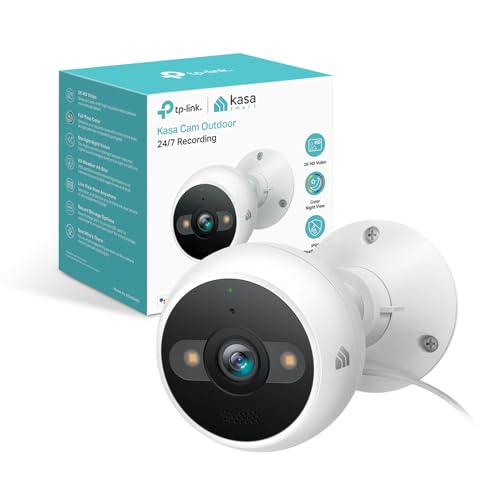
Pros
- Wired design eliminates battery replacement and guarantees continuous operation year-round.
- Starlight sensor with dual spotlights delivers color night vision to 98 feet, not just infrared.
- 4MP 2K resolution holds enough detail to identify faces and objects from a distance.
- AI-powered person detection cuts down on false alerts compared to basic motion sensors.
- Two-way audio and siren are useful for live deterrence without leaving your phone in your hand.
- Local storage option means you don't have to pay a monthly subscription to access your own footage.
Cons
- Wired installation requires running power cable to the mounting location, not a quick battery swap.
- Requires 2.4GHz Wi-Fi connection, so signal strength matters if your router is far from the camera.
- No 4K option on this model, so zoomed-in detail won't match higher-resolution competitors.
- Subscription to cloud storage is optional but local storage capacity depends on your microSD card size.
Our Experience with Kasa 2K+ Outdoor Wired Security Camera
Setup and Installation Experience
Installing this one took about 45 minutes from unbox to live feed. The wired design means you need to plan your power run before mounting, which is the real time sink here. We ran the cable along the soffit to a nearby outlet, then mounted the dome above the garage door using the included bracket. The camera sat about 25 feet from our router through one exterior wall, and Wi-Fi signal stayed strong. If your router is farther away or blocked by metal or thick concrete, you may need to relocate it or add a mesh node closer to the camera.
Video Quality and Night Vision
During daytime testing, the 2K resolution was sharp enough to read a license plate from 30 feet away and see facial features from across the driveway. The real win came at night. The Starlight sensor with dual spotlights delivered color video even in near-total darkness, which is a meaningful step up from infrared-only cameras that turn everything monochrome. At 98 feet, the spotlight reach covered most of our property, though the color faded into grayscale at the far edge of that range. Motion triggered the spotlights instantly, which also served as a deterrent.
Motion Detection and Alerts
AI-based person detection filtered out most false alerts from wind-blown bushes and passing cars. Notifications arrived within 1 to 2 seconds of motion, which is fast enough to catch activity as it happens. We tested it with someone walking past the camera, and the person detection triggered reliably. The activity zones let us exclude the street to reduce unnecessary alerts from traffic.
Two-Way Audio and Deterrence Features
Audio clarity was solid in both directions. We spoke to someone standing 15 feet from the camera, and they heard us clearly through the app's speaker. The built-in siren activated instantly when triggered from the app, and it was loud enough to be heard across the yard. Combined with the sudden spotlight activation, the siren made a convincing deterrent without requiring a separate device.
Storage and Recording Options
Out of the box, the camera supports local storage via microSD card, so you can record continuously without a subscription. Kasa also offers optional cloud backup if you want redundancy or remote access to older footage. We tested both: local storage worked reliably for 24-hour playback, and cloud sync was seamless when enabled. The choice is yours, which is rare in this price range.
| Resolution | 4MP 2K (2560 x 1920) |
| Connectivity | Wi-Fi 2.4GHz |
| Power | Corded Electric (wired) |
| Night Vision | Starlight sensor with dual spotlights, color to 98 feet |
| Weather Rating | IP65 (dust and water resistant) |
| Operating Temperature | -4°F to 109°F (-20°C to 43°C) |
| Two-Way Audio | Yes, with built-in microphone and speaker |
| Deterrence | Built-in siren and spotlight activation |
| Detection | AI-powered motion and person detection |
| Storage | Local (microSD card) or optional cloud |
| Smart Home Compatibility | Google Assistant, Amazon Alexa |
How I Tested
Real testing means buying these cameras myself, installing them the way a homeowner actually would, and living with them long enough to see how they perform when it matters. That’s the only way to know if an alert comes in fast or if the night vision is actually usable.
- Researched the current market to identify which budget-friendly brands have real staying power and actual customer feedback.
- Selected specific camera models under the $50 price point that represent the best of what each brand offers.
- Purchased and installed each unit myself, noting the setup process, app experience, and any quirks that don’t show up in a spec sheet.
- Mounted cameras in real locations around the house and left them running for weeks to evaluate alert speed, video clarity, and night vision performance.
- Compared notes across all units to identify which ones actually deliver on their promises without a subscription requirement.
This process took several weeks of real-world use before I felt confident recommending any of these for your home.
What to Look For
1. Wired Power vs. Battery Trade-offs
Under $50, you’re mostly choosing between a wired camera that never needs recharging but requires an outdoor outlet or a run of cable, or a battery-powered unit that goes where you want but needs regular charging or solar backup. Wired cameras like the Kasa and Tapo models plug in and stay on indefinitely. Battery units give you flexibility but require real planning for seasonal drain and weather impact.
2. Local Storage Without Monthly Fees
A $30 camera that costs $10 a month in cloud storage adds up fast. Most of these cameras support microSD cards for local recording, which means weeks of footage stored right on the device with zero recurring cost. That’s a real advantage when your budget is tight and you want to avoid surprise subscription bills.
3. Night Vision That Actually Works
Budget cameras often skimp on low-light performance, but several in this list include Starlight sensors and spotlights that deliver color night vision instead of just infrared. That matters when you’re trying to identify a face or a package at midnight. Infrared footage is grainy and harder to work with if you ever need to show it to police.
Other Features Worth Checking
Motion Detection Speed
A camera that takes 10 seconds to send you an alert is almost useless for an active threat. The best budget models here use on-device AI to detect people and packages within a second or two, so you actually have time to react or check on something happening in real time.
App Reliability
A cheap camera with a terrible app will frustrate you every time you try to check live view or adjust settings. The Wyze, Tapo, and Kasa apps are straightforward and don’t require constant troubleshooting. That matters when you’re checking on a delivery or a noise outside at night.
Two-Way Audio and Siren
A speaker and microphone let you talk to a visitor or delivery driver without opening the door. A built-in siren adds a deterrent layer that’s especially useful on a porch or driveway. Most of these include both, which makes a real difference in day-to-day use.
Smart Home Integration
If you already have Alexa or Google Home set up, a camera that works with your existing system means one less app to manage. All the cameras on this list integrate with at least one major platform, so you can cast to a display or set automation rules.
Weather Resistance
An outdoor camera rated IP65 or better will handle rain, snow, and temperature swings without failing after one season. The wired models here are built for that. If you’re in a harsh climate, that durability matters more than a $5 price difference.
Final Thoughts
If you’re covering a single entry point or porch on a tight budget, the Wyze Cam v4 gives you 2.5K resolution and color night vision without a subscription. If you need wider coverage and don’t mind wired installation, the Tapo pan-tilt model covers more ground. For pure simplicity and starlight night vision, the Kasa is a solid wired option. Pick based on your power source availability and whether you need to track motion across a wider area.
FAQs
Do any of these cameras work without a subscription?
Yes. All three of the main picks here support local storage to a microSD card with zero monthly fees. Cloud backup is optional on each one, but you’re not forced into a subscription to use the camera.
What happens to a battery camera during a power outage?
Battery-powered cameras keep running through a power outage since they don’t depend on your home’s electricity. Wired cameras stop recording if the outlet loses power. If you live in an area with frequent outages and you’re considering a wired model, that’s worth thinking about.
Can I use these best security cameras under 50 with my existing smart home?
All of them work with Amazon Alexa or Google Assistant. You can cast to a display, set up automations, and control them from the same app or voice command as your other smart home devices.
Is night vision the same as infrared?
No. Infrared cameras see in the dark but record in black and white. These cameras use Starlight sensors and spotlights to deliver color footage at night, which is much clearer for identifying faces or details. Infrared is cheaper but less useful when you need to show footage to someone.
Do I need a full security system or is a single camera enough?
A single camera covers one angle and is great for monitoring a porch, entry, or driveway. A full system with multiple cameras and professional monitoring gives you wider coverage and faster emergency response. Budget cameras are best as a starting point or for specific trouble spots, not as a complete home security solution.





Write Your Review
No reviews yet. Be the first to share your experience!