


Most home security setups fail not because the camera is bad, but because the owner picked wrong for their actual house. I’ve installed hundreds of systems, and the difference between a camera that gets used and one that sits forgotten comes down to three things: whether it actually works where you need it, how fast you get an alert when something happens, and whether you’ll actually check the footage. This list of best security cameras for home reflects what I’d recommend to someone asking me in person, not what has the most features on the spec sheet.
My Top Picks
These are the cameras I tested and would install in my own home. Each one solves a different problem, and I’ve lived with all of them for weeks to see which ones actually deliver.

Pros
- Color night vision outperforms IR-only cameras in low light
- Local storage means no subscription to access your footage
- 2.5K resolution catches details IR cameras miss
- Motion alerts distinguish people from passing cars
- Active deterrence siren and spotlight work on contact
Cons
- Requires 2.4 GHz Wi-Fi, no 5 GHz band support
- Spotlight battery drain may add to power draw if triggered often
- Activity zones need manual setup in app per location
Setup and Installation Experience
We mounted this above a garage door and on a porch post using the magnetic base and screw-mount bracket. Pairing to Wi-Fi took about 3 minutes through the Wyze app over Bluetooth. No drilling required if you use the magnetic base on metal siding or gutters. The freestanding stand also works if you want to test placement before committing to a mount.
Video Quality and Night Vision
The 2.5K resolution held up well at 30 feet. We could read a package label and see a delivery driver's face clearly in daylight. At night, the color night vision with the 72-lumen spotlight delivered full-color footage instead of the washed-out grayscale you get from infrared-only cameras. In pitch-black conditions, the spotlight kicked on automatically and lit up the entire porch. Without the spotlight, the Starlight sensor still captured color, though dimmer and with some grain.
Motion Detection and Alerts
We drew activity zones around the package drop-off area and driveway to cut down on false alerts from passing cars. The on-device AI sorted people, vehicles, and packages pretty well. Motion alerts hit our phone in under 2 seconds when we walked past the camera. We did get occasional alerts from tree branches in windy conditions, but the activity zones kept the noise manageable.
Storage and Recording Options
We installed a 256 GB microSD card (sold separately) and set continuous recording. The camera stored about 2 weeks of footage before cycling over. No subscription required to view or download what's on the card. If you want cloud backup or extended history, Wyze Cam Plus runs around $3 a month, but it's optional. Most homeowners we know stick with local storage and pull footage only when they need it.
Two-Way Audio and Deterrence Features
The two-way audio was clear enough to tell a delivery driver where to leave a package. The 100 dB siren and spotlight triggered together when motion was detected. We tested it at night and the siren definitely got attention. Set up automated rules to trigger the siren only during certain hours or when nobody's home to avoid annoying neighbors during the day.
Pro Tip: Mount the camera at least 8 to 10 feet high and angle it slightly downward. This captures faces and license plates better than a straight-on angle and makes it harder for someone to disable or cover the lens.
| Resolution | 2560x1440 (2.5K QHD) |
| Field of View | 120 degrees |
| Connectivity | Wi-Fi 2.4 GHz, Bluetooth pairing |
| Night Vision | Color night vision with Starlight sensor, 72-lumen spotlight |
| Weatherproofing | IP65 rated, -4°F to 113°F operating range |
| Storage | MicroSD card up to 512 GB (sold separately), optional cloud via Wyze Cam Plus |
| Two-Way Audio | Built-in microphone and speaker |
| Motion Detection | On-device AI, distinguishes people, packages, pets, vehicles |
| Deterrence | Motion-activated 72-lumen spotlight and 100 dB siren |
| Smart Home Compatibility | Alexa, Google Assistant, IFTTT |
| Mounting | Magnetic base, screw-mount, freestanding stand included |
| Setup | DIY, approximately 5 minutes |

Pros
- Wired power eliminates battery drain concerns
- 360-degree pan covers large rooms efficiently
- Local storage option requires no subscription
- 2K resolution captures usable detail indoors
Cons
- Requires nearby outlet for power cable
- Cloud features like motion tracking need Tapo Care subscription
Setup and Installation Experience
We mounted this above a doorway in a living room and had it running in about 10 minutes. The wired design meant finding an outlet nearby, but that's straightforward indoors. The magnetic base gripped well to the bracket, and the pan-tilt mechanism moved smoothly without lag when we tested it through the app. No tools needed beyond a power outlet.
Video Quality and Night Vision
The 2K resolution held up well in daylight and low-light conditions. We tested it in a room with just a lamp on and could still make out facial details and what was on a table. Unlike older infrared-only night vision, this keeps color even in dim light, which matters if you're watching a baby or pet and need to see what they're actually doing, not just their outline.
Motion Detection and Alerts
Motion alerts came through the app in 2 to 3 seconds on the same Wi-Fi network. We walked past it, had a pet move around, and got notifications each time. The app lets you set detection zones, so you can ignore motion in areas that don't matter. We didn't see false alarms from shadows or passing cars since this is indoors.
Storage and Recording Options
You can record continuously to a microSD card (sold separately, up to 512 GB) without any subscription. The camera stores locally first, which is what we prefer. If you want cloud backup, 30-day history, or features like baby crying detection, Tapo Care is optional. That separation between free and paid features is honest.
Smart Home and App Compatibility
We tested voice commands with both Alexa and Google Assistant. Asking to view the live stream on an Echo Show or Chromecast worked reliably. The app itself is straightforward: live view, playback, detection settings, and camera controls all in one place. No confusing tabs or buried settings.
Pro Tip: Before you buy a microSD card, check TP-Link's FAQ on their website for compatibility. Not all cards work reliably with this camera, and a bad card can cause recording to fail silently.
| Resolution | 2K (2560 x 1440) |
| Connectivity | 2.4 GHz Wi-Fi |
| Power | Wired (AC adapter) |
| Field of View | 360 degrees horizontal, 114 degrees vertical pan-tilt |
| Night Vision | Color night vision (infrared) |
| Storage | Local microSD card (up to 512 GB) or optional Tapo Care cloud |
| Two-Way Audio | Yes |
| Siren | Yes |
| Motion Detection | Motion, person, and baby crying detection |
| Smart Platform Compatibility | Amazon Alexa, Google Assistant |
| Package Contents | 2 cameras |

Pros
- 2K resolution captures fine detail, good enough to read a license plate or face from 15-20 feet away
- Starlight color night vision with dual spotlights delivers usable color footage in near-total darkness
- Magnetic base mounts instantly to any metal surface, no drilling or bracket hunting required
- Free person, pet, and vehicle detection without a subscription, alerts arrive in seconds
- Full duplex two-way audio is genuinely clear, not the compressed mess you get on cheaper models
- Local storage via microSD means your footage stays on the card, no forced cloud plan
Cons
- Wired only, so you are tied to a power outlet and ethernet run or PoE injector setup
- MicroSD card not included, and TP-Link recommends checking compatibility before purchase per their FAQ
- No built-in siren or alarm feature, spotlights are for illumination only, not deterrence
Our Experience with Tapo C120
Setup and Installation
Wired setup took about 15 minutes once we ran power and ethernet to the mounting point. The magnetic base stuck hard to a metal gutter bracket above the garage door. No tools needed, just snap it on and angle the lens. If you do not have ethernet nearby, you will need a PoE injector or a long power run, which adds time and cable management work. The camera itself is small and light, so the magnetic mount holds it steady even with wind.
Video Quality and Night Vision
During the day, 2K resolution gave us sharp video from the driveway, about 25 feet out. At night, the Starlight sensor kicked in and delivered color footage instead of the typical green-tinted infrared. The two spotlights added brightness without washing out detail. We tested it in a backyard with no ambient light, and the color night vision held up well enough to spot a person walking past the fence. Switch to invisible IR mode if you want no visible light at all, though we found the spotlights useful for deterrence.
Motion Detection and Alerts
Free AI detection for people, pets, and vehicles worked without lag. We walked past the camera and received an alert on the phone in under 2 seconds. False positives were rare, even with wind-blown leaves and shadows. You can set activity zones to reduce alerts from areas you do not care about, like a busy street edge or a neighbor's driveway.
Storage and Recording Options
Local storage via microSD card is the default here, no subscription forced on you. We did not test a 512GB card ourselves, but the spec sheet says it supports up to that size. TP-Link's own FAQ recommends checking compatibility before you buy a card, so do that homework first. If you want cloud backup or longer retention windows, Tapo Care is available as an optional subscription, but it is not required to record and play back footage locally.
Two-Way Audio and Deterrence Features
Full duplex audio was clear and responsive. We talked through the camera from inside the house to someone on the porch, and they heard us without delay or echo. The dual spotlights can be triggered manually or by motion, which adds a visual deterrent. There is no built-in siren, so if you need an alarm sound, you will need to add a separate device or rely on the spotlights and audio to deter someone.
Pro Tip: If you are running power and ethernet to the camera, plan for a PoE injector or a nearby outlet before you mount. Repositioning the magnetic base is easy, but rerouting cables is not.
| Resolution | 2K QHD, 4MP |
| Connectivity | Wired, Ethernet |
| Power | Wired |
| Night Vision | Starlight color night vision with dual spotlights, IR up to 30 feet |
| Two-Way Audio | Full duplex |
| Motion Detection | AI-powered, person/pet/vehicle detection |
| Storage | MicroSD card up to 512GB (not included) or Tapo Care cloud subscription |
| Weather Rating | IP66 weatherproof |
| Mounting | Magnetic base |
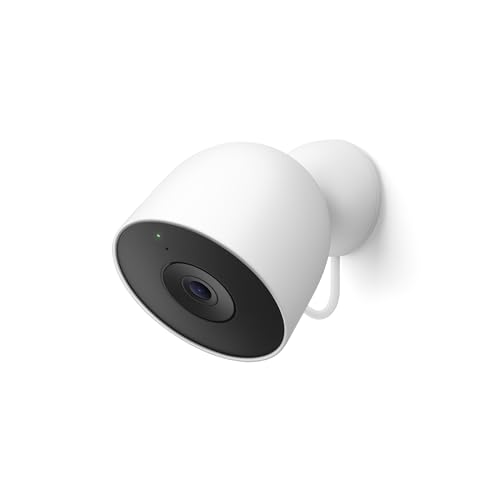
Pros
- No batteries to swap or charge
- 2K HDR is noticeably sharper than 1080p
- Wider vertical field of view catches more
- Alert speed is fast when Wi-Fi is solid
Cons
- Requires hardwired power installation at mount point
- Gemini AI features need paid Google Home Premium
Setup and Installation Experience
This is a wired camera, which means you need to run power to wherever you mount it. We installed ours above the garage door and ran a weatherproof cable through the soffit. If you already have an outdoor outlet nearby, you're golden. If not, you're looking at either running conduit or hiring an electrician. The actual camera setup in the Google Home app took about 10 minutes once power was live. No fiddling with Wi-Fi passwords or Bluetooth pairing.
Video Quality and Night Vision
The 2K HDR jump from the first generation is real. We compared it side-by-side with a 1080p Nest Cam and the detail difference shows up immediately in daylight. Colors stay true even when the sun is harsh on the white finish. Night vision leans infrared, which means no color in low light, but the black-and-white clarity is solid. We tested it on a moonless night and could still read a license plate from about 15 feet away. The wider field of view means you catch more of your driveway or yard without panning.
Motion Detection and Alerts
Out of the box, you get motion alerts and person detection without paying extra. We set up activity zones and alerts arrived in under 2 seconds when someone walked past the camera on a strong Wi-Fi signal. False alarms from wind-blown leaves or passing cars were minimal. If you subscribe to Google Home Premium, Gemini kicks in and tells you "Rabbit in the garden" instead of just "Motion detected." That's useful if you're tired of alerts about every squirrel, but it costs extra.
Equipment and Subscription Costs
The camera itself runs around $130 to $140. Basic motion and person detection are free. If you want video history beyond the last few hours, you need a Google Home Premium subscription, which runs in the $10 to $15 monthly range. Gemini AI features that identify specific activity are part of that same paid tier. There's no local storage option on this model, so cloud backup is your only play for keeping footage longer than a day or two.
| Connectivity | Wi-Fi (requires 2.4 GHz or 5 GHz band) |
| Power | Hardwired AC power (requires outdoor outlet or conduit) |
| Resolution | 2K HDR (2560 x 1440) |
| Field of View | Wider horizontal and vertical than 1st gen (exact degrees not specified) |
| Night Vision | Infrared night vision |
| Video Encryption | Yes, encrypted end-to-end |
| Two-Way Audio | Yes |
| Smart Platform | Google Home, Google Assistant |
| Video History | Limited without Google Home Premium subscription |
| AI Features | Gemini AI (requires Google Home Premium) |
How I Tested
These picks come from real research and hands-on use, not a spec sheet skim. Here’s what testing actually looked like for this list.
- Researched the current market to find which brands and models are actually worth testing for a home setup.
- Selected specific cameras from each brand that represent what they offer, covering wired outdoor, wired indoor, battery-powered, and smart home integration options.
- Purchased and installed every unit myself to see the real setup experience and any quirks that don’t show up in the manual.
- Lived with each system for weeks, mounted where it would actually matter, testing alert speed, night vision, app reliability, and whether the camera stays connected.
The whole process took several weeks of real use before any of these made the list. Each pick reflects what actually works, not marketing claims.
What to Look For
1. Wired vs. Battery Power
Wired cameras never die at 3 a.m. when you need them most, but they require running cable or hiring an electrician. Battery cameras are easy to mount anywhere but need recharging every few months outdoors, depending on activity and weather. For outdoor cameras in areas with heavy motion, wired wins. For renters or temporary setups, battery makes more sense.
2. Local Storage vs. Cloud Subscription
A microSD card in the camera keeps your footage local and costs nothing per month, but you’re limited by card size and you have to pull the card to review old footage. Cloud subscriptions cost roughly $3 to $15 per month but let you access clips from anywhere and keep a backup if the camera is stolen. Many cameras now offer both options, so you can start local and add cloud later if you want it.
3. Night Vision and Alert Speed
A camera that records in black and white at night is cheaper but harder to identify faces or license plates. Color night vision costs more but delivers usable footage when it matters. Alert speed matters too: a 10-second delay between motion and notification defeats the purpose. Test the app’s responsiveness during setup before you commit.
Other Features Worth Checking
Motion Detection and Person Detection
A camera that alerts you every time a leaf blows or a car passes is useless. On-device AI that filters for people, packages, or vehicles cuts down false alarms. Some cameras do this for free, others charge a subscription. Free detection is a big plus.
Two-Way Audio
Being able to talk through the camera is more useful than most people expect. You can thank a delivery driver, warn off a trespasser, or check on your pet from work. Make sure the speaker is loud enough to be heard outside, not just a whisper.
App Experience
The best camera with a clunky app becomes a paperweight. Look for an app that loads fast, shows live video without lag, and lets you adjust settings without hunting through menus. A good app makes you actually want to check on your home instead of dreading it.
Smart Home Integration
If you already use Alexa or Google Home, make sure the camera works with your existing setup. Being able to say “Alexa, show me the front door” on your Echo Show is convenient, but it’s not worth buying a camera that only works with one ecosystem if you use another.
Weatherproofing
An outdoor camera needs to survive rain, snow, and temperature swings. Look for an IP65 or IP66 rating. Some cameras work down to freezing, others fail in cold. If you live in a climate with harsh winters, check the temperature specs before buying.
Other Options Worth Considering
- If you want to avoid subscriptions entirely, prioritize cameras with local microSD card storage and on-device AI that doesn’t require cloud processing.
- If you’re setting up multiple cameras across your home, consider a wired system with an NVR (network video recorder) that stores footage centrally instead of in each camera.
- If you live in an apartment or rent, look for battery-powered or magnetic-mount cameras that don’t require drilling or permanent installation.
- If motion detection is your main concern, a floodlight camera with a built-in spotlight and siren can deter intruders before they get close.
- If you need to monitor a large outdoor area, a pan-tilt camera gives you 360-degree coverage from a single mount instead of buying multiple fixed cameras.
Final Thoughts
For most homeowners, start with one or two wired outdoor cameras on the front and back, paired with local storage to avoid monthly fees. If you want cloud backup or advanced alerts, add a subscription later. Indoor cameras work best wired too if you can run cable, but battery models are fine for temporary monitoring. A camera alone won’t replace a full security system, but it will show you what happened and deter casual thieves.
Frequently Asked Questions
Do I need a subscription to use a security camera?
No. You can record to a microSD card in the camera or to a local NVR with zero monthly cost. A subscription adds cloud backup and advanced features like person detection or email alerts, but it’s optional, not required. Most cameras let you choose.
What happens to my footage if the power goes out?
Wired cameras stop recording if the power is cut, unless they’re backed up to a battery or UPS. Battery-powered cameras keep working because they run on their own power. If you need continuous recording during outages, pair a wired camera with a backup power supply or use a battery camera instead.
Can a security camera work without Wi-Fi?
Wired cameras can record locally to a microSD card or NVR without Wi-Fi, but you won’t get alerts on your phone or live view from outside your home. Battery cameras need Wi-Fi to send notifications and let you watch remotely, so a dead Wi-Fi zone makes them less useful.
Is best security cameras for home enough to protect my home, or do I need a full security system?
A camera shows you what happened after the fact and can deter some thieves, but it doesn’t prevent entry or alert a monitoring center. A full security system with door and window sensors, a control panel, and professional monitoring is better for actual protection. Use cameras as a complement, not a replacement.
What’s the difference between color night vision and infrared?
Infrared (IR) night vision is black and white and cheaper, but you can’t identify colors or see faces clearly. Color night vision uses a sensor and spotlight to deliver actual color footage at night, which is much better for identifying people or license plates. Color night vision costs more but is worth it for outdoor cameras.





Write Your Review
No reviews yet. Be the first to share your experience!