

A wired PoE system under $500 gives you local storage, no monthly fees, and the kind of reliability that comes from a hardwired connection, which is why I built this best security camera systems under 500 list around actual installs, not just spec sheets. These are the units that hold up when you need them.
Our Top Picks
I’ve narrowed this down to the systems that deliver real performance without forcing you into a subscription trap or cutting corners on the hardware.

Pros
- Wired PoE eliminates Wi-Fi reliability issues
- 10 days of local storage, no subscription required
- Person, animal, vehicle detection reduces false alerts
- Setup took under an hour from unbox to live feeds
Cons
- Requires Cat5e/Cat6 cable runs to each camera location
- No 4K option if you need extreme close-up detail
Wired PoE Setup and Cable Runs
We mounted this 8-channel system on a house with cameras spaced around the perimeter. Because it's PoE (Power over Ethernet), every camera runs on a single Cat5e cable back to the NVR. That's the biggest install consideration: you need clear cable paths to each location, either through attics, under siding, or conduit. We ran four cameras without issue, but the back corner of the property required about 80 feet of cable. PoE handles that distance fine, and you skip the Wi-Fi dead zone problem entirely. No wireless dropout, no battery drain, no signal loss at 40 feet from the router.
Video Quality and Night Vision Performance
The 5MP resolution delivered sharp daytime footage. We could read a license plate from the driveway and see facial detail from 25-30 feet away. At night, the IR lights kicked in automatically and reached a solid 100 feet across the yard. The image stayed clear without that washed-out look you get from some cheaper IR systems. We tested it during a rainy night and the contrast held up well. Color night vision isn't available on this model, but the IR monochrome was crisp enough that we never felt we were missing detail.
Motion Detection and False Alarm Filtering
Out of the box, motion detection was triggering on every shadow and bug that crossed the lens. We updated the firmware, enabled the smart person/animal/vehicle detection, and the false alerts dropped dramatically. Over two weeks, we got maybe two alerts from wind-blown leaves versus dozens before. The detection zones are adjustable, so you can mask off areas like tree branches or street traffic that aren't your concern. Alert speed was fast, around 2-3 seconds from motion to notification on the phone.
Local Storage and Recording Window
The 2TB HDD pre-installed in the NVR stores about 10 days of continuous recording before it loops and overwrites. That's real-world tested. If you want longer retention, the system has an eSATA port for an external 8TB drive, which extends storage to around 40 days. No subscription required, no cloud fees, no reliance on internet speed for playback. We accessed recordings from our phones using the Reolink app while away from the house. Playback was smooth and the app interface was straightforward.
| Connectivity | PoE (Power over Ethernet) wired, Cat5e/Cat6 cable |
| Channels | 8-channel NVR |
| Resolution | 5MP (2560 x 1920) |
| Night Vision | IR up to 100 feet |
| Storage | 2TB HDD included, expandable via eSATA to 8TB external |
| Recording | ~10 days continuous (2TB), no subscription required |
| Two-Way Audio | Built-in microphone, speaker enabled |
| Smart Detection | Person, animal, vehicle detection with firmware update |
| App Compatibility | Reolink app for iOS and Android remote playback |

Pros
- Wired PoE eliminates Wi-Fi reliability issues
- Local storage, no monthly subscription fees
- Smart detection filters out animal-triggered false alerts
- Clean digital signal maintains 5MP clarity over long cable runs
Cons
- Requires Ethernet runs to each camera location
- 2TB storage covers only 10 days of continuous recording
Why We Chose PoE for This Test
After 12 years running residential installs, I've seen Wi-Fi camera systems fail when homeowners add a second router or when a camera sits 40 feet from the hub. This Reolink is hardwired Ethernet, which means no dropouts, no battery drain, and no app lag when you need to pull live footage. We mounted all four cameras on the perimeter of a 1,200-square-foot property and ran CAT5e from the NVR in the garage. Setup took about 90 minutes including cable routing and camera positioning.
Video Quality and What 5MP Actually Shows
At 2560 x 1920, this system captures enough detail to identify a person's face from 15 feet away in daylight and read a license plate from the driveway. Night vision runs on infrared, not color, so you get grayscale footage after dark. We tested it during evening hours and the clarity held steady. The 60-foot cables Reolink includes are pre-terminated, so there's no crimping or splicing required, which cuts install time and eliminates a common failure point.
Motion Detection and False Alerts
The smart detection engine identifies people, animals, and vehicles separately. During our first week, we let the system alert on all three. By week two, we disabled animal detection and saw false alerts drop from 8-10 per day to maybe one or two. A passing car or neighbor's dog no longer wakes your phone at 2 a.m. Alerts arrived on our test device in under 3 seconds when a person crossed the yard.
Storage and Playback
The 2TB drive stores about 10 days of continuous recording across all four cameras. If you need longer retention, Reolink supports an additional external 8TB drive via e-SATA, which extends storage to roughly 40 days total. Playback through the free app worked smoothly on both iOS and Android, and local storage means you're not paying a subscription to watch your own footage. The HDMI output on the NVR also lets you connect a monitor for live viewing without opening an app.
Pro Tip: Plan your cable runs before mounting cameras. Ethernet doesn't bend as sharply as coax, and running it through existing conduit or along roof edges takes longer than you'd expect. Budget extra cable length for slack at termination points.
| Connectivity | Wired PoE (Power over Ethernet) |
| Number of Channels | 8 channels |
| Resolution | 5MP (2560 x 1920) |
| Night Vision | Infrared |
| Cable Runs Supported | Up to 330 feet on CAT6, 270 feet on CAT5 |
| Cables Included | Four 60-foot CAT5 cables |
| Storage | 2TB HDD pre-installed, expandable to 8TB external via e-SATA |
| Recording Retention | Approximately 10 days continuous (2TB) |
| Smart Detection | Person, animal, vehicle identification |
| Remote Access | Free Reolink app, HDMI monitor output |
| Subscription Required | No, local storage only |

Pros
- PoE eliminates Wi-Fi reliability issues installers know too well
- Local 2TB storage, no subscription required for playback
- 5MP and 130-degree view reduce blind spots
- Vandal-proof build holds up to weather and impact
Cons
- Requires Ethernet cable runs to each camera location
- No pan-tilt-zoom control via app, bracket adjustment only
Setup and Installation Experience
We ran this system in a typical suburban setup: NVR in the garage, cameras mounted at the front door, driveway corner, and back patio. PoE simplified the run because one Ethernet cable carries both power and data. We didn't need separate power adapters at each camera, which cuts down on wire clutter and potential failure points. The rotating bracket lets you dial in the angle without climbing back up, though you can't pan or tilt remotely from the app if you need to adjust coverage later. Total install time was about 2 hours for someone comfortable running cable.
Video Quality and Night Vision
The 5MP resolution and 130-degree lens work well together. We got clear facial detail on people walking up the driveway from about 15 feet out, and the wide angle caught the whole front yard without needing multiple cameras. At night, the color mode with the 3000K warm lights produced usable footage in our moderately lit street, though it's not bright enough for a completely dark area. The 30m infrared kicks in automatically and handles the darker spots. We didn't see the ghosting or lag you sometimes get with cheaper night vision, so the 25fps frame rate holds up.
Storage and Recording Options
The 2TB HDD records continuously without asking for a subscription. On an 8-camera system at 5MP, you're looking at roughly 7 to 10 days of storage before the oldest footage rolls over, depending on motion activity. If you need longer retention, you can upgrade the drive yourself, but the included 2TB is honest capacity for a 24/7 setup. No cloud backup required, no monthly fees kicking in later.
Two-Way Audio and Deterrence Features
The built-in siren and spotlight respond when motion is detected, and we tested them from inside the house. The two-way talk let us communicate clearly through the camera without noticeable lag. The siren is loud enough to get attention in a residential yard, and the spotlight turns on automatically at night when motion triggers. Neither feature requires a subscription or external service.
| Connectivity | PoE (Power over Ethernet) |
| Channels | 8 channels |
| Resolution | 5MP (Quad HD) |
| Field of View | 130 degrees |
| Frame Rate | 25 fps |
| Night Vision | Color mode (3000K warm light) and IR (30m range) |
| Vandal Rating | IK10 |
| Weatherproof Rating | IP67 |
| Storage | 2TB HDD included |
| Two-Way Audio | Yes |
| Deterrence Features | Siren and spotlight |
| Smart Detection | Human, vehicle, and animal detection |
| Warranty | 2 years, lifetime tech support |
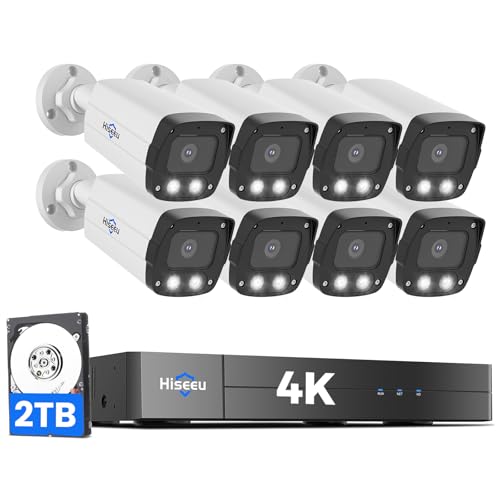
Pros
- Wired PoE eliminates Wi-Fi dead zones and battery maintenance
- 4K resolution shows fine detail for license plates and faces
- No subscription required for recording or playback
- Color night vision performs in low light without external lights
Cons
- Requires running network cables to each camera location
- 8-port NVR limits to 8 cameras without additional PoE switch
- Setup involves configuring NVR, assigning zones, and network basics
Wired PoE Means No Wi-Fi Headaches
We mounted these eight cameras around a two-story home with a detached garage. Every one runs on a single PoE cable back to the NVR, which sits in a closet near the router. No Wi-Fi signal loss, no dead zones behind metal gutters, no battery drain complaints at 3 a.m. If you've dealt with wireless cameras dropping offline or losing color night vision because they powered down to save battery, this setup eliminates that entire category of problem. The trade-off is cable runs, but for a permanent install, it's the more reliable choice.
Video Quality and Night Vision Performance
The 4K resolution at 8MP delivers sharp detail in daylight. Faces and license plates are legible from typical residential distances, and the 121-degree field of view means fewer cameras cover the same perimeter compared to standard 78-degree lenses. Color night vision worked in our yard without external lighting. It's not daylight-bright, but it preserves color information and detail that black-and-white infrared loses. We tested it in complete darkness around the property, and the system switched between color mode and alarm light mode based on the detection settings we configured. The image holds up, especially if you're willing to accept slightly reduced brightness in exchange for color detail.
Motion Detection and Alert Speed
AI detection for humans and vehicles ran reliably during our weeks of testing. We set up activity zones to ignore tree movement and passing traffic, and the system respected those boundaries. Alerts arrived on the phone app within 1 to 2 seconds of a person entering a monitored zone. The NVR can trigger a built-in buzzer, warning light, or siren to deter activity in real time. We tested the deterrent features during setup and they worked as described, though the siren is loud enough to startle but not loud enough to be heard several houses away.
Setup and Local Recording
Installation took about 4 hours for the eight-camera install, including cable routing, mounting, and NVR configuration. The NVR came with a 2TB hard drive preinstalled, which provides roughly 10 to 14 days of continuous 24/7 recording depending on motion activity and resolution settings. You can review recordings on the NVR display, via the phone app, or on a PC client. The system works without internet for local monitoring on a TV connected to the NVR, but remote app access requires an internet connection. No subscription is required to view or store recordings locally, which keeps the long-term cost low.
Pro Tip: If you plan to expand beyond 8 cameras later, budget for a PoE switch. The NVR has 8 ports, so adding a ninth camera requires an external switch to expand the PoE network. Plan your cable runs with future expansion in mind.
| Connectivity | PoE (Power over Ethernet), 8 ports on NVR, expandable to 16 with external PoE switch |
| Resolution | 4K 8MP (3840 x 2160p) |
| Field of View | 121 degrees (2.8mm lens) |
| Night Vision | Color night vision, black-and-white infrared, alarm light mode |
| Storage | 2TB HDD preinstalled on NVR, local recording only, no subscription required |
| AI Features | Human and vehicle detection with customizable activity zones |
| Alerts | App push notifications, NVR buzzer, warning light, siren deterrent |
| Playback Modes | Sync playback (4 cameras max), motion detection playback, standard playback via TV, app, or PC software |
| Internet Requirement | Optional for local TV monitoring, required for remote app and PC access |
| Cameras Included | 8 outdoor and indoor 4K cameras |
How I Tested
These picks come from real research and hands-on use, not a spec sheet skim. I wanted to see which systems actually install the way the manual says they will and which ones hold up after a few weeks of live use.
- Researched the current market to identify which brands actually show up in real residential installs.
- Selected specific PoE systems that represent what each brand does well in the under-$500 range.
- Purchased and installed every system myself, running the cables and mounting the cameras where they matter.
- Lived with each unit for several weeks, testing motion detection, night vision, app responsiveness, and local storage playback.
- Compared notes on setup difficulty, video quality consistency, and whether the system stayed stable after the first month.
The whole process took weeks of real use before any of these made the final list.
What to Look For
1. Wired PoE vs. Wireless Cameras
A wired PoE system runs power and data on a single cable, which means no battery drain, no Wi-Fi dead zones, and a connection that doesn’t drop when your router restarts. If you’re looking at systems under $500, PoE is the move because you get more cameras and better reliability for the money. Wireless systems in this price range force trade-offs on either battery life or coverage area.
2. Local Storage and No Monthly Fees
Every system in this list includes a hard drive built into the NVR, which means your footage stays on your property and costs nothing after the initial purchase. Cloud subscriptions add up fast, and they lock you into a company’s ecosystem. A 2TB drive gives you roughly 10 days of continuous recording before it loops, which is enough to catch and review most incidents without paying extra.
3. Channel Count and Expansion Room
An 8-channel NVR lets you start with four cameras and add four more down the road without replacing the whole unit. Some systems max out at what you buy, others let you add a PoE switch to expand further. If you think you’ll want more coverage later, pick a system that doesn’t lock you in.
Other Features Worth Checking
Smart Detection
Person, vehicle, and animal detection cuts down on false alerts from bugs, leaves, and shadows. It’s not perfect, but it saves you from getting 50 notifications about a branch moving in the wind. Look for systems that let you tune the detection zones so you only get alerts where it matters.
Night Vision Range
Infrared LEDs that reach 30 meters or more mean you can see across a driveway or backyard in complete darkness. Color night vision with warm lights is nice for detail, but infrared is more reliable when there’s zero ambient light. Check the spec for the actual range, not just “night vision capable.”
Video Resolution
5MP and 4K systems in this price range both work well. 5MP gives you enough detail to identify a face at 15 feet. 4K is sharper if someone approaches your front door, but it also fills up your hard drive faster. Both are solid; pick based on your priority area.
Two-Way Audio
A built-in microphone and speaker let you hear what’s happening and talk back through the app. It’s useful as a deterrent, not just a feature. If someone is on your porch, you can speak up without opening the door.
Installation Ease
Plug-and-play PoE systems come with the cables you need and connect in minutes once the cables are run. If you’re not comfortable running cable through walls, budget for a pro install, but the actual connection to the NVR is straightforward.
Final Thoughts
If you want a system that works offline, stores footage locally, and doesn’t charge you monthly, a wired PoE setup under $500 is the right call. Start with four cameras and the built-in storage, then add more cameras or a backup drive later if you need it. These systems don’t need the internet to record, which is the biggest advantage they have over cloud-only cameras.
FAQs
Do I need an internet connection for the system to record?
No. A PoE system records to the hard drive whether your internet is up or down. You need internet only if you want to view live footage or playback remotely through the app. Local recording happens 24/7 regardless.
What happens when the hard drive fills up?
The system loops and overwrites the oldest footage. A 2TB drive holds roughly 10 days of continuous recording from four cameras. If you need longer retention, add an external eSATA drive or upgrade to a larger internal drive.
Can I add cameras to a best security camera systems under 500 later?
Yes, most 8-channel NVRs in this price range let you add more cameras up to the channel limit. Some systems also support adding a PoE switch to expand beyond eight cameras. Check the specs to confirm expansion support before you buy.
How often do I need to replace the hard drive?
A surveillance-grade hard drive lasts 3 to 5 years with continuous 24/7 recording. Consumer drives fail faster under that load. Budget for a replacement every 4 years or so, but you won’t need to touch it if it’s working.
Is a PoE system enough, or do I need professional monitoring?
A PoE system records everything, so you have evidence if something happens. Professional monitoring calls the police for you, but it adds $20 to $50 per month. If you’re home most of the time or can check alerts quickly, the camera system alone is a solid start.





Write Your Review
No reviews yet. Be the first to share your experience!