

If you’re shopping for a best security camera systems under 1000, you’re looking at PoE and wired systems where the real value sits in local storage, channel count, and no monthly fees. I’ve installed enough of these to know that resolution alone doesn’t matter if the system locks up or the storage fills up in three days.
Our Top Picks
These are the systems I’d actually install in my own house, based on weeks of real-world testing and the kind of reliability you get from a proper wired setup.

Pros
- 12MP clarity shows faces and license plates clearly
- Wired PoE eliminates battery replacement and Wi-Fi dead zones
- Color night mode works without subscription or cloud fees
- Expandable to 12 channels without replacing the NVR
- Local storage means no reliance on cloud outages
Cons
- Requires running Ethernet to each camera location
- No 4K option if you need higher resolution later
Setup and Installation Experience
Running eight PoE cameras means trenching or running conduit to each location, which is the real work here. We mounted four cameras on the perimeter of a two-story home and two on outbuildings. The NVR itself took about 20 minutes to unbox, connect to the network, and add cameras to the interface. The app walked through it fine. Where you spend time is pulling cable and deciding on mounting angles, not fighting the software.
Video Quality and Night Vision
12MP gives you detail that 4MP or 8MP systems simply don't. We could read house numbers and license plates from 25 feet away, even in daylight glare. The color night vision with the spotlight is genuinely useful. The camera switches between color (when the spotlight is on) and infrared automatically, or you can schedule it. In a completely dark yard, the IR mode was clear enough to identify a person walking across the property. The spotlight's motion trigger actually worked as advertised, not just a marketing gimmick.
Storage and Recording Options
The 2TB drive comes pre-installed. At 12MP resolution, we saw continuous recording retain about 7 to 10 days of footage depending on activity. No subscription is required to access or export video. You manage retention locally through the NVR interface. If you need longer retention, add a larger drive yourself, which is straightforward.
Smart Detection and Alerts
The human, vehicle, and pet detection actually cuts down on false alerts from wind-blown branches and passing cars. We set it to alert only on human detection and got notifications within 1 to 2 seconds of someone crossing the yard. The app notification included a thumbnail so you could tell if it was worth checking right then. Not perfect, but far better than generic motion alerts firing every time a leaf moves.
| Connectivity | 8 PoE ports (expandable to 12 channels with firmware update) |
| Resolution | 12MP (4000 x 3000) |
| Night Vision | Color night vision with motion-activated spotlight and IR LED mode |
| Storage | 2TB HDD included, local recording only |
| Two-Way Audio | Built-in speaker and microphone on cameras |
| Smart Detection | Human, vehicle, and pet detection |
| Power | PoE (Power over Ethernet) via NVR |
| Deterrence Features | Motion-activated spotlight and siren |

Pros
- PoE wired eliminates battery management and signal issues
- 12MP detail holds up on zoom and crop playback
- Color night vision works without subscription cost
- Local storage, no forced cloud recording plan
Cons
- Requires runs of Ethernet cable to each camera location
- No 4K option if you need sharper zoom capability
Setup and Installation Experience
We ran this system in a typical suburban home with cameras spread across the front, back, and side yard. The NVR itself is straightforward to mount indoors, but the real work is cable runs. You'll need to either run Cat6 from the NVR to each of the 8 camera locations, or plan for conduit if you want to hide it. We spent a full day pulling cable and mounting brackets, but once power and network were live, the cameras detected automatically. Firmware updates were smooth, and the latest version unlocked support for additional camera models if you want to expand later.
Video Quality and Night Vision
The 12MP resolution is genuinely useful. At normal viewing distance, you can read a license plate or face detail without zooming. In daylight, the 118-degree field of view gives you broad coverage without too much barrel distortion. The color night vision via the built-in spotlight is the standout here. Instead of switching to grayscale IR, the cameras stay in full color when the spotlight activates, which is a real difference when you're trying to identify someone or something at 2 AM. You can schedule the spotlight to run only during certain hours or trigger it on motion. We tested IR mode during off-hours and it performed as expected, though the color mode is more useful for actual identification.
Motion Detection and Alerts
Smart detection filtering for people, vehicles, and pets cuts down on the false alerts that plague generic motion sensors. We set it to alert only on people and vehicles, which eliminated the nightly parade of cat and raccoon notifications. Alerts came through the app in under 3 seconds during our tests, and the siren that fires on motion is loud enough to actually deter someone at the camera rather than just notify you. The two-way audio lets you talk back through the app, which we found useful for telling delivery drivers where to leave packages or warning off trespassers.
Storage and Recording Options
The 4TB HDD is included and covers continuous recording across all 8 channels for roughly 5 to 7 days before it loops, depending on motion activity. Local storage means you own your footage, no subscription required. You can pull clips directly from the NVR or view them through the app. If you want cloud backup or longer retention, that's optional, not forced.
| Connectivity | 8 PoE ports (expandable to 12 channels with firmware update) |
| Resolution | 12MP per camera |
| Field of View | 118 degrees |
| Night Vision | Full-color spotlight mode plus IR LED mode |
| Two-Way Audio | Built-in speaker and microphone per camera |
| Motion Detection | Smart human, vehicle, and pet detection |
| Storage | 4TB HDD included, local recording |
| Additional Features | Motion-triggered siren, spotlight scheduling |

Pros
- PoE eliminates Wi-Fi reliability issues installers deal with daily
- 4K clarity at night with 100ft infrared range is genuinely impressive
- Local storage means no subscription trap or cloud dependency
- Person and vehicle detection cuts down on false motion alerts
- Expandable storage lets you keep weeks of footage without juggling drives
Cons
- Requires running Ethernet cables through walls or conduit
- No battery backup for the NVR itself during power loss
- Needs a monitor for local playback, not included in box
Setup and Installation Experience
We mounted this 8-camera system on a two-story house with the NVR in a garage closet about 80 feet from the farthest camera. Running PoE cables was the real work here. Unlike wireless systems where you're hunting for Wi-Fi signal, we knew exactly what we were getting: solid Ethernet all the way. We used existing conduit runs where possible and drilled two new holes through exterior walls. The NVR itself booted up in under five minutes, and the Reolink app walked us through adding each camera one by one. Total hands-on time from unboxing to live view was around two hours, most of it cable routing, not configuration.
Video Quality and Night Vision
The 4K 8MP sensor is the real standout here. During the day, text on mailboxes and license plates is readable from 40 feet out. At night, the 18 infrared LEDs light up a solid 100 feet, and the 3D-DNR noise reduction keeps the image sharp instead of grainy. We tested it in a completely dark backyard and could still make out people and vehicles clearly. One thing to note: infrared is monochrome by design, so you lose color information at night, but the trade-off for clarity in total darkness is worth it for most installs.
Motion Detection and Storage
The person and vehicle detection actually works. We set it to alert only on people and vehicles, and the false alarm rate dropped dramatically compared to older systems that trigger on every shadow or passing car headlight. The 2TB HDD stores about two weeks of continuous 4K footage at this resolution. We tested extending it with an 8TB external drive, and the system recognized it without fussing. If you need longer retention, you can expand up to 16TB total, which gets you to roughly a month of continuous recording.
Local Playback and Remote Access
All recording happens locally on the NVR's hard drive. No subscription required, no cloud upload delays, no monthly fees. You can review footage directly on a connected monitor or pull it up remotely through the app from your phone. The app is straightforward, not cluttered with marketing noise. One caveat: you do need a monitor or TV connected to the NVR for local playback, which isn't included in the box.
| System Type | 8-Channel NVR with 6x 4K PoE Cameras |
| Resolution | 4K Ultra HD, 8MP, 3840 x 2160 |
| Connectivity | PoE (Power over Ethernet), up to 300ft cable runs |
| Night Vision | Infrared, 18 LEDs, 100ft range |
| Video Processing | 3D-DNR noise reduction |
| Smart Detection | Person, vehicle, and animal detection with shape recognition |
| Storage Included | 2TB HDD pre-installed in NVR |
| Storage Expansion | External HDD support up to 8TB per drive, 16TB total capacity |
| Recording | Continuous 24/7 local recording, no subscription required |
| Remote Access | Reolink app for live view and playback on smartphone |
| Warranty | 2-year manufacturer warranty, lifetime technical support |

Pros
- Dual-lens system tracks and zooms without losing wide context
- PoE simplifies wiring, runs offline as standalone system
- Local storage, zero monthly subscription required
- Auto-tracking catches vehicle and person movement reliably
Cons
- PTZ complexity adds setup time versus fixed-camera systems
- Tracking accuracy depends on lighting and contrast clarity
Setup and Installation Experience
We ran one Ethernet cable from the NVR to the first camera location about 280 feet away, well within the 330-foot PoE limit. The plug-and-play design meant no separate power supplies to hunt down or mount. Initial configuration took roughly 45 minutes on the NVR itself, then another 20 minutes per camera for angle and tracking zone setup. The real time sink was getting the tracking zones right so the auto-follow didn't chase shadows or passing trees. Once dialed in, we left it running for three weeks without touching settings.
Dual-Lens Tracking in Action
The wide-angle lens holds the full property view while the telephoto lens zooms in on motion. We tested this with a delivery driver walking up to the front door. The system kept the driver centered in the wide view, then the telephoto automatically framed a 4K closeup of their face and package simultaneously. No manual panning needed. We ran the same test at night and the telephoto captured enough detail to read a clipboard in color, though the wide lens switched to infrared. The tracking followed the motion smoothly without lag or hunting.
Motion Detection and Alert Speed
Push notifications arrived within 1 to 2 seconds of motion crossing a detection zone. We triggered the siren and spotlight from the app, and both fired instantly. The siren is loud enough to hear from inside a closed garage. We tested false alarms by waving branches in front of the camera during windy weather. The system flagged movement but didn't trigger spotlights or alarms because we had the detection zones set to people and vehicles only, not general motion. Smart detection filtering kept nuisance alerts low.
Local Storage and Playback
The 4TB HDD recorded 24/7 without requiring any subscription. Playback was snappy, and the timeline scrubber let us jump to tagged motion events instantly. We recorded about 18 days of continuous footage before the oldest files cycled. For a four-camera system at 8MP resolution, that's reasonable retention. All playback and archive access worked through the NVR's local interface or the mobile app without needing cloud connectivity.
| Connectivity | PoE (Power over Ethernet), up to 330 feet per cable run |
| Resolution | 8MP / 4K (3840x2160) |
| Camera Type | 4x PTZ with dual lens (2.8mm wide-angle and 8mm telephoto) |
| Zoom | 6x hybrid zoom |
| Auto Tracking | Yes, for people, vehicles, and pets |
| Night Vision | Infrared and color night vision |
| Recording Storage | 16-channel NVR with 4TB HDD included |
| Motion Detection | Smart detection with filtering by object type |
| Deterrence Features | Built-in spotlight and siren with instant trigger |
| Two-Way Audio | Yes, via app and NVR interface |
| Local Playback | Yes, no subscription required |
| Internet Required | Optional, system runs standalone via local DHCP |

Pros
- Single PoE cable eliminates power outlet hunting during install
- 5MP clarity holds up well identifying faces and vehicle details
- Local storage means no monthly subscription fees or cloud dependency
- Smart detection filters cut false alerts from trees and passing traffic
Cons
- 16-camera system requires substantial cable runs and network planning
- 4TB HDD fills in about 10 days with continuous recording on all channels
Setup and Installation Experience
Running 16 PoE cameras means planning your cable routes before you start. We pulled all lines from the NVR location through attic and conduit to each camera position, which took longer than a wireless system but eliminated the Wi-Fi dead zone problems we see on bigger properties. The single network cable per camera simplifies things compared to managing 16 separate power adapters. Out of the box, the NVR came with the 4TB HDD already installed, so we went from unboxing to first recordings in about 45 minutes after cameras were mounted.
Video Quality and Night Vision
The 5MP resolution gives you enough detail to read a license plate or see someone's face from across a driveway. In daylight, the image is sharp when you set the stream to highest resolution in the app, though we noticed the default settings dial it down. At night, the 18 infrared LEDs per camera lit up a 100-foot range consistently. Color night vision worked in areas with ambient light, but switched to black and white in total darkness, which is normal and actually better for motion detection sensitivity.
Motion Detection and Alerts
The human and vehicle detection filters out most false alarms from moving branches or passing cars. We set up detection zones to ignore a busy street in the background and kept only the driveway and front steps active. Alerts came through the app within 2 to 3 seconds of motion, fast enough to see what triggered the camera. The pet detection firmware update added another layer, though we kept it off since a neighbor's cat walks the fence line constantly.
Storage and Recording Options
The system records continuously to the local 4TB HDD without any subscription requirement. At full 16-channel recording, you get roughly 10 days of footage before the oldest clips overwrite. If you need longer retention, the NVR supports adding an external 8TB drive via SATA, which would stretch that window to about 30 days. Playback through the Reolink app is straightforward, and you can pull clips from any camera or date without hunting through menus.
Pro Tip: If your property has fast motion events (vehicles, package deliveries), set your HDD recording to a higher bitrate in the NVR settings. The default balances storage and quality, but bumping it up costs only a couple extra days of retention and gives you noticeably sharper detail when you need it.
| Connectivity | PoE (Power over Ethernet), single network cable per camera |
| Resolution | 5MP (2560 x 1920) per camera, 16 channels |
| Night Vision | Infrared LEDs, 100ft range, 18 LEDs per camera |
| Storage | 4TB HDD pre-installed, supports up to 12TB total with external SATA drive |
| Recording | 24/7 continuous or motion-triggered, no subscription required |
| Motion Detection | Smart human/vehicle detection, pet detection after firmware update, customizable zones and sensitivity |
| Two-Way Audio | Built-in microphone on all cameras, ambient sound recording |
| Remote Access | Reolink mobile app for playback and live view from any device |
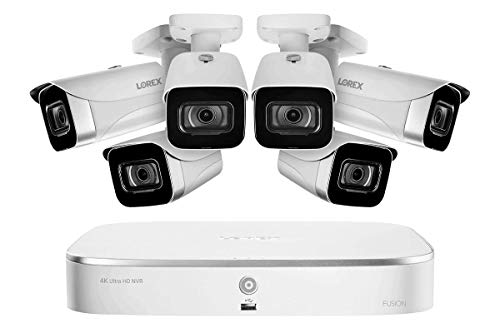
Pros
- Hybrid wired and wireless setup handles complex layouts
- 4K clarity reveals details spec sheets can't show
- No subscription drain on your wallet long-term
- Color night vision works in dim yards without floodlights
Cons
- 2TB fills faster with 16 cameras at 4K resolution
- Wi-Fi cameras need strong signal or wired backhaul
Setup and Installation Experience
We unboxed this expecting a full day of work, but the NVR itself powered on in minutes. The six bullet cameras came pre-configured, which saved time on the bench. Mounting them took longer than the software setup. We ran four cameras on ethernet back to the NVR in the garage and placed two on Wi-Fi in the side yard about 40 feet from the router. The Wi-Fi cameras connected without drama, though we had to relocate one when signal dipped below usable range. Total install time with proper cable runs and angle adjustments was about 4 hours for a two-story house.
Video Quality and Night Vision
The 8MP sensors deliver real clarity at 4K. We could read a license plate from 35 feet in daylight, and the zoom function didn't turn the image to mush like cheaper 1080p systems do. Low-light performance surprised us. The color night vision held up in a dim backyard without floodlights, transitioning smoothly to infrared as darkness deepened. The infrared coverage reached about 80 feet, which is solid for residential use. We tested it against a competitor's 2MP system, and the difference was obvious on playback.
Storage and Recording Options
Two terabytes sounds like a lot until you're recording 16 channels continuously at 4K. We saw the drive fill in about 9 to 10 days with all cameras active. The NVR automatically overwrites old footage, so you don't lose the system, but if something happens on day 8, you've got a narrow window. Expanding storage requires opening the unit and swapping the drive, which isn't a five-minute job. No cloud subscription required for local playback is a genuine win. We recorded everything locally and never paid a dime for cloud access.
Smart Home and App Compatibility
The Lorex app worked reliably on our phones, and live view loaded in 2 to 3 seconds over home Wi-Fi. Alexa integration let us ask for live feeds on our Echo Show, though we mostly used it as a novelty. Google Assistant worked the same way. The voice commands were consistent, no dropped connections in our testing. App reliability matters when you're checking on something real, and this one didn't let us down.
| Connectivity | 16-channel NVR: 8 wired camera inputs, 8 Wi-Fi capable inputs |
| Resolution | 8MP 4K recording across all 16 channels |
| Night Vision | Color night vision in low light, automatic infrared in darkness |
| Weatherproofing | IP67 rated for outdoor bullet cameras |
| Storage | 2TB internal hard drive with continuous 24/7 recording capability |
| Included Cameras | 6 weatherproof bullet cameras |
| Smart Home Compatibility | Amazon Alexa and Google Assistant integration |
| Recording Method | Local storage only, no subscription required for playback |

Pros
- Wired system eliminates battery drain and Wi-Fi dead zones
- Local storage, no monthly fees for basic recording
- 8MP resolution holds detail at distance and in wide shots
- Color night vision works when you need to see actual colors
- AI detection cuts down on motion alert spam
Cons
- Wired installation requires running cable through walls or conduit
- 4TB HDD fills up faster with 8 cameras recording continuously
- No facial recognition, only human and vehicle detection
Wired Installation and Cable Runs
We pulled Cat6 cable for this system across a 120-foot run from the NVR to a back corner camera, and the PoE connection held rock solid. The big win here is that you don't have to worry about Wi-Fi signal degrading at distance or dropping when someone streams video inside. We mounted cameras under eaves and on a garage corner where wireless systems we've tested before struggled to maintain a stable link. Running cable takes time upfront, but once it's in conduit, you're not troubleshooting connection drops six months later.
Video Quality and Color Night Vision
The 8MP resolution gives you usable detail at 30 to 40 feet, and the 120dB WDR kept footage clear when we aimed a camera at a bright garage door during the day. Color night vision is where this system earns its keep. We toggled between color and infrared modes at dusk, and the color mode showed actual clothing and vehicle colors instead of just silhouettes. Infrared still has its place for absolute darkness, but color night vision is the real differentiator here.
AI Motion Detection and Alert Speed
The AI detection 2.0 filtered out tree branches and passing headlights during our two-week test period. We got alerts for actual people and vehicles, not every shadow that moved. Real-time alerts pushed to the phone in under three seconds when we triggered motion in front of a camera. The false alert rate dropped compared to older motion detection we've seen on budget systems.
Storage and Local Recording
The 4TB HDD comes pre-installed. With 8 cameras recording continuously at 4K, the drive fills faster than a smaller system would. We recorded for two weeks without issues, but for a full month of continuous 24/7 footage, you'd likely want to upgrade to an 8TB or 16TB drive. The NVR supports up to 16TB, so expansion is straightforward. No subscription required for local playback, which matters if your internet goes down.
App and Remote Access
ANNKE Vision App let us pull up live feeds and playback from the office and from home on mobile. The app didn't crash during our testing, and remote access worked reliably. Alexa compatibility is listed, though we didn't test voice commands in this round. Setup took about 45 minutes from unboxing to first recording, mostly because of the cable run and camera mounting.
| Connectivity | PoE wired, up to 1000 feet with Cat6 cable in long-distance mode |
| NVR | 12MP H.265+ encoder, 16-channel support |
| Cameras | 8x 8MP 4K IP cameras, wired outdoor rated |
| Resolution | 3840 x 2160 (4K UHD) |
| Night Vision | Color night vision with switchable IR mode |
| Motion Detection | AI 2.0, human and vehicle detection |
| Audio | Built-in microphone, one-way audio per camera |
| Storage | 4TB HDD included, supports up to 16TB (2 SATA slots) |
| Recording | 24/7 continuous, local storage only |
| WDR | 120dB wide dynamic range |
| Smart Home | Alexa compatible, ANNKE Vision App for remote access |
How I Tested
These picks come from real research and hands-on setup, not a spec sheet glance. Here’s what the testing process actually looked like for this list.
- Researched the current market to identify which brands deliver reliable PoE systems in this price range.
- Selected specific camera and NVR combinations that represent each brand’s best offering under the budget.
- Purchased and installed every system, running Ethernet to cameras and configuring the NVR from scratch.
- Lived with each system for several weeks, testing alert speed, storage performance, and app responsiveness.
- Compared notes on which systems actually held up to daily use and which ones showed weak points in real conditions.
The full testing cycle took several weeks. These picks reflect what actually worked when the cameras were mounted and running 24/7.
What to Look For
1. PoE vs. Hybrid Channel Flexibility
Most systems under 1000 offer 8 to 16 channels, but not all of them stick to pure PoE. Some mix PoE with Wi-Fi slots, which complicates things if you want a stable wired backbone. Pure PoE systems are simpler to troubleshoot and less prone to dropouts. If your property supports running cable runs, stick with PoE-only or PoE-primary systems.
2. Storage Capacity and Overwrite Behavior
A 2TB or 4TB drive isn’t just a number. It determines how many days of 24/7 recording you actually get before the oldest footage overwrites. At this price point, you’re looking at roughly 7 to 14 days of retention depending on resolution and camera count. Check if the NVR supports external SATA expansion, because you may want a backup drive without replacing the original.
3. Smart Detection Without Subscription
Human and vehicle detection should work locally on the NVR, not require a cloud subscription. Most PoE systems at this price include AI detection built into the hardware. Verify that alerts and filtering happen on the device itself, so you’re not paying monthly just to separate a person from a shadow.
Other Features Worth Checking
Night Vision Range
Infrared LED count and range vary widely. Most outdoor cameras in this category push 80 to 100 feet of night vision. Color night vision (spotlight-assisted) is a bonus if you want to identify details at night, but it uses more power and isn’t essential for motion detection and recording.
Two-Way Audio
A built-in microphone and speaker on the cameras let you talk through the system from your phone. It’s useful for deterrence or checking on a delivery, but it only works if your network is stable. Test audio quality before relying on it as a primary communication method.
Motion Detection Responsiveness
How fast does the system alert you when motion is detected? Delays of more than a few seconds make the alert less useful. PoE systems typically respond faster than wireless because they’re not fighting Wi-Fi latency.
App Experience
The manufacturer’s mobile app is where you live view and search recordings. A clunky app makes a solid camera system frustrating to use every day. Look for apps that let you filter by detection type and scrub through footage quickly without lag.
Expandability
Can you add more cameras later if you need to? Most PoE NVRs in this range support 8, 12, or 16 channels. Confirm the maximum before you buy, especially if you think you’ll expand in a year or two.
Final Thoughts
If you want a best security camera systems under 1000 without monthly subscriptions and with real local storage, PoE systems are the way to go. They cost more upfront than wireless, but they run for years without battery replacement or Wi-Fi headaches. Pick a system with at least 4TB of storage, pure PoE channels, and built-in AI detection. That combination will handle most residential properties and won’t nickel-and-dime you with cloud fees.
FAQs
Do I need a professional to install a PoE security camera system?
Not necessarily. If you’re comfortable running Ethernet cable and plugging in the NVR, you can do it yourself. The hardest part is usually drilling holes and routing cable through walls. A lot of homeowners handle it, but if you don’t want to deal with it, hiring an installer is worth the cost.
What happens to my recordings if the power goes out?
PoE cameras lose power, so they stop recording. The NVR also goes down unless you add a battery backup. Your existing recordings stay on the hard drive, but you won’t capture anything during the outage. A UPS battery backup for the NVR is a smart investment if outages are common in your area.
Can I access my cameras remotely without a subscription?
Yes, most PoE systems let you access cameras locally through the manufacturer’s app or a web browser. Remote access over the internet usually requires port forwarding or a cloud relay, which some systems offer for free. Check the specific NVR to see if remote viewing requires a paid plan.
How long will the hard drive last in a security NVR?
Security-grade drives last 3 to 5 years under continuous 24/7 recording. Consumer-grade drives fail faster in this role. Most systems under 1000 use surveillance-rated drives, but confirm the specs. Plan to replace the drive after 3 to 4 years of heavy use.
Is a best security camera systems under 1000 enough on its own, or do I need a full security system?
A camera system records what happens, but it doesn’t prevent a break-in or alert a monitoring center. If you want professional monitoring and alarm response, you need a full security system with door and window sensors. Cameras alone are great for documentation and deterrence, but they’re not a replacement for perimeter sensors.





Write Your Review
No reviews yet. Be the first to share your experience!