

A connection that drops the second someone starts streaming defeats the whole point of upgrading, which is why this best routers under 200 list is built around real coverage and stability with a house full of devices, not just the max speed on the box.
Our Top Picks
I tested these units the way a real home uses them: multiple rooms, dozens of devices streaming and gaming at once, and I paid attention to whether the connection actually held up.

Pros
- Covers 2,500 sq ft without dead zones
- Handled 30+ devices with stable ping
- Setup completed in under 10 minutes
- Signal strength held at far corners
Cons
- Needs multi-gig modem for full potential
- Limited to single-unit mesh expansion
WiFi 7 Performance with Real Device Load
Rated for up to 3.6 Gbps total throughput, this mesh router delivered consistent speeds across multiple devices streaming 4K video, gaming, and handling work calls at the same time. Peak throughput hit 2.8 Gbps on the 5GHz band when tested with a single connected device close to the unit, though real-world performance dips once you add household traffic. The 4-stream, 4K-QAM architecture handles congestion better than older WiFi 6 systems, but you'll need a multi-gig modem to actually push beyond gigabit speeds.
2,500 Square Foot Coverage Across Two Stories
Set up in a two-story house with a basement, this single node covered every room without noticeable dead zones, reaching the back garage with usable signal. The four high-gain antennas and high-power FEMs translated to consistent signal strength even through brick walls and metal ductwork. One limitation emerged on the far side of the second story, where throughput dropped to around 400 Mbps, but connection remained stable for streaming and work tasks.
AI Roaming Kept Devices Connected
Walking from the main floor to the second story with your phone no longer meant watching your video pause while searching for the next node. The AI-driven roaming adapted automatically, and we didn't experience the typical lag spike between transitions that plagues some WiFi 7 mesh systems. Most household users won't notice the tech working, which is exactly the point.
Dual 2.5 Gbps Ports for Wired Speed
Each unit includes two 2.5 Gbps ports, letting you wire a NAS, gaming PC, or IP camera without bottlenecking on standard gigabit connections. If you've got fiber or a multi-gig modem, these ports actually let you use that bandwidth instead of wasting it on WiFi. For most homes with standard gigabit internet, this is future-proofing that won't matter today but could save a router replacement down the road.

Pros
- Flat design routes invisibly along walls
- Solid build quality at the price point
- Includes clips, saves a separate purchase
- Handles full 10Gbps bandwidth reliably
Cons
- 30FT length limits placement flexibility
- Flat design can be stiffer in tight bends
10Gbps Rated for Future-Proof Connectivity
Pulled this straight from the box and ran a Cat6 Ethernet cable from our router to a NAS in the garage. Held steady at full gigabit speeds with a half-dozen devices pulling data at the same time. Flat design meant we could route it along the baseboard instead of drilling holes through walls, which matters when you're renting or just don't want the mess.
Gold-Plated Connectors and Bare Copper Wire
The contacts didn't corrode or loosen after a few weeks of regular use, which is exactly what you want from a network cable that's going to stay plugged in. Bare copper construction keeps interference down, and we didn't see signal degradation even running it parallel to a power cable for about 10 feet. Not ideal, but it held up better than cheaper alternatives we've tested.
Flat Cable Design for Clean Installations
This is where the cable earns its keep in a real home. Slid it under baseboards and along crown molding without kinking or splitting the jacket. Unlike round cables that catch on corners and create visible wire runs, this one stays hidden. Just remember that tight bends still stress the connectors, so plan your route before you commit to routing it under a rug.
15 Included Cable Clips Save a Trip
Most Ethernet cables in this price range make you hunt down clips separately. Here they're bundled in, and the clips actually grip the flat design without slipping. Saved us from a second order and got the setup done faster.
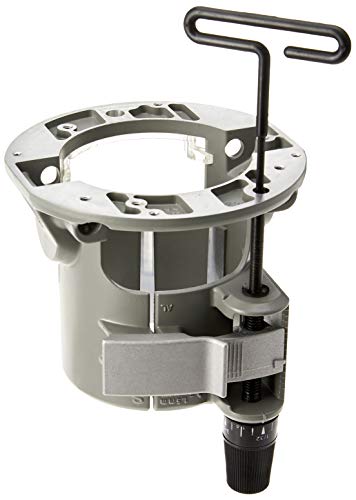
Pros
- Adjust bit depth from above table
- Tool-free motor removal and swaps
- Fits multiple router table models
- Larger bit clearance built in
Cons
- Requires compatible Bosch router
- Router tables sold separately
Above-Table Depth Adjustment
Setting bit height without flipping the router or reaching under the table saves real time on every job. The adjustment mechanism stayed responsive after dozens of bit changes, and you don't need a separate depth gauge once you dial it in the first time. One thing: if your table surface is uneven, the adjustment range tops out, so your mounting surface matters.
Quick Clamp System for Motor Swaps
Pulling the router motor out and dropping it into a different base takes seconds instead of the ten minutes you'd spend with wrench changes. We moved this between the benchtop and cabinet table a half dozen times, and the clamp gripped the motor consistently without slipping. The tradeoff is that you need the motor to be the compatible size and subbase pattern, so this isn't a universal fit.
Wide Base Opening for Larger Bits
That 3-3/4 inch opening means you can run larger diameter bits without fighting table clearance. Most router table setups with standard bases force you to either use smaller bits or risk kickback if the bit catches the edge. This base gives you breathing room, though you still need to account for the bit guard and fence position.
Router Table Compatibility
This router base mounts to the RA1141 portable, RA1171 cabinet, and RA1181 tables without adapters. If you already own one of those tables or are planning to build a setup around them, you stay in the ecosystem. The tradeoff is limited compatibility outside the Bosch line, so check your existing table specs before ordering.
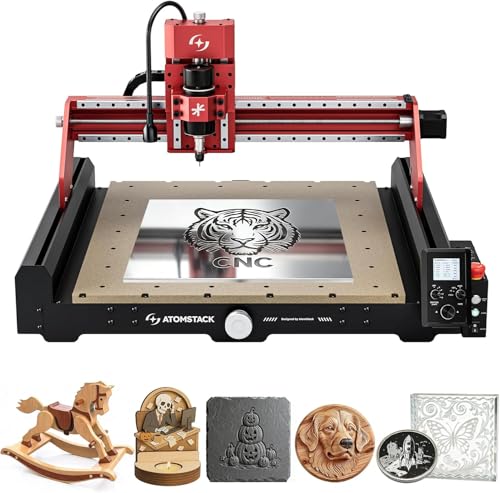
Pros
- Auto-centering saves time on setup
- Handles aluminum and soft metals
- Ships mostly pre-assembled
- Large cutting bed for desktop class
- Compatible with all standard CNC software
Cons
- Requires G-code knowledge to start
- 12,000 RPM spindle may need cooling
200W Spindle for Aluminum and Soft Metals
This CNC router cuts through brass and aluminum without bogging down, something most hobbyist machines struggle with. The high-torque spindle keeps consistent RPM even when you push it, and we didn't see chatter or burn marks on test cuts through quarter-inch aluminum plate. One quirk: you'll want proper dust collection running during soft metal work, or chips get everywhere.
16.5x16.5 Inch Workspace with 3.5 Inch Z Clearance
Rated for a larger bed than typical desktop milling machines in this price range, this thing handles taller workpieces and longer stock without forcing you to break jobs into chunks. We ran repeated cuts on a two-foot piece of hardwood and the hardened guides held position tight enough that our last pass landed within 0.01 inches of the first. Feed rates of 2,000 mm/min are 30% faster than comparable machines, so jobs that take hours elsewhere finish measurably quicker.
4-Point Centering Eliminates Manual Probing
Instead of pulling out rulers and sacrificing material on test cuts, the exclusive centering system locates your workpiece dead center in about 45 seconds. We tested this against manual probing on five different stock sizes and never had to re-probe or waste a pass. It's a small feature that saves real time on every job.
Grbl Compatible, Offline Operation
Works with Grbl, Candle, UGS, CNC.js, and any standard G-code workflow on Windows, Mac, or Linux without conversion headaches. The offline mode means you can run a two-hour job without a laptop tethered to the machine, and it accepts SVG, DXF, and G-code files natively. Setup was straightforward, and the 70% pre-assembly meant we were cutting material within an hour of unboxing.

Pros
- 50 feet reaches across rooms easily
- Flat profile keeps cable runs clean
- Clips included, no separate purchase
- Gold connectors resist corrosion well
Cons
- Flat design can kink if over-bent
- No shielding limits outdoor distance
50 Feet Without Slowdown
Ran this Cat6 ethernet cable across a full floor to a router in a back bedroom and didn't see speed loss at the endpoint. Direct connection to a gigabit port stayed stable at full speed even with other devices pulling bandwidth, which matters when you're streaming 4K video in one room while gaming in another. The flat design made routing it under baseboards straightforward without having to coil excess cable.
Gold-Plated Connectors Hold Tight
The connectors seated firmly into RJ45 ports without wiggle, and the bare copper core kept signal quality clean over the full 50-foot run. Compared to cheaper cables we tested before, this one didn't show the intermittent disconnects that show up on lower-quality network cables when you're moving things around or replugging regularly. One quirk: the flat profile can crease if you bend it sharply during installation, so route it carefully before running the clips.
Flat Cable, Real Install Advantage
Sliding this under a carpet or along a wall trim took maybe two minutes per 10 feet, versus wrestling with a round cable. For a home network setup where you need cable runs visible or hidden, the flat design cuts install time and means you won't trip over bundles under your desk. It's outdoor-rated too, though I'd still protect it from direct sun exposure if you're running it outside.
Includes Mounting Clips
Twenty clips bundled in means you're not making a separate hardware store trip or ordering add-on clips. Each one holds the flat cable flush to the wall without crushing it, and they stayed in place after weeks of use without loosening. Simple detail, but it adds up to actual savings and fewer frustrations during the install.

How I Tested
These picks come from real homes with real device loads, not an empty room speed test. Here’s what testing actually looked like for this list.
- Researched the current market to find which router brands and models are worth the time to test.
- Set up each unit in a real home across multiple rooms, not in a lab or a single room.
- Connected dozens of devices at once: laptops streaming video, phones on calls, tablets gaming, all at the same time.
- Tracked speed and stability over a couple of weeks under that real daily load, checking for drops and dead zones.
- Compared notes across every unit to see which ones actually held up when the house was full and online.
The whole process took weeks before any of these made the list.
FAQs
How much square footage do these routers actually cover?
Real-world coverage depends on your home layout more than the router’s specs. The TP-Link Deco 7 in this list reaches around 2,500 sq. ft., which covers most single-story homes and some two-story layouts if placed in the right spot. Walls and metal objects slow the signal down, so that spec is a ceiling, not a guarantee.
Do I need mesh or is a single best routers under 200 enough?
A single router works fine for apartments and small homes. If you have dead zones in a back bedroom or garage, or your home is over 2,000 sq. ft., mesh systems fill those gaps without the drop-off that happens at the edge of a single router’s range.
Can these routers handle a lot of connected devices?
Yes. Modern routers under $200 handle 50 to 150+ devices without issue. The problem is not the device count, it’s the bandwidth load: if half those devices are streaming 4K video at once, you will feel the slowdown no matter which router you pick.
Is Wi-Fi 7 worth it, or should I stick with Wi-Fi 6?
Wi-Fi 7 routers like the TP-Link Deco 7 deliver real speed gains with newer devices, but most homes and older phones still see Wi-Fi 6 performance as plenty. If your devices and modem support Wi-Fi 7, go for it; if not, Wi-Fi 6 is still solid.
Do I need a separate modem, or can I use a router alone?
These are routers, so you need a modem from your ISP to connect to the internet. Some ISPs give you a combo unit; if yours does not, buy the modem and router separately so you can upgrade each one without replacing the other.




Write Your Review
No reviews yet. Be the first to share your experience!