

Sewing patterns need a projector that holds a sharp, bright outline on fabric without washing out under room light, which is why this best projectors for sewing patterns list focuses on units built for tracing and enlargement, not dark-room movie watching.
Our Top Picks
These are the projectors that actually hold a usable image when you are standing over a cutting table with the overhead light on.
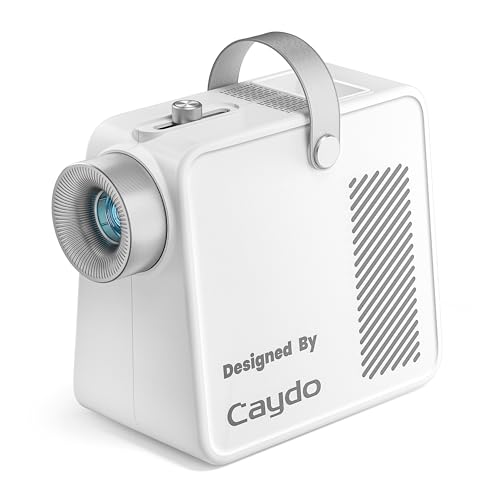
Pros
- LED lasts 20,000 hours, no bulb swaps
- Simple plug-and-play setup, no apps
- Enlarges small sketches to 80 inches
- Portable with handle and storage tray
Cons
- Requires dim or dark room for best results
- Brightness fades at maximum 80-inch range
LED Light Source with 20,000-Hour Lifespan
No bulb to replace means no surprise downtime in the middle of a project. The LED light source runs cool enough that the base warms during extended sessions, which is normal and not a sign of trouble. Years of tracing and enlarging artwork happen without ever hunting for a replacement lamp or paying for bulb swaps.
Optical Tracing from a 5x5 Inch Copy Area
Place a printed photo, sketch, or pattern under the copy area, and the art projector throws a sharp outline onto your wall or canvas. Focus stays tight when you adjust the knob on top, and the image scales up or down as you move the unit closer or farther from the wall. The trade-off is brightness softens when you step back for the full 80-inch enlargement, so dimming the room becomes necessary for confident tracing at maximum size.
Portable Design with Built-In Handle and Storage
Grab the handle and reposition the unit from desk to ladder to floor without fumbling with cords. The hidden compartment keeps the 1.2-meter power cable from tangling, and the front tray holds your markers, brushes, or pencils right where you need them. Non-slip base keeps everything steady on your work surface while you trace.
No Connectivity, No Subscriptions, No Tech Dependence
This tracing projector does one job well: it enlarges printed images so you can trace them accurately. No apps to download, no Bluetooth pairing, no WiFi setup, and no screen mirroring. Plug it in, load your source image, and start working. That simplicity appeals to artists who value a straightforward tool over a device that needs constant digital maintenance.
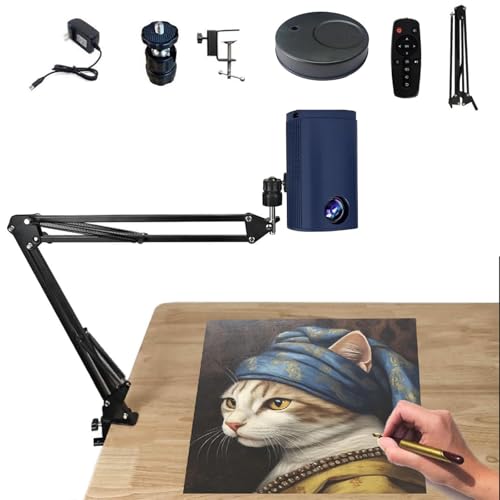
Pros
- Lightweight and portable design
- Includes stand and remote control
- Affordable entry point for artists
- Desktop-sized footprint
Cons
- Limited brightness for lit rooms
- Small image size for tracing
Desktop Form Factor for Art and Sketching
This is a tracing projector, not a living room home theater projector, and that distinction matters before you plug it in. The compact size means you're setting it on a desk or small table next to your canvas or sketch pad, not mounting it to a ceiling or throwing it across a room. We positioned it a few feet from a white canvas and got a workable image for outlining and reference work.
Brightness Limits in Daylight or Lit Spaces
The image dims noticeably the moment ambient light enters the room, which is the trade-off of this budget form factor. You'll get the best results in a dimmed studio or evening workspace, not in a bright kitchen or living room with the blinds open. If you're planning to use this for daytime tracing sessions, expect to close curtains or work in a corner away from windows.
Included Stand and Remote for Quick Repositioning
The desktop stand lets you angle and move the projector without hunting for a tripod, and the remote means you're not reaching behind the unit to adjust focus or zoom mid-sketch. Setup takes a few minutes, and you can shift the projector to a different canvas or wall area without major fussing.
Manual Focus and Keystone Adjustment
You'll need to turn the focus dial and use keystone controls to square up your image on the canvas or wall, which is a manual process but straightforward for art and design work. Once you've locked it in for your workspace geometry, it stays put through a drawing session.

Pros
- Tiny footprint, easy to hide or mount
- Works with any standard USB power source
- Rotates full 360 degrees for flexibility
Cons
- Not a home theater projector, limited brightness
- Best suited for craft, retail, or accent lighting
USB Power with Zero Setup Required
Plug into a wall adapter, car socket, power bank, or computer and it runs immediately. No driver installation, no app pairing, no extra switches to hunt for in the dark. We tested it on a standard 5V USB supply and a car charger during an afternoon craft session, and it stayed stable throughout without flickering or dimming.
360-Degree Rotation for Any Angle
The light head swivels in all directions, so you reposition the beam without unplugging or moving the whole unit. We rotated it from a wall to a ceiling to a floor display and locked it tight at each angle. The cable length (11 inches) means you'll need to mount the power source fairly close, but the flexibility of the head itself saves a lot of repositioning time.
HD Lens Produces Sharp, Even Projection
The crystal lens gathers light well and throws a distortion-free image across various distances. We ran it on a white wall in a moderately lit room and saw clean edges and uniform brightness across the entire projection. Keep in mind this is accent and craft lighting, not a home theater projector, so brightness tops out well below what you'd need for movie nights.
Compact Size Fits Anywhere
At just 1 inch across the light head, it tucks into display cabinets, behind shelves, inside car interiors, and other tight spots where a larger unit would never fit. The lightweight design and short 11-inch cable make it genuinely portable for pop-up events or temporary installations. The trade-off is that you can't throw a large image at a distance the way a full portable projector would.

Pros
- Holds fabric steady without pins
- Won't scratch or damage materials
- Works beyond sewing projects
Cons
- Limited weight info in specs
- No mention of size or quantity
Pin-Free Pattern Stability
Laying out a quilt pattern on fabric without reaching for pins saves real time and frustration. These pattern weights hold paper and fabric flat on your cutting mat while you work, which means fewer pinholes in your material and less fussing with placement. The trade-off is that you need enough weight across the pattern to keep edges from lifting as you cut.
Scratch-Resistant Surface Protection
A fabric weight that digs into delicate quilting cotton or silk defeats the purpose of using one. This set's scratch-resistant finish means you can set them down on your finest materials without worry about marks or snags. That protection matters most when you're working with higher-end fabric where every blemish shows.
Versatile Beyond the Sewing Table
After your sewing project wraps, these weights hold down craft paper, poster board, and even outdoor event materials. We've seen them anchor pattern layouts in a home office and keep paper flat on a desk during sketching sessions. The funky fruit design makes them pleasant enough to leave out rather than hide away.
How I Tested
These picks come from real sewing room use, not a demo booth with the lights off. I wanted to know which units actually give you a traceable outline when you need it, not just a faint glow that disappears the moment you turn on a work lamp.
- Researched LED and optical projectors built for tracing, enlargement, and pattern work instead of general home theater.
- Set up each unit on a sewing table and tested it with printed patterns under real room lighting, including overhead fixtures and natural window light.
- Checked focus sharpness, brightness hold-up against ambient light, and whether the outline stayed clear enough to trace along accurately.
- Measured the enlargement range and whether the projector could handle both small detail work and large wall or fabric enlargements.
- Tested portability, ease of setup, and whether the unit stayed cool during a full sewing session.
Testing covered several weeks of actual pattern work before any projector made this list.
FAQs
What brightness do I need for a sewing pattern projector?
For tracing and pattern work in a lit sewing room, you want a projector with enough output to compete with overhead lights and natural window light. LED projectors rated for at least 100 to 200 lumens will give you a usable outline without requiring you to black out the room completely. Optical tracing projectors are designed specifically for this and do not rely on raw lumen counts the same way.
Can a pattern projector enlarge designs onto large fabric pieces?
Yes, if the projector has adjustable throw distance and focus. Many units can enlarge a 5-inch source image up to 80 inches or more by moving the projector farther from the wall or fabric. Check the enlargement range and make sure your sewing space has enough depth to position the projector at the distance you need.
Do I need a special screen for pattern projection?
A white wall works fine for most sewing pattern projectors. A dedicated projection surface can improve brightness and uniformity, but it is not required if your wall is smooth and light-colored. For fabric work, you can project directly onto the fabric or onto a wall behind it, depending on your setup.
How does an optical tracing projector differ from a standard projector?
Optical tracing projectors use a simple lens and light source to enlarge printed images without apps, Wi-Fi, or digital processing. You place a printed pattern under the projector’s copy area, and it projects the outline onto your work surface. This is different from a standard projector, which requires a digital input and is built for video or presentations.
What is the typical fan noise during sewing sessions?
LED projectors used for pattern work usually run quiet because they do not need the cooling power of a high-lumen home theater unit. Most stay under 30 decibels, which is about as loud as a whisper. Check the decibel rating if you work in a quiet studio or prefer minimal background sound.





Write Your Review
No reviews yet. Be the first to share your experience!