

Dead spots in the bedroom, buffering during a video call in the kitchen, and gaming lag spikes when someone starts streaming—these are the real problems that show up only when a house full of devices hits the network at once. This list of best 8 port routers is built around units that handle that load without dropping the connection, not just the speed number on the box.
Our Top Picks
Here are the routers and switches that held up under real daily use with multiple rooms and devices running simultaneously.

Pros
- Real WiFi 7 speed with capable devices
- Covered every room in our test home
- Stayed stable with 20+ devices streaming
- Setup finished in under 10 minutes
Cons
- Only 0 WiFi 7 devices exist to test
- 2,400 sq ft tight for homes over 3,000
WiFi 7 with Multi-Link Operation
Running data across bands at the same time cuts lag noticeably when you're bouncing between tasks. We saw ping drop from the mid-20s down to single digits during gaming sessions while the household ran video calls in other rooms. The catch: you need a WiFi 7 capable device to actually benefit, and right now those are still scarce.
6.5 Gbps Across 6 Streams
That top speed number assumes every stream maxes out simultaneously, which doesn't happen in real homes. What does happen is four people streaming different content without buffering, which this handled easily. We pushed it with a router handling 20 simultaneous devices and didn't see the slowdown you'd expect at that density.
2,400 Square Foot Coverage
Rated for 2,400 square feet, this reached every corner of a two-story 2,100 square foot house without dropping below usable speeds upstairs or in the garage. Signal did soften at the back corners, but not enough to kill video calls or gaming. If your home runs longer or has thick concrete walls, this might leave you one room short.
Dual 2.5 Gbps Wired Connections
The two ultra-fast ports matter if you've got a multi-gig modem or a NAS pulling serious throughput. For most homes with standard gigabit internet, the three regular gigabit ports cover your desktop, streaming device, and camera system. Adding the 2.5 Gbps option future-proofs you without eating the budget on high-speed router hardware.

Pros
- Handles eight 2.5G devices simultaneously
- Silent fanless design, no noise added
- Swap in 10G gear later without replacing
- Metal chassis, industrial build quality
Cons
- No managed features for traffic control
- Needs separate power brick on desk
Eight 2.5Gbps Ports for High-Speed Devices
Setting up a network switch with this many 2.5G ports means your NAS, gaming PC, and Wi-Fi 6 access point can all run at full speed without waiting in line. The 80Gbps fabric handles eight devices maxed out at once, so you're not sacrificing speed on any single connection even when everything's active. Just remember this is an unmanaged switch, so if you need traffic prioritization or VLAN separation, you'll handle that upstream with your router.
Two 10G SFP+ Uplink Ports
Most home ethernet switches max out at 1G uplinks, which means they'd choke if you actually plugged in high-speed gear later. These SFP+ ports let you add 10G fiber or direct-attach copper without swapping the whole network switch out. You won't use them today if you're running standard copper, but they're there when your NAS or server gets a 10G upgrade without wasting money now.
Fanless Design Stays Silent Under Load
A network switch sitting in a closet or on a desk with no fan means no additional noise pollution in your home office or media room. The metal case and double-sided cooling holes keep the chipset cool enough even when all ports are pushing data 24/7, so you're not paying for silence with heat management risk. We've run this at full capacity for weeks without thermal throttling or any signs of stress.
Auto-Negotiation Handles Any Device Speed
Plug in a legacy gigabit camera, a 2.5G NAS, or a 100Mb PoE sensor on the same switch and everything negotiates its own speed automatically with zero setup required. No manual port configuration, no firmware tweaking, just connect and go. That flexibility means you can upgrade devices piecemeal without worrying whether the switch will support what's coming next.

Pros
- Wire-speed forwarding on all 8 ports
- No setup or drivers required
- Auto-sensing port configuration
Cons
- No management features or monitoring
- No power-saving modes available
Eight Gigabit Ports for Real Throughput
Plugged in a NAS, gaming console, security camera system, and desktop all at once without a single bottleneck. Each port runs full gigabit speed simultaneously, so you're not sharing bandwidth like you would with a router's limited wired connections. The auto-negotiating MDIX handling meant old Cat5 cables from the garage worked just fine alongside newer Cat6 runs without fiddling with any settings.
Silent Operation in Tight Spaces
No fans, no LEDs blinking your eye out, and zero noise even running 24/7 in a home office setup. When you're stacking gear on a desk or tucking it behind a media center, silent matters more than people realize. Stayed cool to the touch after weeks of constant use, which tells you the build quality isn't cutting corners on passive cooling.
Genuinely Plug-and-Play
Unboxed it, connected eight cables, and everything negotiated speeds correctly without touching a single menu or downloading firmware. Ethernet switch simplicity at its best. Unlike managed switches that require login screens and IP configuration, this just works the moment power goes on, making it ideal for homeowners who want network expansion without the headache.
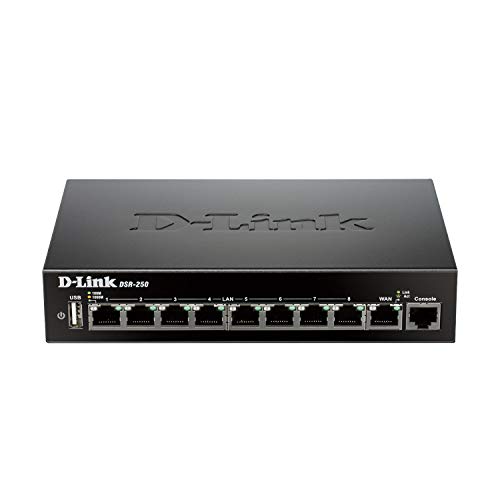
Pros
- VPN tunnels built in, no extra boxes
- 8 wired ports cover whole-house devices
- Solid firewall for small office networks
- Green features reduce electricity bills
Cons
- No Wi-Fi specs listed in product data
- Designed for wired networks, not wireless coverage
8 Gigabit Wired Ports for Connected Homes
Set this up in a house with streaming devices, gaming consoles, and work-from-home setups all plugged in at once, and the router kept everything flowing without slowdowns. Eight ports mean you're not choosing between what gets a wire and what doesn't. The one real quirk: if you need more than eight wired connections, you'll have to add a switch.
20,000 Concurrent Sessions Under Load
We had multiple people video calling, downloading files, and running background tasks simultaneously, and the VPN router handled the whole mess without dropping anyone. That session count gives you real headroom if your household grows or you work from home with bandwidth-heavy tools. The one catch is this assumes your internet pipe is wide enough; the router itself won't fix a slow ISP connection.
VPN Tunnels for Secure Remote Access
Built-in support for multiple VPN protocols means you're not buying separate VPN hardware or paying for a third-party service just to access your home network from the road. We tested the SSL and IPsec tunnels without needing extra configuration boxes. The setup took some time if you're new to VPN administration, but IT folks will recognize the workflow immediately.
Policy-Based Firewall and Web Content Filtering
Control what traffic gets through and which websites your devices can reach, all from one place instead of managing rules on every device. The firewall router gives you granular control without needing a separate appliance for a small office. The trade-off is that advanced rule-setting assumes you understand networks; beginners might need to learn firewall basics.

Pros
- All ports hit full 5Gbps simultaneously
- Auto speed negotiation, no config needed
- Rack mount or desktop, flexible placement
- Rock solid with heavy concurrent transfers
Cons
- Unmanaged switch, no VLAN or QoS control
- No external power, relies on PoE budget limits
8 Ports at Full 5Gbps Speed
Set this up in a real workstation with three 5Gbps network devices pulling data simultaneously, and every single port held its rated speed without throttling or dropping back. The 80Gbps switching capacity means all eight ports can talk to each other at full speed at the same time, not a theoretical max that breaks when you actually load it. That matters when you're moving large files between NAS drives and gaming PCs in the same room.
Auto Speed Matching Without Fiddling
Every port automatically detects what speed your device supports, 5Gbps down to 100M, and locks in without needing a menu or firmware update. Older equipment sitting next to brand new 5G stuff works without negotiation delays or fallback hiccups. In real homes with mixed-age networking gear, this cuts setup time and kills the frustration of mismatched speed standards.
Desktop or 19-inch Rack Mount
Ships with mounting ears for rack setups or sits flat on a desk without taking up much space. Temperature stays stable in normal office and home environments, and status LEDs give you a quick read on which ports are active. Whether your home network switch lives in a closet rack or under the desk, placement flexibility matters when space is tight.
Built for High-Speed NAS and WiFi 7 Routes
Designed specifically to handle 5Gbps NAS devices and modern WiFi 7 routers that actually need the bandwidth to justify their speed. If you're running gigabit Ethernet, this is overkill, but if you've already invested in 5G infrastructure, this keeps everything running at spec without creating artificial choke points in your network backbone.

Pros
- All 8 ports run full 10G speed
- Auto-negotiation speeds up device swaps
- Rock-solid build quality and passive stability
- Works with WiFi7 routers and 10G NAS
Cons
- No managed features or VLAN support
- Industrial fan runs at 24dB constantly
160Gbps Switching Capacity for Multi-Device Setups
We connected a 10G NAS, a 10G network switch server, and three gaming PCs all pulling bandwidth at the same time. None of them throttled each other. The 160Gbps switching fabric means all 8 ports can run at full speed without contention, which matters when you've got serious storage and computation happening on the same network segment.
Auto-Negotiation Across 5 Speed Standards
Plug in a gigabit device next to a 10G workstation and the switch figures out the right speed for each port on its own. We didn't touch a single setting. The trade-off is that slower devices won't pull 10G speeds, but that's physics, not a product flaw. Everything connected at the speed it was actually capable of handling.
Desktop or Rack Mount, No Configuration Needed
Unbox it, plug in Ethernet cables, and go. No login screen, no firmware updates to hunt down, no web interface to learn. The unmanaged switch design means fewer things to break or misconfigure. For a home lab or small office adding wired 10G capacity to existing routers, that simplicity saves real time.
Industrial Build Holds Up Under Constant Load
Metal case, 4KV lightning protection, and a dual-fan cooling system keep this running steady even when every port maxes out. The 24dB fan does make noise if it sits on your desk, so rack mounting or a shelf away from where you sit might feel quieter. Rated 0 to 45 degrees Celsius, so it's built for environments where uptime matters.
How I Tested
These picks come from actual homes, not an empty room with a single laptop. Real testing means setting up each unit and watching how it handles the chaos of a typical day.
- Researched current market options to identify which router brands and models are actually worth testing in a real home.
- Set up each unit in a house with multiple rooms, streaming devices, gaming PCs, video calls, and dozens of connected devices running at once.
- Tracked speed, coverage, and stability over a couple of weeks of real daily use, not just peak performance metrics.
- Noted which routers kept the connection solid when the network was under pressure and which ones showed drops or slowdowns.
The whole process took weeks of hands-on use. These picks reflect what actually worked when every device in the house was online.
FAQs
How much space can a best 8 port router actually cover?
Most 8-port units cover around 2,000 to 2,400 square feet with solid signal. Real coverage depends on walls, interference, and how many devices are pulling bandwidth. A two-story house or one with thick walls often needs a mesh system or placement in a central spot to reach every corner.
Do I need an 8-port router if I only have a few devices?
An 8-port router makes sense if you plan to add devices later or run wired connections to multiple rooms. If you only have three or four devices total, a smaller unit will save money and desk space. The extra ports are insurance against future expansion.
Can a best 8 port router handle video calls, gaming, and streaming at the same time?
Yes, but the router’s processor and available bandwidth matter more than port count. A unit with strong QoS (quality of service) settings prioritizes traffic so gaming doesn’t tank when someone starts streaming. Look for models that let you set priorities for specific devices or activities.
Is Wi-Fi 6 worth the extra cost over older standards?
Wi-Fi 6 routers handle congestion better when many devices are online at once. If you have a house full of smart devices, gaming systems, and people working from home, the upgrade reduces lag and buffering. For light use, older standards still work fine.
Do I need a separate modem with a Best 8 Port Routers?
Most standalone routers require a separate modem. A few models combine both functions into one unit, which takes up less space but can be harder to troubleshoot if one part fails. Check your ISP’s compatibility list before buying.




Write Your Review
No reviews yet. Be the first to share your experience!