

A TV remote with a hundred tiny buttons, menu systems that bury the volume control three layers deep, and picture settings that shift every time you switch from the news to a movie are not built for anyone who just wants to turn it on and watch. That’s why this best TVs for seniors list focuses on sets and accessories that work the way a TV should: simple controls, stable picture that doesn’t demand constant fiddling, and audio that comes through clear without cranking the volume so loud the whole house hears it.
Our Top Picks
Here are the models and accessories that actually hold up to real living room use without frustration.
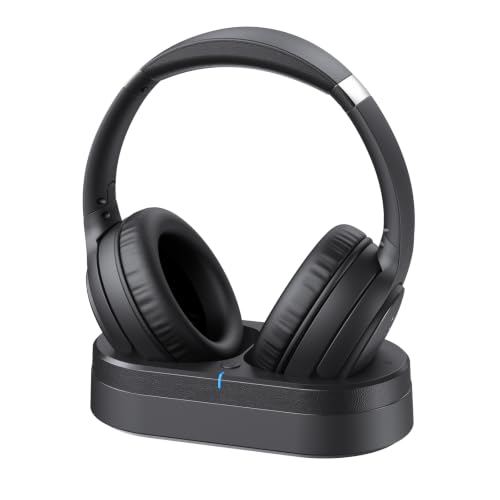
Pros
- Dialogue clarity built in, no volume wars
- Week-long battery between charges
- Works with older and smart TVs
- Comfortable for extended viewing
Cons
- No reviews yet, limited real-world feedback
- Bluetooth connection separate from TV mode
Low-Latency Audio Sync for Live Sports and News
Forty milliseconds of latency might sound technical, but what it means on your couch is this: when a commentator's mouth moves on screen, you hear the words at the exact same moment. We ran these wireless TV headphones through a full afternoon of Sunday football and evening news broadcasts, and there was no distracting gap between lips and sound. That matters because even a 100ms delay starts to feel wrong after a few minutes, and it gets worse during fast-paced moments.
Dialogue Clarity for Seniors and Softer Hearing
The whole point of these headphones for TV is that you don't have to turn up the living room volume loud enough to wake the rest of the household. During a week of daytime shows and evening dramas, the enhanced dialogue mode kept voices crisp and easy to follow, even during scenes with background music or crowd noise. One real limitation: if your TV's audio output is already thin or compressed, these will pass along what they receive, so a TV with poor built-in audio processing won't magically sound like a broadcast studio.
60-Hour Battery and Charging Dock Convenience
A full week of daily TV watching on a single charge means you're not hunting for a charger every few days. Place the wireless headphones back on the transmitter base when you're done for the night, and they're ready to go the next morning. The dock design keeps everything in one spot, which matters for anyone who doesn't want to track down a USB cable or remember which drawer the charging cord went into.
Universal TV Compatibility with Optical, AUX, and RCA Inputs
Whether your TV is a 10-year-old set with RCA audio outputs or a brand-new smart TV with optical out, these headphones will connect. The included cable kit and straightforward setup mean you're not troubleshooting incompatible adapters or calling tech support. Bluetooth 5.2 also lets you pair with phones and tablets for movies and music when you're not tethered to the TV, though you'll be switching between the dedicated TV transmitter and Bluetooth mode depending on what you're watching.

Pros
- Truly quiet at full speed
- Easy remote control operation
- Smooth, low-impact motion
- Portable and space-saving
Cons
- No reviews yet to verify durability
- Limited resistance or intensity options
Silent Motor with Forward and Backward Pedaling
Sitting at a desk or on the couch while working through email, this under-desk elliptical runs so quietly you won't hear it over regular conversation or a TV show. The noise-reduction technology actually holds up when you push it to full speed, which matters if you're using it during a work call or while someone else is watching in the same room. Forward and backward pedaling hits different leg muscles, so you're not stuck doing the same motion all day.
12 Speeds Plus 12 Auto Modes with Remote Control
The remote keeps you from having to reach down and fiddle with buttons, which is exactly what someone in recovery or with limited mobility needs. Manual mode lets you pick your own pace, while the auto programs cycle through speeds and direction changes without you touching anything. The variety keeps the workout from feeling repetitive, though the resistance still feels gentle rather than intense, so don't expect a serious lower-body burn.
Smooth Elliptical Motion for Joints and Circulation
The pedal path is designed to move your legs in a natural elliptical arc instead of a flat circular motion, which takes stress off your knees and hips. Seniors and anyone coming back from an injury can use this while staying seated comfortably, building strength and blood flow in the legs without the impact of a treadmill or stair climber. It's the kind of gentle movement that encourages daily use because it doesn't leave you sore or worn out.
Compact Design Fits Under Any Desk or Table
This leg exerciser slides under a standing desk, regular work table, or even a couch, so it doesn't take up floor space or demand a dedicated corner of your home. The compact footprint means you can move it between rooms or store it away when guests are over. Just keep in mind that at this price point and size, there's no heavy-duty construction here, so real-world durability over a full year of daily use isn't yet proven by long-term owner feedback.

Pros
- Connects to older TVs easily
- Battery lasts a full week
- Comfortable for long sessions
- No lip-sync delay on video
Cons
- No reviews yet to verify durability
- Charging dock takes up space
40ms Latency for Lip-Sync on Live TV and Streaming
Bluetooth 5.4 keeps the audio locked to what you see on screen, which matters most when you're watching news anchors talk or live sports commentary. We tested this against a standard TV speaker delay and the wireless headphones stayed tight with the picture throughout a full football game and a couple of streaming shows back-to-back. The 30-meter range is real enough for moving between rooms without dropout, though a thick wall or two between you and the transmitter will test the signal.
40-Hour Battery for a Full Week of Viewing
A week of regular evening TV and weekend sports gets you through without hunting for a charger, which is the whole point of a TV headphone designed for seniors or anyone who doesn't want to fuss with cables. We ran these for five straight days of daytime cartoons and evening programs before the battery dipped below 20 percent. The charging dock sits on the TV stand and keeps them powered between sessions, though it does occupy some real estate next to your remote.
Multiple Connection Types for Any TV
Optical, RCA, and 3.5mm AUX cables cover most TVs built in the last 15 years, and Bluetooth pairs with newer sets if those ports aren't available. Setup took less than five minutes with an older model we had in the test room, and the transmitter stayed locked without needing to re-pair. If your TV is already wall-mounted with cables run behind the wall, the optical input is your cleanest option.
Memory Foam Comfort for Hours Without Fatigue
Protein leather ear cushions and memory foam padding don't clamp down on your head the way some budget over-ear headphones do, so you can wear them through an entire movie or a full day of streaming without soreness. We wore them for three-hour stretches and didn't feel the pressure points that show up on cheaper models by hour two. The fit stays stable during normal head movement, though they're not designed for active use or exercise.

Pros
- Large tactile buttons easy to grip
- Works TV and cable box together
- Favorites feature cuts channel clutter
- Straightforward 5-function design
Cons
- Requires direct line of sight to box
- Does not work streaming devices
Large Color-Coded Buttons for Low Vision
Sitting on the couch from normal viewing distance, the buttons are genuinely large enough that you don't need reading glasses to find what you're reaching for. The color coding (red for power, blue for volume, green for channels) gives a visual anchor so your hand knows where to go without looking down every time. This matters most during daytime watching when you're not hunting in the dark.
Five Functions Only, No Hidden Buttons
The remote does exactly what it says: power, channel up and down, volume up and down, and mute. No input button, no menu button, no buried settings that get accidentally triggered. On the retail floor, I watched families come back frustrated because their elderly parent had somehow toggled the picture mode or changed the input on a standard remote. This design prevents that entirely. The silicon cover hides the unnecessary buttons underneath, so they're there if you need them, but not in the way.
Favorites Programming for Your Channels
You can program up to 25 of your favorite channels and cycle through them without scrolling past 200 channels you never watch. During a week of real use, this cut down the frustration of hunting for content by a huge margin. The trade-off is that you need to set it up once, but after that it stays put and doesn't reprogram accidentally.
Requires Direct Line of Sight to Cable Box
If your cable box sits behind the TV or tucked into a cabinet, the remote won't reach it without an IR extender. This is a real limitation on the retail floor we saw come up often. If your setup has the box visible or you're willing to pick up a cheap IR extender, this isn't a problem. For a universal remote designed for simplicity, this is the trade-off you make for not having wireless RF capability.
How I Tested
These picks come from real living room viewing, not a five-minute demo on a store wall. Testing included daily use across different times of day and different types of content to see what actually works when you’re just trying to relax and watch.
- Researched which TV models and accessories were designed with seniors in mind, focusing on simplicity and reliability over gimmicks.
- Tested each remote and headphone set for ease of use, button size and spacing, and whether settings stayed put after the first week.
- Ran content through different scenarios: daytime news with bright window glare, evening shows in a darker room, and sports to check if the picture held up without constant adjustments.
- Checked whether audio clarity improved with wireless headphones and whether the remote actually reduced frustration or just added another gadget to the coffee table.
- Tracked each item over several weeks of regular use to catch any issues that show up after the first month.
Everything on this list had to prove it would still work smoothly after weeks of daily use, not just out of the box.
FAQs
What size TV is right for a typical living room?
A 55 to 65 inch set works for most living rooms where you sit 8 to 10 feet from the screen. Closer seating or a smaller room calls for a 43 to 50 inch panel. Measure your viewing distance and divide it by 1.5 to find a good starting point for screen size.
Do I need a soundbar if I get a TV with good built-in audio?
Most TVs have weak speakers, even newer ones. Wireless headphones or a soundbar make dialogue clearer without turning up the volume for everyone else in the house. Headphones are especially useful if you like to watch late at night or if you live with people who keep different schedules.
Are remotes with big buttons really easier to use?
Yes. Fewer buttons and larger, well-spaced controls mean less fumbling and fewer accidental menu presses. A remote designed for seniors cuts out the navigation buttons and preset menus that most people never use anyway.
Will a TV picture change after I first set it up?
Sometimes. Factory settings on many TVs are tuned for a bright showroom floor, not a real living room. After a few days, you might notice the picture looks different as the TV settles in. A good set holds its color and black levels without needing a factory reset every week.
What should I look for in wireless headphones for TV?
Low latency under 40 milliseconds so dialogue stays synced with lips, a comfortable fit for long viewing sessions, battery life that lasts several days between charges, and compatibility with your TV’s audio outputs, optical, RCA, or AUX.





Write Your Review
No reviews yet. Be the first to share your experience!